1
Open a command prompt or terminal
On Windows, open Command Prompt or PowerShell. On macOS or Linux, open Terminal.
IPv6 (Internet Protocol version 6) is the 128-bit network layer protocol that
identifies and routes data between devices on the internet by assigning each interface
a unique, globally routable address. Defined by RFC 2460 in December 1998 and
updated by RFC 8200 in 2017, IPv6 expands the address space from IPv4's
4.3 billion to 340 undecillion (3.4 × 1038)
unique addresses. Each IPv6 address consists of eight groups of four hexadecimal
digits separated by colons — for example, 2001:db8::1. As of
March 28, 2026, IPv6 carries more than 50% of global traffic to Google's
services — the first time this threshold has been crossed in the protocol's history.
IPv6 (Internet Protocol version 6) is the current version of the Internet Protocol, specified by the IETF in RFC 2460 (December 1998) and superseded by RFC 8200 (July 2017). IPv6 operates at the network layer (Layer 3 of the OSI model), assigning each network interface a globally unique 128-bit address used for packet routing across interconnected networks.
IPv4, the predecessor defined by RFC 791 (1981), uses 32-bit addresses and supports approximately 4.3 billion unique addresses — a pool that IANA fully allocated at the top level in February 2011. IPv6 addresses this exhaustion by expanding the address space to 128 bits, yielding 2128 = 340 undecillion unique addresses. That is enough to assign more than 500 quadrillion addresses to every square millimetre of Earth's surface.
Adoption has accelerated steadily. On March 28, 2026, IPv6 traffic to Google's services exceeded 50% (50.10%) globally for the first time, per data published by Internet Society Pulse — 18 years after Google began tracking this metric. Countries leading native IPv6 deployment include France (73%), India (72%), and Saudi Arabia (65%). Countries below 20% include Italy (17%), Spain (10%), and Egypt (4%).
An IPv6 address is 128 bits divided into eight 16-bit groups. Each group is represented as four hexadecimal digits, and groups are separated by colons. Full notation example:
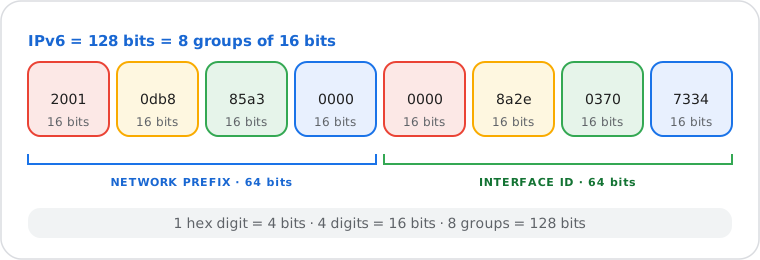
2001:0db8:85a3:0000:0000:8a2e:0370:7334Each hexadecimal digit represents 4 bits. Four hex digits represent 16 bits. Eight such groups yield 8 × 16 = 128 bits. Because addresses in full notation are long and prone to transcription errors, RFC 5952 defines two compression rules that produce a shorter, valid representation.
Rule 1 — Omit leading zeros within each group.
Leading zeros in any group may be removed. Each group must retain at least one digit.
For example, 0db8 becomes db8, and
0001 becomes 1.
Rule 2 — Replace the longest consecutive run of all-zero groups
with ::.
The double-colon may appear at most once per address. If two separate runs of zeros
are equal in length, the leftmost run is compressed. A single all-zero group may
also be replaced.
Applying both rules to the example from Section 2:
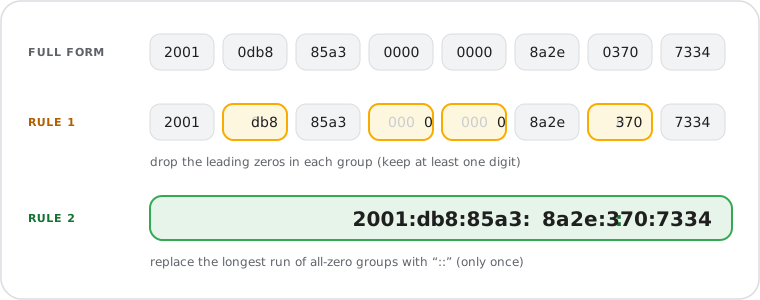
2001:0db8:85a3:0000:0000:8a2e:0370:7334
→ 2001:db8:85a3::8a2e:370:7334| Full Address | Compressed | Rules Applied |
|---|---|---|
2001:0db8:0000:0000:0000:0000:0000:0001 |
2001:db8::1 |
Leading zeros + consecutive zero block |
fe80:0000:0000:0000:0202:b3ff:fe1e:8329 |
fe80::202:b3ff:fe1e:8329 |
Leading zeros + consecutive zero block |
0000:0000:0000:0000:0000:0000:0000:0001 |
::1 |
Loopback — all groups zero except the last |
2001:0db8:0000:0001:0000:0000:0000:0001 |
2001:db8:0:1::1 |
Longest zero block (rightmost, 3 groups) compressed |
Use the IPv6 Address Compressor to shorten any full-form IPv6 address, or the IPv6 Address Expander to restore the complete eight-group notation.
RFC 4291 (IP Version 6 Addressing Architecture, February 2006) defines three address categories: unicast, anycast, and multicast. Specific prefixes distinguish several subtypes with different routing scopes and purposes.
| Address Type | Prefix | Scope | Purpose |
|---|---|---|---|
| Global Unicast | 2000::/3 |
Internet-routable | Public internet addresses; assigned by ISPs and regional registries (RIRs) |
| Link-Local | fe80::/10 |
Same link only | Auto-assigned to every IPv6-enabled interface; cannot traverse a router |
| Loopback | ::1/128 |
Local host only | Self-reference and testing; equivalent to IPv4's 127.0.0.1 (RFC 4291) |
| Unique Local | fc00::/7 |
Private network | Non-routable private addresses; IPv6 equivalent of RFC 1918 ranges |
| Multicast | ff00::/8 |
Group of interfaces | One-to-many packet delivery; replaces IPv4 broadcast entirely |
| Anycast | No fixed prefix | Nearest matching node | Same address on multiple servers; used in DNS root servers and CDN infrastructure |
The RFC 1918 private address ranges (10.x.x.x, 172.16–31.x.x, 192.168.x.x), NAT mechanics, and CGNAT (RFC 6598) are covered in detail on the Public IP vs Private IP guide.
The table below compares IPv4 and IPv6 across nine dimensions. It is self-contained and designed to be read without additional context.
| Feature | IPv4 | IPv6 |
|---|---|---|
| Address Length | 32 bits | 128 bits |
| Format | Dotted-decimal (e.g. 192.168.1.1) | Colon-hexadecimal (e.g. 2001:db8::1) |
| Total Addresses | ~4.3 billion (232) | 340 undecillion (2128) |
| Header Size | 20–60 bytes (variable) | Fixed 40 bytes |
| Address Configuration | Manual or DHCP | Manual, DHCPv6, or SLAAC (RFC 4862) |
| NAT Required | Yes — most networks share one public IP | No — every device receives a unique public address |
| IPsec Support | Optional | Built-in, mandatory (RFC 4301) |
| Broadcast | Supported | Eliminated — replaced by multicast |
| Specification | RFC 791 (1981) | RFC 2460 (1998) / RFC 8200 (2017) |
SLAAC allows a device to configure its own global unicast IPv6 address without a
DHCP server. When a device joins a network, it sends a Router Solicitation to the
all-routers multicast address (ff02::2). The router responds with a
Router Advertisement containing the network prefix — typically a /64. The device
appends a 64-bit interface identifier to the advertised prefix to form its full
128-bit address.
The interface identifier is derived from the device's MAC address using the EUI-64 process, or generated randomly per RFC 7217 to prevent cross-network device tracking. Because no server maintains a lease table, the process is called "stateless" — each device configures itself independently.
DHCPv6 provides an alternative or complement to SLAAC. In stateful DHCPv6, a server assigns specific IPv6 addresses and tracks active leases, directly equivalent to IPv4 DHCP. In stateless DHCPv6, SLAAC handles address assignment while DHCPv6 provides additional configuration such as DNS server addresses. Whether a network uses SLAAC, DHCPv6, or both is communicated to devices via flags carried in the Router Advertisement message.
Most networks in 2026 operate in dual-stack mode: each device holds both an IPv4 address and an IPv6 address simultaneously. Modern operating systems support this by default — Windows 10 and later, macOS 10.7 and later, Linux kernel 2.6 and later, iOS, and Android all prefer IPv6 when both endpoints support it, falling back to IPv4 transparently.
On March 28, 2026, Google recorded that IPv6 carried 50.10% of global traffic to its services — the first time native IPv6 exceeded 50% in the 18 years since Google began tracking this metric (Internet Society Pulse, April 2026). Leading countries: France (73%), India (72%), Saudi Arabia (65%).
Where native dual-stack is not yet available, transition mechanisms such as 6to4 (RFC 3056) and DS-Lite (RFC 6333) allow IPv6 traffic to traverse IPv4 infrastructure through tunneling, enabling incremental deployment.
Check your device's network settings or run a terminal command to retrieve your IPv6 address in seconds.
Put this guide into practice