You don't have javascript enabled. Please enable javascript to use this website.

Browser Fingerprint Test

Detects screen resolution, user agent, browser engine, and system timezone — the four signals used to generate your unique fingerprint hash.
Your fingerprint ID in this browser Reading… Built in your browser from the … signals below. Try a private window: the same ID shows that private mode does not hide it.
Result

Reading your browser…

Full user agent (sent with every request)

Everything is read in your browser and nothing is sent to our server. We cannot tell how rare your ID is: that would need a database of other visitors, and we keep none.

More Tools

Browser Fingerprint Test — Detect the Signals Websites Use to Track You

Browser fingerprinting is a stateless tracking technique that identifies a browser by collecting hardware and software attributes — screen resolution, color depth, user agent string, rendering engine, and system timezone — and combining them into a persistent unique identifier. Unlike cookies, a fingerprint cannot be deleted, because it is derived from device configuration, not stored data. Research from the EFF's Panopticlick project found that 83.6% of tested browsers produced a unique fingerprint across a basic attribute set.

Signal What It Reveals Tracking Risk
Screen Resolution Monitor pixel dimensions and color bit depth High — rare resolutions narrow the candidate pool significantly
User Agent String Browser name, version, OS, and layout engine High — full UA string is unique across most browser and OS combinations
Browser Engine Rendering engine: Blink, Gecko, or WebKit Medium — narrows to browser family
System Timezone IANA timezone identifier from OS clock High — timezone mismatch with VPN location is a direct tracking signal
Language / Locale navigator.language — primary browser locale Medium — narrows geographic origin and keyboard layout
CPU Threads navigator.hardwareConcurrency — logical CPU thread count Medium — distinguishes device class (mobile vs workstation)
Fingerprint Hash Combined hash of all detected signals High — consistent across sessions, cannot be cleared

How to Use the Browser Fingerprint Test

The browser fingerprint test runs automatically on page load — no input required.

1

Read the four signal groups

Check screen and device, browser and system, location hints and graphics: each value is readable by any website without permission.
2

Inspect your user agent string

Review the full UA string your browser sends with every HTTP request, revealing browser name, version, and OS.
3

Note your system timezone

Confirm your Intl.DateTimeFormat timezone — a mismatch with your VPN server's location is a visible tracking signal.
4

Compare your fingerprint ID

Copy the fingerprint ID, then open the page in a private window or another browser: the same ID means that mode does not hide your fingerprint.

How Browser Fingerprinting Works

Browser fingerprinting reads attributes via JavaScript APIs standardized in the W3C HTML Living Standard and ECMA-402. The Screen API (window.screen) exposes width, height, and colorDepth without any user permission grant. The Navigator API (navigator.userAgent) returns the full UA string sent with every HTTP request. Note that the User-Agent Client Hints API (navigator.userAgentData), introduced in Chrome 90 and defined in the W3C UA-CH draft, is replacing the legacy UA string in Chromium-based browsers; both are read by production tracking scripts.
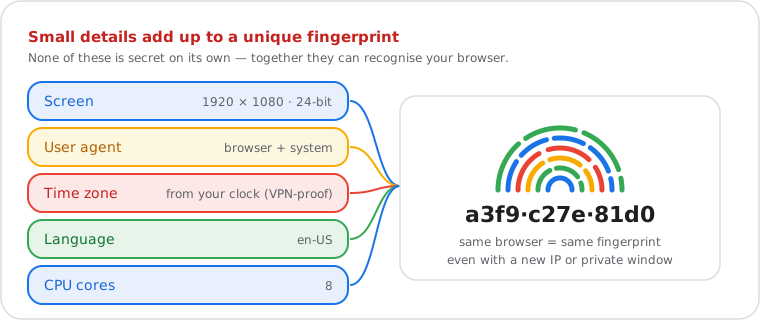
Diagram: screen size, user agent, time zone, language and CPU cores combine into one fingerprint that recognises the same browser even with a new IP or in a private window
No single detail identifies you; the combination can.

System timezone is obtained via Intl.DateTimeFormat().resolvedOptions().timeZone (ECMA-402), which returns the IANA timezone identifier directly from the OS clock — independent of the browser's locale setting and unaffected by VPN connections. Hardware concurrency (navigator.hardwareConcurrency) returns the number of logical CPU threads, distinguishing mobile devices from workstations. Touch support (navigator.maxTouchPoints) further separates device classes.

Production fingerprinting systems extend beyond these basic signals to include Canvas API rendering output (HTML5 Canvas, using toDataURL() to hash pixel-level GPU rendering differences), WebGL vendor and renderer strings, and installed system fonts — each adding several bits of entropy. The EFF's Panopticlick study demonstrated that combining 8 basic attributes produces a fingerprint unique for 83.6% of browsers. All detection on this tool runs client-side — no data is transmitted to any server.

Why Incognito Mode Does Not Help

Incognito mode isolates cookie storage and clears browsing history after the session. It does not modify window.screen, navigator.userAgent, navigator.hardwareConcurrency, or Intl.DateTimeFormat output. Every fingerprint signal read by this tool returns identical values in incognito and in normal browsing. Google's own documentation for Chrome confirms this explicitly.

Common Uses for a Browser Fingerprint Test

VPN configuration verification. A privacy-conscious user enables a VPN routed through a Frankfurt server. The fingerprint test shows system timezone America/New_York — a direct mismatch. Tracking systems detect this IP-timezone inconsistency as a strong VPN signal, partially defeating the privacy goal. The user corrects this by setting the OS timezone to match the VPN server location before any browsing session begins.

Anti-detect browser profile testing. A security researcher configuring a test browser profile needs to verify that screen resolution and user agent match the intended spoofed values before logging into a test account. The tool surfaces the exact values the target platform will receive, allowing configuration corrections before any account activity exposes the profile.

Browser compatibility audit. A QA engineer receives a visual regression report that only reproduces at specific screen dimensions. The fingerprint test confirms the reporter is on a 1440×900 display at 32-bit color depth — a configuration absent from the test matrix — allowing the engineer to reproduce the bug without guessing the environment.


Frequently Asked Questions

What is a browser fingerprint?
A browser fingerprint is a unique identifier assembled from the technical attributes your browser automatically exposes — including screen resolution, user agent string, system timezone, and rendering engine. Unlike cookies, a fingerprint cannot be cleared by deleting browser data, because it is derived from your hardware and software configuration, not from stored files. Research from the EFF's Panopticlick project found that 83.6% of browsers tested produced a unique fingerprint using a basic attribute set.
How accurate is browser fingerprinting for cross-site tracking?
Fingerprinting accuracy depends on the number of signals collected. Using only screen resolution, user agent, and timezone, accuracy is high for desktop browsers and lower for mobile devices where hardware configurations are more uniform. Production tracking systems add canvas rendering output, WebGL GPU data, and installed fonts to the signal set, which significantly increases uniqueness. This tool reads canvas and WebGL too, but not installed fonts. The EFF's Panopticlick study puts basic fingerprint uniqueness at 83.6% across tested browsers.
Does this tool store or log my browser data?
No data is transmitted to any server. The browser fingerprint test runs entirely in your browser using JavaScript — screen, navigator, timezone, canvas and WebGL values are read locally and never sent off your device. No IP address, fingerprint hash, user agent, or session data is collected, stored, or logged by this tool.
Does incognito or private browsing mode change my browser fingerprint?
No. Incognito mode clears cookies and browsing history after the session ends, but it does not modify your screen resolution, user agent string, system timezone, or graphics card. Open this test in a private window: if the fingerprint ID is the same, incognito does not hide your fingerprint. Google's own documentation for Chrome confirms that incognito does not prevent fingerprinting — it only limits local data storage.
What is the difference between a browser fingerprint and an IP address?
An IP address reveals your network location and can be masked using a VPN or proxy. A browser fingerprint identifies the specific hardware and software environment of your device — screen resolution, user agent, graphics card, and timezone — and persists even when your IP changes. A VPN successfully changes your apparent IP address but leaves these fingerprint signals unchanged, meaning a tracker combining both signals can still identify you across sessions.
How can I reduce my browser fingerprint exposure?
Tor Browser provides the strongest protection by standardizing all detectable attributes to be identical across all users. Brave in Shield mode randomizes canvas and WebGL output each session. Firefox with Resist Fingerprinting (privacy.resistFingerprinting = true) rounds screen resolution and overrides timezone reporting. Extensions like CanvasBlocker target individual high-entropy vectors. Note: randomizing a single attribute in isolation often increases uniqueness rather than reducing it — effective fingerprint reduction requires coordinated multi-vector spoofing.

Related Guides

Guide What Is a VPN and How Does It Protect Your IP Address?
A VPN masks your IP address but leaves your browser fingerprint intact. Understanding both signals is essential for meaningful privacy protection.
Guide What Is a Proxy Server and How Does It Work?
Proxies route your network traffic through an intermediary server. Like VPNs, they change your apparent IP without altering any fingerprint signal.