1
Open the Proxy Checker
Open whatismyipnow.com/proxy-checker — the tool reads your HTTP connection headers automatically, no input required.
A proxy server is a network intermediary that forwards a client's internet requests to destination servers on behalf of that client, replacing the client's IP address with its own in each outbound connection. When you request a web page through a proxy, your browser sends the request to the proxy first; the proxy opens a new connection to the destination server under its own IP address, retrieves the response, and returns it to you. Common proxy protocols include HTTP (RFC 7231), HTTPS via the CONNECT method, and SOCKS5 (RFC 1928), which operates across both the transport and application layers of the OSI model.
Every internet connection involves two endpoints: the client (your device) and the server (the website or service you are accessing). Without a proxy, your device opens a direct TCP connection to the destination server and that server sees your real IP address in the connection metadata.
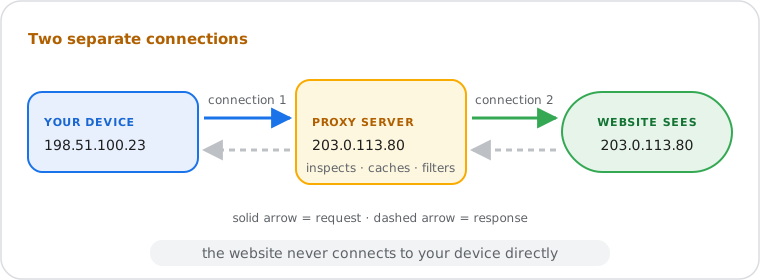
When a proxy is in the path, the flow changes: your device opens a connection to the proxy server, the proxy evaluates the request, then opens its own separate connection to the destination server on your behalf. The destination server receives a connection from the proxy's IP address, not yours. The proxy relays the response back to your device. From the destination server's perspective, the request originated from the proxy.
Because the proxy maintains two independent connections — one to you, one to the destination — it can inspect, cache, modify, or filter the traffic passing through it. Caching proxies store copies of frequently requested resources and serve them directly without contacting the origin server, reducing latency and upstream bandwidth consumption. Content-filtering proxies inspect request URLs against a block list and return a denial page for restricted destinations — a model used widely in corporate and educational networks.
The two dominant proxy architectures serve opposite roles in a network, and understanding the distinction is essential because the term "proxy server" refers to both in different contexts.
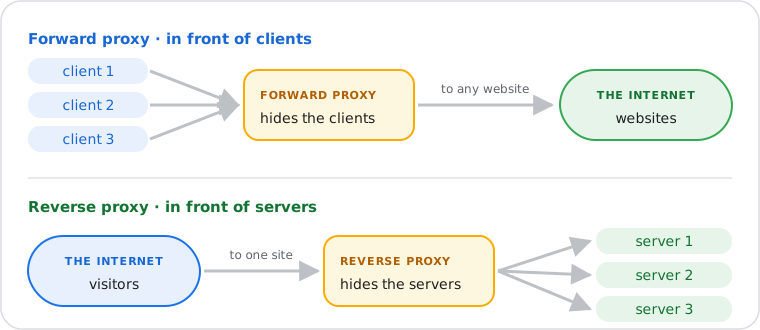
A forward proxy sits in front of clients. Clients are configured to route their outbound requests through it. The forward proxy acts on behalf of the client, forwarding requests to any destination on the internet. Use cases include employee internet access control in enterprises, IP address masking for anonymous browsing, and bypassing geographic content restrictions. The client always knows it is using a forward proxy; the destination server may not know the client's real identity.
A reverse proxy sits in front of servers. External clients connect to the reverse proxy believing they are reaching the origin server directly. The reverse proxy forwards inbound requests to one or more backend servers and returns their responses to clients. Use cases include load distribution across server pools, TLS/SSL termination, DDoS absorption, and serving as a Web Application Firewall (WAF). Cloudflare and NGINX are the most widely deployed reverse proxy systems. Clients never configure a reverse proxy; it is transparent to them.
The fundamental rule: a forward proxy serves clients by controlling their outbound access; a reverse proxy serves servers by controlling inbound access on their behalf.
Proxy servers communicate with clients and destination servers through one of three primary protocols, each with distinct capabilities and network layer behavior.
HTTP proxies operate at Layer 7 of the OSI model and understand the HTTP protocol natively. The client sends a standard HTTP request to the proxy, which parses the request, may modify headers, and forwards the request to the destination. Because the proxy reads the full HTTP message, it can log URLs, cache responses, and filter content. HTTP proxies work only with unencrypted HTTP traffic. The default port registered with IANA is 3128, though 8080 is also common.
HTTPS proxies handle encrypted web traffic using the HTTP CONNECT method defined in RFC 7231. The client sends a CONNECT request to the proxy specifying the destination host and port. The proxy establishes a TCP tunnel to that destination and notifies the client with a 200 Connection Established response. The client then begins its TLS handshake directly with the destination server through the tunnel. The proxy relays encrypted bytes in both directions without decrypting them — it cannot read the content or modify headers once the tunnel is established. This is why HTTPS traffic cannot be cached or content-filtered by a standard forward proxy.
SOCKS5 proxies, specified in RFC 1928, operate at a lower level than HTTP proxies. SOCKS5 is a general-purpose protocol that tunnels any TCP or UDP connection through the proxy without inspecting the application-layer content. Because it is protocol-agnostic, SOCKS5 proxies can handle HTTP, HTTPS, email, FTP, and any other TCP/UDP-based traffic. SOCKS5 also supports username and password authentication, making it suitable for deployments that require per-connection access control. The IANA-registered port for SOCKS is 1080.
Proxy servers and VPNs both route traffic through an intermediary and replace your visible IP address, but they differ fundamentally in scope, encryption, and the network layer at which they operate. The comparison below covers the protocol-level distinction without VPN protocol depth — for IPsec, WireGuard, and OpenVPN mechanics, see the What Is a VPN guide.
| Feature | Proxy Server | VPN |
|---|---|---|
| Traffic scope | Per-application (browser or specified app only) | System-wide (all applications and operating system traffic) |
| Encryption | None for HTTP proxy; tunnel only for HTTPS CONNECT and SOCKS5 | Full end-to-end encryption for all traffic |
| IP masking | Yes — destination sees proxy IP | Yes — destination sees VPN server IP |
| DNS leak protection | No — DNS queries may bypass proxy and reveal location | Yes — quality VPNs route all DNS through the encrypted tunnel |
| OSI layer | Layer 7 (HTTP/HTTPS) or Layer 4–5 (SOCKS5) | Layer 3 — operates at the network layer |
| Speed | Faster — no encryption overhead for HTTP proxies | Slower — encryption and tunneling add overhead |
| Configuration | Per-browser or per-application setting | System-level client or OS network adapter |
Proxy servers are classified by position in the network, the anonymity they provide to the client, and the protocol they carry. The table below covers the six types encountered in practice, including the OSI layer and RFC reference where applicable.
| Proxy Type | Position | Hides Client IP | Protocol | Primary Use Case |
|---|---|---|---|---|
| Forward Proxy | Client-side (outbound) | Yes | HTTP, HTTPS (CONNECT), SOCKS5 | Anonymity, corporate web filtering, geo-bypass |
| Reverse Proxy | Server-side (inbound) | No — hides server IP instead | HTTP, HTTPS | Load balancing, TLS termination, WAF, CDN |
| Transparent Proxy | Client-side (not configured on client) | No — client IP is forwarded in headers | HTTP (Layer 7) | ISP caching, network monitoring, content filtering |
| Anonymous Proxy | Client-side | Yes — proxy identity is detectable | HTTP, SOCKS (Layer 7) | Basic browsing privacy, bypassing IP-based restrictions |
| Elite (High-Anonymity) Proxy | Client-side | Yes — proxy identity is hidden | HTTP, SOCKS (Layer 7) | Maximum anonymity, bypassing proxy-detection systems |
| SOCKS5 Proxy | Client-side | Yes | SOCKS5 per RFC 1928 (Layer 4–5) | Non-HTTP traffic, P2P, any TCP/UDP protocol |
Free public proxy servers introduce security and privacy risks that are absent when connecting directly to the internet or through a verified paid service.
Traffic logging. The proxy operator controls the intermediary and can log every request passing through it. For unencrypted HTTP traffic, the operator can read URLs, cookies, and form submissions in full. There is no independent verification mechanism equivalent to the audited no-logs policies available from commercial VPN providers.
Content injection. Some malicious free proxies modify unencrypted HTTP responses in transit, inserting advertising scripts, tracking pixels, or malware into web pages before they reach your browser. Because the proxy sits between you and the content, it has full read-write access to anything not protected by TLS.
SSL stripping. A malicious proxy can downgrade HTTPS connections to HTTP between the proxy and the client while maintaining an encrypted connection to the destination server — a technique known as SSL stripping. The browser may not display a security warning if the downgrade is executed correctly. Using a proxy that you do not control over an untrusted network carries this risk.
Shared IP reputation. Free proxies allocate the same IP address to many simultaneous users. If any user sends spam, conducts abuse, or triggers blacklist criteria, the shared IP is listed. Any subsequent user of that IP inherits the poor reputation — including email delivery failures if the IP appears on DNSBL lists. Use the IP Blacklist Checker to verify whether a proxy's IP appears on known blacklists before relying on it.
Confirm your proxy is routing traffic correctly and not exposing your real IP address.