IPv6 Compressor — Shorten Any IPv6 Address to RFC 5952 Canonical Form
IPv6 address compression converts a full 128-bit hexadecimal address — written as eight groups
of four digits separated by colons — to the shortest valid notation defined by RFC 5952
(August 2010). Two rules apply: (1) leading zeros within each 16-bit hextet are stripped, and
(2) the longest consecutive sequence of all-zero hextets is replaced by a double colon (::),
which may appear only once. Compressed and expanded forms represent the same address — the
underlying value is unchanged.
Property
Detail
Input format
Full 128-bit IPv6 address — 8 hextets of up to 4 hex digits each
Rule 1 (§4.1)
Strip leading zeros in every hextet — 0db8 → db8
Rule 2 (§4.2)
Replace longest consecutive all-zero run with :: — once per address only
Tiebreak (§4.2.3)
When two runs share equal length, the leftmost is compressed
:: minimum (§4.2.2)
:: applies only to runs of 2 or more consecutive zero hextets
Output case (§4.3)
Lowercase hexadecimal — 2001:DB8::1 is non-canonical
How to Use the IPv6 Compressor
Enter any full or partially compressed IPv6 address and get the canonical short form in seconds — single address or bulk list.
1
Enter Your IPv6 Address
Paste a full-notation IPv6 address (e.g. 2001:0db8:0000:0000:0000:ff00:0042:8329) into the input field. To compress multiple addresses at once, switch to Bulk List mode and paste one address per line.
2
Click Compress IPv6
Click the Compress IPv6 button. The tool validates the input, expands any existing :: notation to all eight hextets, strips leading zeros from each group, and locates the longest consecutive all-zero run.
3
Read the Compressed Result
The output is the RFC 5952 canonical compact form. Leading zeros are removed from each hextet. The longest consecutive zero sequence is replaced by ::. If two runs tie in length, the leftmost is compressed per RFC 5952 §4.2.3.
4
Copy and Use the Result
Click Copy Result to copy the compressed address. Paste it directly into your firewall rule, DNS AAAA record, router CLI, or application configuration.
How IPv6 Compression Works — RFC 5952 Rules
RFC 5952 (August 2010) standardizes the canonical text representation of IPv6 addresses to
eliminate format inconsistencies that caused failures in log auditing, string comparison, and
certificate validation. Four requirements are relevant to this tool:
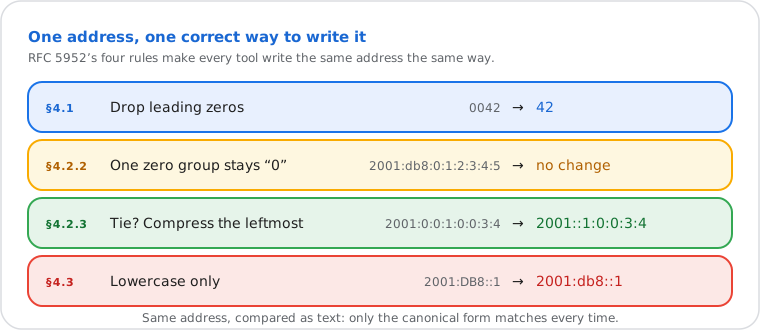
RFC 5952 gives every IPv6 address exactly one correct short form.
§4.1 — Suppress leading zeros. Every leading zero within a 16-bit hextet
must be removed. 0042 becomes 42; 0000 becomes
0. Trailing zeros within a hextet are never removed.
§4.2.2 — Single zero group stays explicit.:: must not shorten
a single isolated zero hextet. 2001:db8:0:1:2:3:4:5 compresses to
2001:db8:0:1:2:3:4:5 — the 0 remains; no :: is
applied.
§4.2.3 — Leftmost wins on equal-length ties. When two consecutive zero
runs share the same length, the leftmost is compressed.
2001:0:0:1:0:0:3:4 → 2001::1:0:0:3:4, not
2001:0:0:1::3:4.
§4.3 — Lowercase only. All hexadecimal digits must be lowercase.
2001:DB8::1 is non-canonical; 2001:db8::1 is correct.
The canonical form matters beyond readability. DNS AAAA records (RFC 3596) and BGP routing
tables store addresses in canonical form. Application code comparing IPv6 strings without
normalization produces false negatives — 2001:db8::1 and
2001:0db8:0:0:0:0:0:1 are the same address but fail a naive string equality check.
Command line
How to Compress an IPv6 Address Without an Online Tool
Output: 2001:db8::ff00:42:8329. The .NET IPAddress class normalizes to canonical form.
The bulk list mode in this tool is faster when compressing many addresses at once without
writing a script, or when working on a machine without Python installed.
Common Uses for IPv6 Address Compression
Firewall and ACL configuration. A network engineer is adding IPv6-based
access control rules to a Cisco IOS router. The router CLI rejects non-canonical notation
with a "% Ambiguous command" error. Compressing addresses before entry eliminates the error
and ensures rules match what the routing table stores.
DNS AAAA record provisioning. A DevOps engineer is setting a DNS AAAA record
for a dual-stack web server. The output of ip addr show on Linux returns the
expanded form. Compressing it to canonical notation before pasting into the DNS registrar's
portal ensures the record is accepted and consistent with PTR record lookups.
Application-level address normalization. A Python developer is storing IPv6
client addresses in a database and comparing them against block lists. Inconsistent notation
— 2001:db8::1 from one source and 2001:0db8:0:0:0:0:0:1 from
another — causes false negatives in equality checks. Normalizing all addresses to RFC 5952
canonical form at ingestion eliminates the mismatch.
Frequently Asked Questions
What is the double colon (::) in an IPv6 address?
The double colon (::) is a shorthand notation defined in RFC 4291 that represents one or more consecutive groups of 16-bit zeros in an IPv6 address. It may appear only once per address. For example, 2001:0db8:0000:0000:0000:0000:0000:0001 compresses to 2001:db8::1, where :: replaces seven consecutive all-zero hextets. Without ::, the compressed form still removes leading zeros but writes each zero group explicitly as 0.
Why does my result not show :: even though the address contains zeros?
Per RFC 5952 §4.2.2, :: must not be used to shorten a single 16-bit zero field. If your address contains only one isolated zero group — such as 2001:db8:0:1:2:3:4:5 — the zero group remains as 0 and no :: is applied. The compressed output is 2001:db8:0:1:2:3:4:5. The :: substitution applies only when two or more consecutive zero hextets can be collapsed.
Does compressing an IPv6 address change its value or routing behavior?
No. Compression is a formatting change only — the underlying 128-bit value is identical. 2001:0db8:0000:0000:0000:ff00:0042:8329 and 2001:db8::ff00:42:8329 are the same address. Routers, firewalls, and operating systems treat them as identical destinations. RFC 5952 exists precisely because inconsistent notation caused string comparison failures in log auditing and certificate validation — not because the addresses differ in routing.
What is the difference between a compressed and an expanded IPv6 address?
An expanded IPv6 address always has eight groups of exactly four hexadecimal digits — 32 characters plus seven colons, totaling 39 characters. Example: 2001:0db8:0000:0000:0000:ff00:0042:8329. A compressed address removes leading zeros from each hextet and replaces the longest consecutive all-zero sequence with ::. Example: 2001:db8::ff00:42:8329 (24 characters). Both encode the same 128-bit address. RFC 3596 requires compressed notation for DNS AAAA records.
How do I compress an IPv6 address from the command line?
On Mac and Linux, Python 3's built-in ipaddress module follows RFC 5952: python3 -c "import ipaddress; print(str(ipaddress.ip_address('2001:0db8:0000:0000:0000:ff00:0042:8329')))". On Windows PowerShell: [System.Net.IPAddress]::Parse('2001:0db8:0000:0000:0000:ff00:0042:8329').IPAddressToString. Both output the canonical compressed form. The bulk list mode in this tool is faster when processing many addresses without writing a script.
Do you store or log the IPv6 addresses I compress?
No address data is transmitted to any server. The entire compression process runs in the browser — the IPv6 address never leaves your device. No input is logged, stored, or sent to a third party. This applies equally in single-address mode and bulk list mode.