What Is a MAC Address? Find Yours, and Why It Changes
A MAC address is the hardware address of a device's network connection (Wi-Fi, Ethernet or Bluetooth): 12
hexadecimal digits like 3C:22:FB:12:34:56. Your router uses it to deliver data to the right
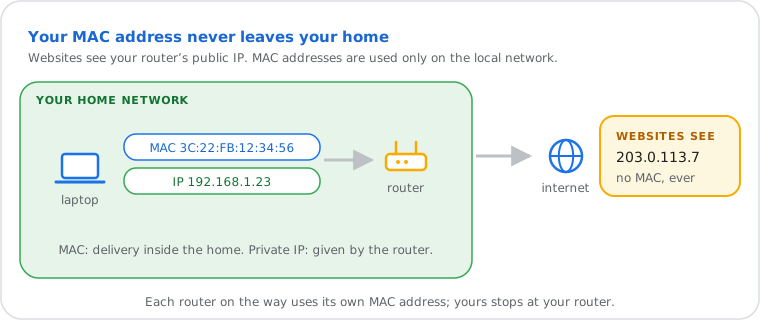
device at home. Unlike your IP address it never leaves your local network, and phones now hide the real one
behind a private address on each Wi-Fi network.
Have one to identify? MAC address lookup tells you who made the device.
MAC Address vs IP Address
The MAC address names the device's network hardware inside your home; the IP address is how data finds it across networks.
| MAC address | IP address | |
|---|---|---|
| Looks like | 3C:22:FB:12:34:56 | 192.168.1.23 at home, a public one on the internet |
| Set by | The manufacturer (or your phone, for a private address) | The network: your router at home, your provider for the public one |
| Works | Only on your local network | Across networks, the whole internet |
| Changes | Hardware one: never. Private one: per network | Often (dynamic IPs) |
| Websites see it | No | Your public IP, yes (see yours) |
How to Find Your MAC Address
It's in your network settings, called "Physical address" (Windows), "Wi-Fi Address" (Apple) or "MAC address" (Android).
On Windows: open Command Prompt and run getmac /v, or Settings › Network & internet › Wi-Fi › Hardware properties › "Physical address (MAC)".
Every other device, including consoles, TVs and printers: where to find the MAC address. A computer with Wi-Fi and Ethernet has two MAC addresses, one per connection.
How to Read a MAC Address
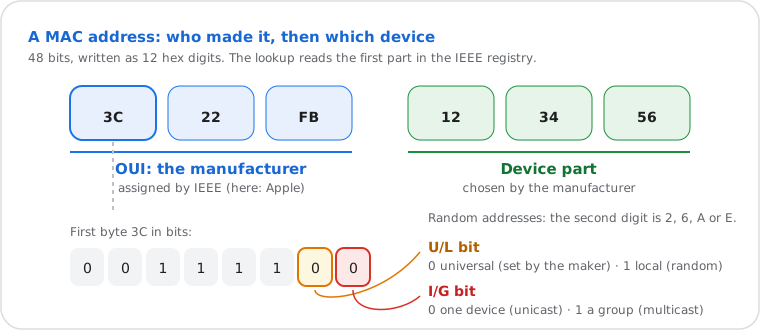
Six pairs of hex digits: the first three name the manufacturer, the last three the device. A 2, 6, A or E in second place means a private, random address.
- Same address, three spellings:
3C:22:FB:12:34:56(most systems),3C-22-FB-12-34-56(Windows),3c22.fb12.3456(Cisco). Capitals don't matter. - The first half (OUI) is a prefix the manufacturer bought from IEEE: paste it into the MAC lookup to see the company.
- Second digit 2, 6, A or E (
x2:,x6:,xA:,xE:): a "locally administered" address, almost always a phone's or laptop's private address, or a virtual machine. No company is behind it.
Private (Random) MAC Addresses
Phones use a different, made-up MAC address on each Wi-Fi network so you can't be followed from network to network. At home you can turn it off for one network.
| System | What it does by default | Turn it off for one network |
|---|---|---|
| iPhone, iPad (iOS 14+) | A private address per network. iOS 18 adds Off, Fixed or Rotating (a new one about every two weeks) | Settings › Wi-Fi › ⓘ › Private Wi-Fi Address |
| Android (10+) | A random address per saved network | Wi-Fi › the network › Privacy › Use device MAC |
| Windows 10, 11 | Off unless you turn it on | Settings › Network & internet › Wi-Fi › Random hardware addresses |
What private addresses can break at home: a fixed local IP (DHCP reservation) for a device, parental-control schedules or blocks tied to a device, and router allow-lists. If one of those stops working after a phone update, set that phone to its device MAC (or "Fixed") on your home network only, and keep private addresses everywhere else. Hotel and café Wi-Fi may ask you to sign in again when the address rotates.
What Your Router Uses MAC Addresses For
To list connected devices, give a device the same local IP every time, apply parental controls and wake computers remotely.
- Connected devices list: every device shows with its MAC address. An unknown device? Paste its MAC into the lookup: "Amazon" or "Espressif" is often a smart speaker or plug; a private (random) address is usually a phone.
- Reserved IP addresses: the router links a MAC address to a fixed local IP, handy for a printer, console or camera (static vs dynamic IP, and needed for port forwarding).
- Parental controls and schedules: picked by device, that is by MAC address.
- Wake-on-LAN: a "magic packet" with a computer's MAC address switches it on over the network.
Is MAC Filtering Safe?
Not as protection: anyone nearby can read allowed MAC addresses from the air and copy one. Your Wi-Fi password does the real work.
MAC filtering (an allow-list or block-list of devices) is fine for small jobs like blocking a child's tablet at night, but it's tedious with private addresses and gives no real security. Protect the network with WPA3 or WPA2 (AES), a long password, WPS off and an updated router. More: why hiding your Wi-Fi name doesn't help either.
Can Someone Track or Change a MAC Address?
Websites can't see it, and it doesn't reveal where you are. It can be changed in software, which is how private addresses work.
- Websites and apps over the internet: never see your MAC address. Each router on the way uses its own; only your public IP reaches them.
- Location: a MAC address isn't tied to a place. Some location services map the BSSIDs of Wi-Fi routers they've seen (that's how phones locate themselves without GPS), but they don't find you from your MAC.
- Nearby sensors in shops or stations can notice the same hardware address over time: private addresses stop that.
- Changing it ("spoofing") is a setting on most systems and routers; it's legal on your own devices. That's also why a MAC address proves nothing about who's on a network.
What Is a MAC Address, Technically?
A 48-bit identifier (EUI-48) from the IEEE 802 standards, used at the data-link layer, below IP.
That gives about 281 trillion possible addresses. In the first byte, one bit marks group (multicast) addresses and another marks locally administered ones, the bit private addresses set. On a local network, your device finds the MAC address that matches an IPv4 address with ARP, or with Neighbor Discovery on IPv6. Older IPv6 setups built the address's last 64 bits from the MAC (the "modified EUI-64" of RFC 4291); systems now use random ones instead, for the same privacy reason.
Frequently Asked Questions
What is a MAC address?
What is the difference between a MAC address and an IP address?
How do I find my MAC address?
getmac /v or look under the Wi-Fi adapter's "Physical address". Mac: System Settings › Wi-Fi › Details. iPhone: Settings › General › About › Wi-Fi Address. Android: Settings › About phone. Phones may use a different, private address on each Wi-Fi network.