1
Submit the check
Click Check SSL Certificate. The server opens a TCP connection to port 443, completes a live TLS handshake, and retrieves the full certificate chain.
SSL Certificate Checker |
SSL Certificate Checker performs a live TLS handshake with any public domain on port 443 and returns the X.509 certificate details served by that domain's server. Results include the Certificate Authority (CA) that issued the certificate, the validity window, days until expiry, trust chain depth, self-signed status, and HSTS header configuration. Governed by RFC 8446 (TLS 1.3), RFC 5280 (X.509 Certificate format), and RFC 6797 (HSTS), results reflect the live certificate at query time — not cached data, not a database lookup.
| Detail | Value |
|---|---|
| Protocol | TLS 1.2 (RFC 5246) / TLS 1.3 (RFC 8446) |
| Connection Port | 443 (HTTPS standard) |
| Certificate Format | X.509 v3 (RFC 5280) |
| Max Certificate Validity | 398 days (CA/Browser Forum Baseline Requirements) |
| Let's Encrypt Validity | 90 days — auto-renewal triggered at 30 days remaining |
| Data Stored | None — results are not logged or retained |
Type the domain to check (e.g. google.com). The tool strips https://, http://, www., and any URL path automatically before connecting.
| Field | Meaning | What to Look For |
|---|---|---|
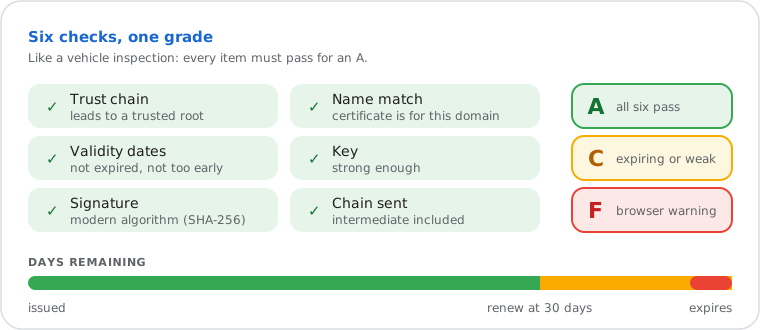
| Security Grade | Overall rating from six checks: trust chain, domain name match, validity dates, key, signature and chain sent | A = all checks pass. C = works, but expiring within 15 days or weak key/signature. F = browsers show a warning (expired, not trusted or wrong name). |
| Issuer (CA) | The Certificate Authority that verified the domain and signed the certificate | The Trusted by browsers check confirms the chain ends at a trusted root (for example Let's Encrypt, DigiCert, Sectigo, GlobalSign, Google Trust Services). |
| Days Remaining | Calendar days until the certificate's NotAfter timestamp, per RFC 5280 §4.1.2.5 | Renew at 30 days or earlier. Let's Encrypt auto-renews at 30 days if Certbot is running. |
| Chain Depth | Number of certificates served in the TLS handshake: root CA, intermediate CA(s), and leaf | Depth of 1 (leaf only, no intermediate) causes trust errors on mobile Safari, older Android, and API clients. |
| Signature Algorithm | Cryptographic algorithm used to sign the certificate (from the X.509 SignatureAlgorithm field) | SHA256withRSA or SHA256withECDSA = acceptable. SHA1withRSA = deprecated and insecure (RFC 8996). Reject immediately. |
| HSTS | Presence of the Strict-Transport-Security response header, defined in RFC 6797 | Enabled forces HTTPS on all subsequent requests. Disabled means HTTP downgrade is possible on the first browser visit. |
| Self-Signed | Certificate's Subject and Issuer fields are identical — no CA involvement in the issuance | Acceptable only on internal servers. All major browsers reject self-signed certificates on public domains with a CERT_AUTHORITY_INVALID error. |
All modern HTTPS connections use TLS (Transport Layer Security), not SSL. The SSL name persists by convention — the active protocol stack is defined in RFC 8446 (TLS 1.3, August 2018) and RFC 5246 (TLS 1.2, 2008). TLS 1.0 and TLS 1.1 were formally deprecated by RFC 8996 in March 2021 and are blocked by Chrome, Firefox, Safari, and Edge.
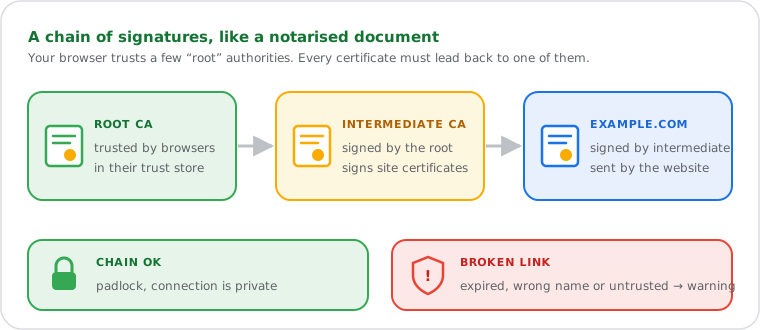
During a TLS handshake, the server presents an X.509 certificate (RFC 5280) containing its public key, identity information (Common Name or Subject Alternative Names), the Certificate Authority that issued it, and NotBefore / NotAfter validity dates. The client checks the certificate against its built-in trust store — a list of root CA certificates maintained by the operating system or browser. If the certificate chains back to a trusted root, the connection proceeds. If the chain is broken or the root is untrusted, the browser displays a security error.
HSTS (HTTP Strict Transport Security, RFC 6797) supplements certificate validation by instructing browsers to reject any non-HTTPS connection to the domain for the duration specified in the max-age directive. A production server should set max-age to at least 31536000 (one year). Domains on the HSTS preload list are hardcoded into browsers and require no header at all — the browser enforces HTTPS before making any connection.
Do it yourself
OpenSSL is the standard command-line library for TLS/SSL certificate inspection on Linux, macOS, and Windows (via WSL, Git Bash, or OpenSSL for Windows). The online checker queries from a neutral external server — results reflect the certificate served to external clients, which may differ from a local check if split DNS or CDN edge routing is in effect.
# Retrieve certificate subject, issuer, and validity dates
echo | openssl s_client -connect example.com:443 -servername example.com 2>/dev/null \
  | openssl x509 -noout -subject -issuer -dates
# Count certificates in the chain (should be 2 or more for a complete chain)
openssl s_client -connect example.com:443 -showcerts -servername example.com </dev/null 2>/dev/null \
| grep -c "BEGIN CERTIFICATE"# Check expiry date only
echo | openssl s_client -connect example.com:443 -servername example.com 2>/dev/null \
| openssl x509 -noout -enddate$domain = "example.com"
$tcpClient = New-Object System.Net.Sockets.TcpClient($domain, 443)
$sslStream = New-Object System.Net.Security.SslStream($tcpClient.GetStream())
$sslStream.AuthenticateAsClient($domain)
$cert = [System.Security.Cryptography.X509Certificates.X509Certificate2]$sslStream.RemoteCertificate
$cert | Select-Object Subject, Issuer, NotBefore, NotAfter
$tcpClient.Close()certutil -verify -urlfetch example.com
The -servername flag in the OpenSSL commands above is required for SNI (Server
Name Indication, RFC 6066). Without it, servers hosting multiple TLS certificates via SNI
may return the default certificate rather than the one for the requested hostname — producing
misleading results on shared hosting and CDN configurations.
Diagnosing certificate trust errors on mobile devices. A web developer receives reports that an API endpoint throws certificate validation errors on Android 7.x clients but not on desktop Chrome. SSL Certificate Checker shows a chain depth of 1 — the server is sending only the leaf certificate. Desktop Chrome fetches the missing intermediate via the AIA extension silently. Older Android's certificate store does not perform this fetch and rejects the connection outright. Adding the intermediate CA certificate to the server's TLS configuration resolves the error across all clients.
Catching failed auto-renewal before visitors see an error. A DevOps engineer manages 30 production domains across multiple hosting providers. A Certbot renewal job silently failed after a DNS provider change invalidated the HTTP-01 ACME challenge. Periodic SSL checks flagged the certificate at 12 days remaining — enough time to reconfigure the challenge method and renew before any visitor saw an expired certificate warning.
Auditing a third-party SaaS integration before go-live. A security engineer verifies that a payment processor's API endpoint used in production serves a certificate from a trusted CA with a complete chain and HSTS enabled. The checker reveals HSTS is disabled on the API subdomain — the security team raises it with the vendor before the integration goes live, preventing a potential HTTP downgrade attack on the integration traffic.