What Is DNS?
How the internet's phone book turns names into IP addresses, and how to choose, change and fix it.
DNS (Domain Name System) is the internet's phone book: it turns a name like example.com into the IP address computers use to connect, usually in a few milliseconds. A DNS server answers those lookups; your internet provider runs one for you, and public ones like Google (8.8.8.8) and Cloudflare (1.1.1.1) are free.
What Is a DNS Server?
A DNS server is a computer that answers "what is the IP address of this name?". Your device asks one server, the resolver, and the resolver finds the answer among three other kinds: root, top-level domain and authoritative servers.
| Server | What it does | Example |
|---|---|---|
| Resolver (recursive) | Asks the others on your behalf and remembers the answers | Your provider, 8.8.8.8, 1.1.1.1 |
| Root servers | Know where each top-level domain (.com, .org, .uk…) is served | a.root-servers.net … m.root-servers.net |
| TLD servers | Know which name servers hold each domain in that ending | The .com servers |
| Authoritative name servers | Hold the domain's real records: its IP addresses, mail servers… | The domain's DNS host |
There are 13 root server names, a to m, run by 12 organisations, and over 2,000 copies of them around the world, so the nearest one answers. The domain's name servers are set where it was registered: see a domain's with our NS lookup.
How Does DNS Work?
Your browser asks its cache, then your device's, then the resolver; only if nobody remembers the answer does the resolver ask the root, the TLD servers and the domain's name servers. The answer is then cached for as long as its TTL says.
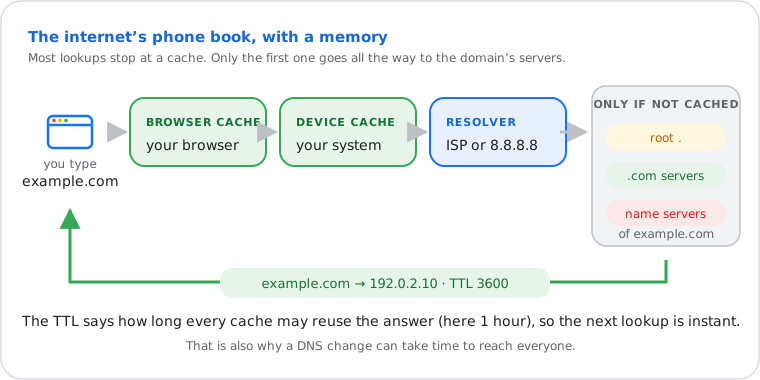
- You type example.com. The browser checks whether it looked it up recently.
- If not, it asks the operating system, which has its own cache.
- If not, the system asks the resolver set in your network settings, usually your router, which passes the question to your provider's resolver or to the one you chose.
- The resolver, if it doesn't remember the answer, asks a root server ("who handles .com?"), then the .com servers ("who handles example.com?"), then example.com's name servers ("what's its address?").
- The answer, say
192.0.2.10, comes back with a TTL (time to live, in seconds). Every cache on the way keeps it that long, so the next lookup is instant.
DNS was defined in 1987 (RFC 1034 and RFC 1035) and still works this way. It mostly uses UDP port 53. The resolver path step by step, with timings, is on our DNS lookup page.
What Are DNS Records?
A domain's DNS is a list of records, each with a type: A gives its IPv4 address, AAAA its IPv6 address, MX its mail servers, CNAME an alias, NS its name servers and TXT text such as SPF and DMARC.
| Record | What it says | Look it up |
|---|---|---|
| A | The IPv4 address of the name | DNS lookup |
| AAAA | The IPv6 address | Website IPv6 test |
| CNAME | "This name is an alias of that one" | CNAME lookup |
| MX | The servers that receive the domain's email, by priority | MX lookup |
| NS | The domain's authoritative name servers | NS lookup |
| TXT | Text: SPF, DKIM, DMARC, site verifications | TXT lookup |
| PTR | The name of an IP address (reverse DNS) | Reverse DNS |
| SOA, CAA | Zone settings; which certificate authorities may issue SSL | DNS lookup |
Which DNS Server Should I Use?
Your provider's DNS works fine for most people. Switch to a public resolver if it's slow, unreliable or redirects mistyped names to ads: Cloudflare and Google are fast everywhere, Quad9 also blocks known malicious sites.
| Resolver | Addresses | Good to know |
|---|---|---|
| Cloudflare | 1.1.1.1 · 1.0.0.1 | Fast, privacy-focused; 1.1.1.2 also blocks malware, 1.1.1.3 malware and adult content |
| Google Public DNS | 8.8.8.8 · 8.8.4.4 | Fast and very reliable, no filtering |
| Quad9 | 9.9.9.9 · 149.112.112.112 | Blocks domains known to spread malware or phishing; non-profit based in Switzerland |
| OpenDNS (Cisco) | 208.67.222.222 · 208.67.220.220 | Optional filtering; FamilyShield (208.67.222.123) blocks adult content |
| AdGuard DNS | 94.140.14.14 · 94.140.15.15 | Blocks ads and trackers for every device that uses it |
The fastest one depends on where you are: try your domains with the live lookup above, which shows each resolver's response time. Set two addresses from the same provider, so the second takes over if the first fails.
How to Change Your DNS Server
Change it in your device's network settings, for that device only, or in your router, for every device at home. The steps for the system you're using are open below.
Windows 11 Network settings
Settings › Network & internet › Wi-Fi (or Ethernet) › your network's properties › DNS server assignment › Edit › Manual › turn on IPv4 › enter the two addresses. Windows 11 can also encrypt the lookups there (DNS over HTTPS).
Mac System Settings
System Settings › Network › Wi-Fi › Details… next to your network › DNS › click + and add each address.
iPhone / iPad Wi-Fi details
Settings › Wi-Fi › ⓘ next to your network › Configure DNS › Manual › Add Server. It applies to that Wi-Fi network only.
Android Private DNS
Settings › Network & internet › Private DNS (Samsung: Connections › More connection settings) › Private DNS provider hostname: one.one.one.one, dns.google or dns.quad9.net. It's encrypted and works on Wi-Fi and mobile data.
Linux NetworkManager
Settings › Network › your connection › IPv4 › turn off automatic DNS and enter the addresses, or nmcli con mod "name" ipv4.dns "1.1.1.1 1.0.0.1" ipv4.ignore-auto-dns yes, then reconnect.
ChromeOS Network settings
Settings › Network › your Wi-Fi network › Network › Name servers › Custom name servers.
For every device at once, change the DNS in your router's internet (WAN) or DHCP settings: see how to find your router. In Chrome, Settings › Privacy and security › Security › Use secure DNS changes it for the browser only.
What Is My DNS Server?
On Windows, run ipconfig /all and read "DNS Servers"; on a Mac, see System Settings › Network › Wi-Fi › Details › DNS. If it shows your router's address (like 192.168.1.1), the router forwards lookups to your provider.
- Windows:
ipconfig /all› DNS Servers - Mac:
scutil --dns | grep nameserver, or the DNS tab above - Linux:
resolvectl status(or/etc/resolv.conf) - iPhone: Settings › Wi-Fi › ⓘ › Configure DNS shows the servers
A web page can't read this setting from your device, which is why no site can show it reliably without running its own DNS servers.
How to Fix Slow DNS Lookups
Restart your router, clear your device's DNS cache, then switch to a faster public resolver; if a VPN or security app handles DNS, check it too.
- Measure first: the live lookup shows how fast each resolver answers from our server; if all are fast and your sites are slow to start, the delay is local.
- Restart the router (unplug for 30 seconds): its DNS forwarder can hang.
- Clear the DNS cache: Windows
ipconfig /flushdns· Macsudo dscacheutil -flushcache; sudo killall -HUP mDNSResponder· Linuxresolvectl flush-caches· Chrome:chrome://net-internals/#dns› Clear host cache. - Change the resolver on the device or router (steps above) and test again.
- Check what else does DNS: a VPN, ad blocker or antivirus with "web protection" can slow or break lookups; turn it off to compare.
- "DNS server not responding"? The resolver didn't answer at all: restart the router, then set a public resolver. If one site alone fails, its own name servers may be down: check with NS lookup.
Is DNS Private and Secure?
Classic DNS isn't encrypted, so your provider and anyone on your network can see the names you look up. Encrypted DNS (DNS over HTTPS or TLS) hides them from the network; DNSSEC proves answers weren't forged.
- DNS over HTTPS (DoH, RFC 8484) and DNS over TLS (DoT, RFC 7858) encrypt lookups between you and the resolver. Browsers, Windows 11, Android's Private DNS and iOS support them. The resolver itself still sees the names.
- DNSSEC (RFC 4033) signs a domain's records, so a resolver can reject fake answers. Our DNS lookup checks whether a domain is signed.
- DNS hijacking: malware or an attacker who changes your router's DNS can send you to fake sites. If your router lists DNS servers you didn't set, change them back and change the router password.
Frequently Asked Questions
What does DNS stand for?
What is 8.8.8.8?
Is it safe to change my DNS server?
Does changing DNS make the internet faster?
Can my DNS provider see the websites I visit?
How long does a DNS change take to work?
Next steps