1
Turn the VPN On and Reload
Connect your VPN and reload the page. "IP changed?" should be green: websites now see another IP than your saved one.
VPN & Proxy Checker |
Is my VPN working? To check, open this page with the VPN on: it shows the IP websites see and whether it belongs to a VPN network, checks for WebRTC, IPv6 and DNS leaks, compares your time zone with your IP, and tells you if your IP changed. It also detects proxies and Tor, and checks any other IP address for a VPN. Nothing is stored.
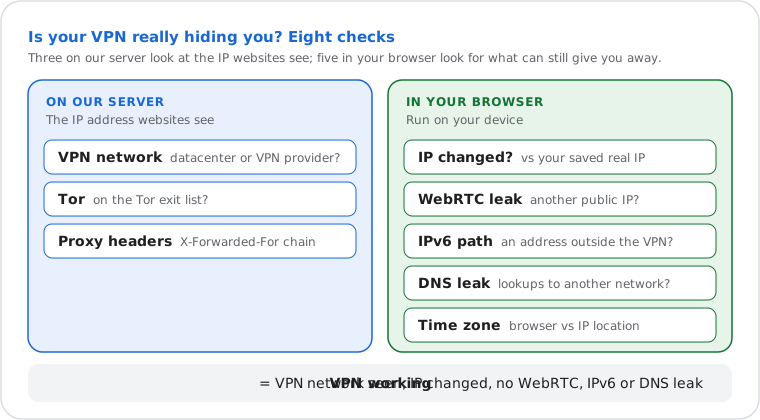
A VPN checker, or VPN test, shows whether your VPN really hides you. On our server, this one checks the IP address websites see: whether it belongs to a datacenter or VPN-provider network, whether it's a Tor exit, and whether a proxy added your address to the X-Forwarded-For header. In your browser, it tells you whether your IP changed since you saved your real one, looks for WebRTC, IPv6 and DNS leaks, and compares your time zone with your IP's. The same checks tell you if you're behind a proxy.
VPN detection works the same way for any address: enter an IP under "Is this IP a VPN?" and the network and Tor checks tell you whether it belongs to a VPN, a proxy, a server or Tor. No checker can detect a VPN or proxy that uses a home IP address and adds no header.
Turn your VPN off, open this page and press "Save current IP as my real IP". The address is kept only in your browser.
What the checker can see depends on what you connect through. Most commercial VPNs exit from datacenter networks, so the network check spots them; a proxy can also give itself away in the X-Forwarded-For header; and a VPN or proxy on home (residential) addresses looks like any home connection.
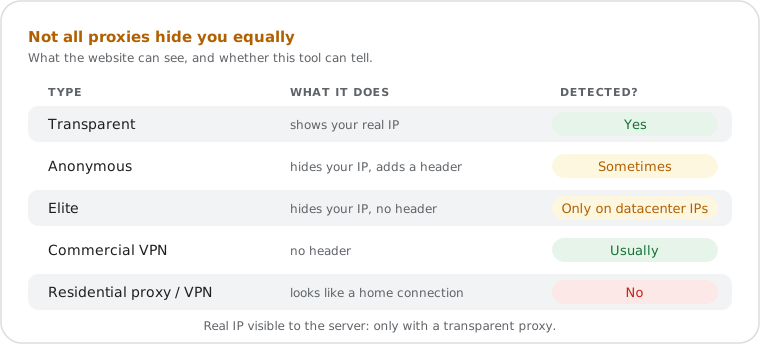
A "No VPN or proxy detected" result therefore means your connection is direct, or you use a VPN or proxy with a home IP address that adds no header. These two cases look the same from the server: the "IP changed?" check in your browser is the one that tells them apart.
Eight checks run when the page opens: three on our server, on the IP address websites see, and five in your browser, which look for what can still give you away behind a VPN.
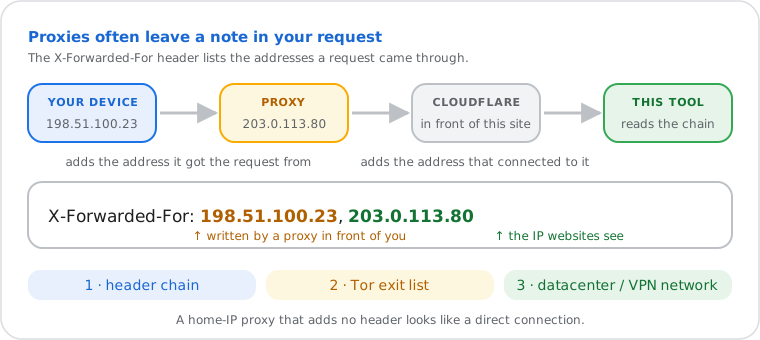
When a request passes through a proxy server, the proxy often adds the address it received the request
from to the X-Forwarded-For header before passing it on. The result is a comma-separated
chain of IP addresses, one per hop.
RFC 7239 (Forwarded HTTP Extension) standardizes this concept through the formal
Forwarded header, though X-Forwarded-For remains the dominant
de facto implementation across proxy software.
This site runs behind Cloudflare, which adds the address that connected to it (the IP websites see) to the end of the header. This tool reads the full X-Forwarded-For chain and labels each address: your IP, Cloudflare's published IPv4 and IPv6 ranges (this site's own network), or an address added before your request reached Cloudflare. That last kind was written by a proxy in front of you, and is usually the address the proxy received your request from — your device or the previous hop — not the proxy itself. Only IP addresses are read; anything else in the header is shown as "Not an IP address".
The two other server checks look at the IP itself. The Tor check compares it with the Tor Project's public list of exit nodes, downloaded again every hour. The network check finds the IP's autonomous system (ASN) in the GeoLite2 database and looks it up in a list of about 940 hosting, datacenter and VPN-provider networks. The same two checks power the Privacy line on the What Is My IP page.
The browser checks stay on your device except for a few requests. The WebRTC check asks
Cloudflare's STUN server (stun.cloudflare.com) for your public address, the same way a
video call would, and lists any public IP that differs from the one websites see. The IPv6 check
asks ipv6.whatismyipnow.com, which answers only over IPv6, for the address it sees. The
time zone check compares Intl.DateTimeFormat in your browser with the time zone of your
IP location. The DNS leak check makes your browser look up six unique names under our test zone;
the lookups fail at once, but our own DNS server records which resolvers asked, and the page compares
their networks (ASN) with the one websites see. Your saved real IP is kept in your browser's local
storage, never on our server.
Five results come up most often. Find yours, then the fix.
| You see | What it means | What to do |
|---|---|---|
| The VPN works "VPN or proxy detected", IP changed, no leak |
Websites see the VPN's address and country, not yours. They can still tell you use a VPN, because its network is known. | Nothing. Test again after VPN or browser updates. |
| The VPN is on, but WebRTC leaks | The verdict is fine, but WebRTC shows another public IP, often your real one. | Turn on WebRTC protection in the VPN app, or use the browser setting in the WebRTC leak test. |
| The VPN is on, but DNS leaks | Your IP is hidden, but your DNS lookups go to your internet provider, which can see the sites you visit. | Turn on DNS leak protection in the VPN app, or follow the fixes in the DNS leak test. |
| The VPN is on, but nothing changed "No VPN or proxy detected", same IP as your saved one |
The VPN isn't carrying this browser's traffic. | Check that it's connected, turn off split tunnelling (the VPN covering some apps only), or install the VPN extension in this browser. |
| "Proxy detected" at work or school | The network's firewall or filtering proxy added an internal address, such as 10.0.4.17, to the header. Some internet providers do the same with a carrier-grade NAT address such as 100.64.12.9. | Normal on managed networks. RFC 7239 lets such proxies identify themselves in the Forwarded header. |
Next steps