WebRTC Leak Test |
216.73.216.54
Seen by our server when you opened this page
Scanning…
Found by your browser through a STUN server
What Is a WebRTC Leak?
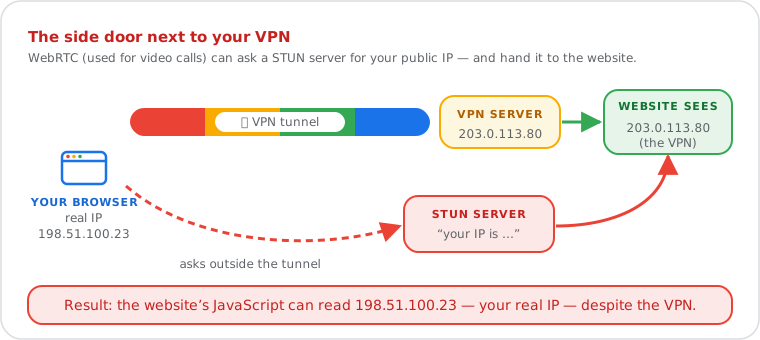
A WebRTC leak test detects whether the WebRTC API built into your browser exposes real IP addresses to websites through ICE candidate gathering — even behind a VPN. WebRTC (Web Real-Time Communication, RFC 8825) contacts STUN servers (RFC 8489) to discover public IPs using the ICE protocol (RFC 8445), bypassing VPN tunnels at the browser level. Results include public IPv4, public IPv6, and local LAN addresses visible to any website running WebRTC JavaScript.
| Fact | Detail |
|---|---|
| WebRTC standard | RFC 8825 (Overview), RFC 8826 (Security) |
| STUN protocol | RFC 8489 — Session Traversal Utilities for NAT |
| ICE framework | RFC 8445 — Interactive Connectivity Establishment |
| Private IP ranges | RFC 1918: 10/8, 172.16/12, 192.168/16 |
| Affected browsers | Chrome, Firefox, Edge, Opera, Brave (WebRTC enabled by default) |
| Chrome local IP mitigation | mDNS obfuscation — local IPs replaced with random .local hostnames |
Open the WebRTC Leak Test Page
Allow a few seconds (at most 6) for the browser to contact a STUN server and gather its ICE candidates. The verdict appears as soon as gathering finishes.
Fix a Leak and Test Again
What the Results Mean
| Result Field | Meaning | Example |
|---|---|---|
| No WebRTC leak | WebRTC shows the same public IP that websites see. With a VPN on, the VPN also covers WebRTC. | Both sides show 203.0.113.45 |
| WebRTC leak | WebRTC reveals a public IP of the same type (IPv4 or IPv6) that is different from the IP websites see. With a VPN on, it is usually your real ISP address. | Websites see 198.51.100.7, WebRTC reveals 203.0.113.45 |
| Check your IPv6 (or IPv4) address | WebRTC reveals an address of the other type. Without a VPN this is normally your own dual-stack connection. With a VPN, many only tunnel IPv4, so the IPv6 address may be your real one. | Websites see 203.0.113.45, WebRTC reveals 2001:db8::1 |
| Local network | Your private address assigned by your router (RFC 1918 range). Not globally unique and not reachable from the internet. Alone, not a privacy threat. | 192.168.1.105 |
| Hidden (mDNS) | Your browser replaced your local IP with a random .local name. Your public IP can still appear through STUN. | a1b2c3d4.local |
| No public IP revealed | WebRTC is blocked or disabled, or STUN could not be reached. Nothing leaks through WebRTC. | — |
The test does the comparison for you: it puts the IP our server sees next to the public IP WebRTC reveals. With a VPN on, the two should be the same VPN address. If WebRTC shows your ISP address instead, your VPN does not cover WebRTC traffic.
ICE Candidate Types and Privacy Risk
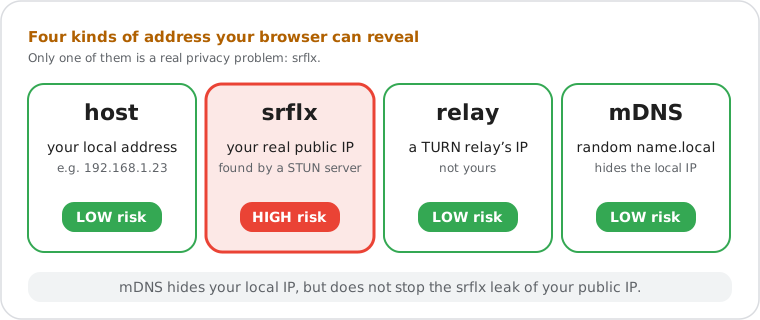
The ICE protocol (RFC 8445) defines four candidate types that a browser generates during peer discovery. Each type carries a different privacy implication:
| Candidate Type | How the IP Is Discovered | Privacy Risk |
|---|---|---|
host |
Read directly from the local network interface. | Low — private range IP only (RFC 1918). Modern Chrome obfuscates these with mDNS .local hostnames. |
srflx (server-reflexive) |
STUN server (RFC 8489) reflects the public IP seen at the NAT boundary. | HIGH — reveals your real public IPv4 to the website. The primary WebRTC leak vector. |
relay |
IP from a TURN relay server, used when direct connection fails. | Low — the relay server's IP, not your real address. |
mDNS (.local) |
Browser replaces host candidate with a random .local hostname. |
Low — local address obfuscated. Does not prevent srflx public IP leak. |
A raw ICE candidate string looks like this:
candidate:3478291056 1 udp 1845501695 203.0.113.45 12345 typ srflx raddr 0.0.0.0 rport 0
The IP 203.0.113.45 above is your real public IP returned by the STUN
server. This tool parses every ICE candidate string and classifies each IP address
using this structure. All processing happens in your browser — no candidate data
is transmitted to this site's servers.
Do it yourself
How to Fix a WebRTC Leak by Browser
Firefox Complete Disable (Recommended)
Firefox is the only major browser that supports full WebRTC disabling without an extension:
1. Type about:config in the address bar and press Enter.
2. Accept the risk warning.
3. Search for: media.peerconnection.enabled
4. Double-click the result to set its value to false.
Trade-off: disabling WebRTC in Firefox breaks Google Meet, Zoom web client, Discord (browser version), and other real-time services. Use a dedicated browser profile for video calls or re-enable WebRTC temporarily when needed.
Chrome Extension Required
Chrome provides no built-in setting to disable WebRTC. Install uBlock Origin from the Chrome Web Store, then:
1. Open the uBlock Origin Dashboard.
2. Go to Settings.
3. Enable "Prevent WebRTC from leaking local IP addresses".
Alternatively, the official WebRTC Network Limiter extension from Google provides configurable IP handling policy options without blocking WebRTC entirely.
Brave Built-in Policy Control
Settings → Privacy and security → WebRTC IP handling policy
→ Select: "Disable non-proxied UDP"
Brave provides the most granular built-in WebRTC control of any Chromium-based browser.
Edge Flag-Based Control
Navigate to: edge://flags/#enable-webrtc-hide-local-ips-with-mdns
→ Set to: Enabled
This enables mDNS obfuscation for local IPs in Edge. Public IP via STUN reflection is not blocked by this flag — use uBlock Origin for full protection.
Any browser VPN with Native WebRTC Protection (Best Solution)
The most reliable fix across all browsers is a VPN that explicitly routes WebRTC traffic through its tunnel, preventing the browser from reaching STUN servers directly. Many VPN apps have a "WebRTC leak protection" option: check that it is on, then run this test again and confirm both IP addresses match.
Who Needs a WebRTC Leak Test?
VPN user verifying connection security. A freelancer working from a shared network connects to their VPN before accessing client systems. Before starting work, they run this test. The verdict is "WebRTC leak": their real ISP IP appears next to the VPN address — Chrome is bypassing the VPN tunnel. They install uBlock Origin, re-run the test, and confirm the verdict "No WebRTC leak" before proceeding.
Journalist protecting source communications. A journalist in a
country with restrictive internet laws relies on a VPN to contact sources securely.
This test reveals that while DNS routes through the VPN, WebRTC discloses the real
ISP address. They switch to Firefox, disable WebRTC via about:config,
and verify with a second scan before reconnecting.
IT administrator auditing VPN compliance. A security administrator rolling out a corporate VPN policy directs employees to run this test before any device is marked compliant. Two Chrome users show public IPv4 leaks — their VPN client is not intercepting WebRTC traffic. The administrator deploys a managed browser extension policy via Group Policy to resolve the issue across the fleet.