1
Open WhatIsMyIPNow in any browser
Navigate to whatismyipnow.com — your public IPv4 and IPv6 addresses are displayed automatically at the top of the page.
An IP address is a numerical label assigned to every device on a network that identifies it for communication and enables routing of data packets between source and destination. The Internet Protocol — standardized as IPv4 under RFC 791 (1981) and IPv6 under RFC 2460 (1998) — governs the format and routing of these addresses. IPv4 uses 32-bit dotted-decimal notation (e.g. 192.0.2.1) and provides approximately 4.3 billion addresses. IPv6 uses 128-bit colon-hexadecimal notation (e.g. 2001:db8::1) and provides 340 undecillion addresses. Every device on the public internet holds a globally unique IP, assigned by its Internet Service Provider (ISP).
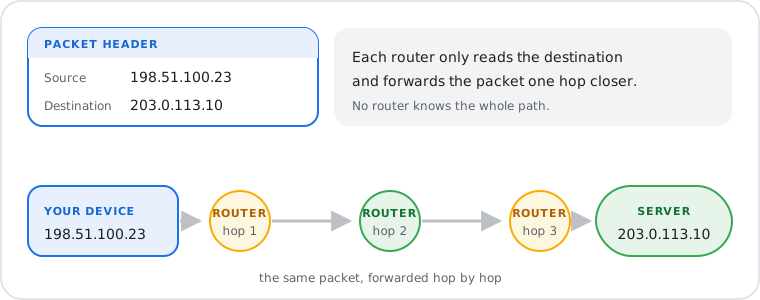
When a device sends data across the internet, that data is broken into small units called packets. Each packet carries a source IP address and a destination IP address in its header, following the format defined by the Internet Protocol. Routers along the path read the destination IP in each packet's header and forward it toward the destination through a series of hops — a process called IP routing. No single router knows the full path; each one makes an independent forwarding decision based on its routing table. When all packets arrive at the destination IP, the receiving device reassembles them into the original data. This source-to-destination addressing is the fundamental mechanism behind every internet action: web browsing, email, video streaming, DNS resolution, and API calls.
Two versions of the Internet Protocol are in active use today.
IPv4, defined in RFC 791 and published in September 1981, uses 32-bit binary addresses expressed in dotted-decimal notation: four numbers separated by periods, each ranging from 0 to 255. An example is 192.0.2.1. The 32-bit structure supports approximately 4,294,967,296 (4.3 billion) unique addresses — a number that seemed adequate in 1981 but proved insufficient as connected devices scaled to billions worldwide. The Internet Assigned Numbers Authority (IANA) exhausted its central pool of unallocated IPv4 addresses in February 2011, and regional registries depleted their allocations in subsequent years. IPv4 scarcity is managed today primarily through Network Address Translation (NAT), which allows multiple devices on a private network to share a single public IPv4 address.
IPv6, defined in RFC 2460 (1998) and updated by RFC 8200 (2017), was created specifically to solve IPv4 exhaustion. It uses 128-bit addresses expressed in eight colon-separated groups of four hexadecimal digits. The full form of an address is 2001:0db8:85a3:0000:0000:8a2e:0370:7334, which compresses to 2001:db8:85a3::8a2e:370:7334 using the zero-suppression rules defined in the standard. The 128-bit space provides 340 undecillion unique addresses (3.4 × 10³⁸) — more addresses than could ever be depleted by internet-connected devices. As of 2026, approximately 45% of global internet traffic uses IPv6, with Google, major ISPs, and cloud providers fully deployed. Most modern devices operate in dual-stack mode, holding both an IPv4 and an IPv6 address simultaneously and using whichever the destination network supports.
The table below summarizes the technical differences between the two active versions of the Internet Protocol. Both remain in use; dual-stack deployment is the current operational standard.
| Attribute | IPv4 | IPv6 |
|---|---|---|
| RFC Standard | RFC 791 (September 1981) | RFC 2460 (1998), updated RFC 8200 (2017) |
| Bit Length | 32 bits | 128 bits |
| Notation | Dotted decimal — 192.0.2.1 | Colon-hex — 2001:db8:85a3::8a2e:370:7334 |
| Total Addresses | ~4.3 billion | 340 undecillion (3.4 × 10³⁸) |
| Exhaustion Status | IANA central pool depleted February 2011 | No foreseeable exhaustion |
| 2026 Deployment | Still dominant (~55% of global traffic) | Growing (~45% of global traffic) |
Every internet-connected device operates with two categories of IP address. A public IP address is globally unique and routable across the internet — assigned by your ISP, it identifies your network to every external server you communicate with. A private IP address is assigned within your local network by your router (for example, 192.168.1.100) and is not routable on the public internet. RFC 1918 reserves three address blocks specifically for private use: 10.0.0.0/8, 172.16.0.0/12, and 192.168.0.0/16.
Your router connects these two spaces using Network Address Translation (NAT): when your device sends a request to an external server, the router replaces the private source IP with its public IP before forwarding the packet, then translates the reply back on return. This is why multiple devices in a home or office can share one public IPv4 address. For the full RFC 1918 private address ranges and a detailed breakdown of NAT mechanics, see the Public IP vs Private IP guide.
Most residential internet users are assigned a dynamic IP address — one that can change over time as the ISP reassigns addresses from its pool using DHCP (Dynamic Host Configuration Protocol). A static IP address is fixed and does not change; it is used by web servers, mail servers, and services that require a consistent, predictable address for inbound connections. Static IPs are available from most ISPs but typically carry an additional monthly cost. For a complete explanation of DHCP lease mechanics, lease renewal cycles, and when to request a static IP, see the Static IP vs Dynamic IP guide.
An IP address does not contain your personal identity, but it exposes several characteristics of your network connection to any server you communicate with:
Your Internet Service Provider (ISP) — the organization that owns the IP block is publicly registered and visible via WHOIS lookup.
A general geographic location — geolocation databases map IP blocks to the city or region where the ISP registered them. Country-level accuracy is approximately 95–99%; city-level accuracy averages 50–75%, and is lower for mobile carrier and satellite broadband connections.
VPN or proxy usage — if you are routing traffic through a VPN or proxy server, the exit server's IP address and location are visible instead of your own.
An IP address does not reveal your street address, full name, or any personally identifiable information. That data is held only by your ISP and is released only under legal process. To check exactly what your current IP reveals, use the IP Geolocation Lookup tool or the What Is My ISP tool.
ipconfig to see your local IP, or visit whatismyipnow.com to see your public IP. On macOS, open Terminal and run ifconfig | grep inet for local IPs, or check System Settings → Network. On iPhone, go to Settings → Wi-Fi, tap your network, and read the IP address field. On Android, go to Settings → About → Status → IP address. Your public IP — what external servers see — is always visible instantly at whatismyipnow.com regardless of device.