You don't have javascript enabled. Please enable javascript to use this website.

Public IP vs Private IP Addresses

A public IP address is a globally routable network identifier assigned by your ISP that enables devices to communicate across the internet, while a private IP address (RFC 1918) is a non-routable identifier used exclusively within local networks. Network Address Translation (NAT) bridges the two: when a private-network device sends traffic to the internet, the router replaces the private source address with the shared public IP. Every home and business network uses both simultaneously — one public IP for all external traffic, individual RFC 1918 private IPs for each internal device. The three RFC 1918 ranges together provide approximately 17.9 million addresses available for private use.

What Are Public IP Addresses?

A public IP address is the address the whole internet sees for your connection. Your ISP assigns it, and no other network uses it at the same time.

A public IP address (also called an external IP address) is a globally unique numerical identifier assigned to your internet connection by your Internet Service Provider (ISP). Public IPs are drawn from address pools allocated to ISPs by one of the five Regional Internet Registries: ARIN (Americas), RIPE NCC (Europe, Middle East, and Central Asia), APNIC (Asia-Pacific), LACNIC (Latin America and Caribbean), and AFRINIC (Africa).

Public IP addresses are routable across the open internet — any device anywhere can initiate a direct connection to a public IP. Web servers, email servers, and any internet-facing service require a public IP. For home users, the ISP assigns one public IP to the router; all devices on the local network share it for outbound internet communication.

Public IPs may be static (fixed permanently, required by servers and services that must be consistently reachable) or dynamic (reassigned periodically by the ISP). Most residential connections use dynamic public IPs, which may change on reconnection or after an ISP-defined lease period.


What Are Private IP Addresses?

A private IP address identifies a device inside your home or office network. It comes from the RFC 1918 ranges and is never routed on the internet.

A private IP address (also called an internal or local IP address) is a non-routable address used exclusively within a local network. Defined in RFC 1918 (IETF, September 1996), private address space allows every organization and household to assign unique identifiers to every internal device without consuming globally registered public IP space.

Private IPs are assigned by your router, typically via DHCP. Because standard internet routers never forward RFC 1918 addresses, the same private IP can exist simultaneously across millions of separate local networks worldwide without conflict. Your neighbor's device may hold 192.168.1.100 — identical to an address on your network — and neither interferes with the other.

Private IP addresses are not inherently secure. The non-routability of RFC 1918 space limits external exposure, but security within a private network depends on firewalls, NAT configuration, and access controls — not on the address range alone.


Private IP Address Ranges (RFC 1918)

RFC 1918 reserves three blocks of IPv4 address space for private use. These blocks were originally drawn from the legacy Class A, B, and C systems and are expressed today using CIDR (Classless Inter-Domain Routing) notation. Any address within these three ranges is, by definition, a private IP and will not be forwarded by any standard internet router.
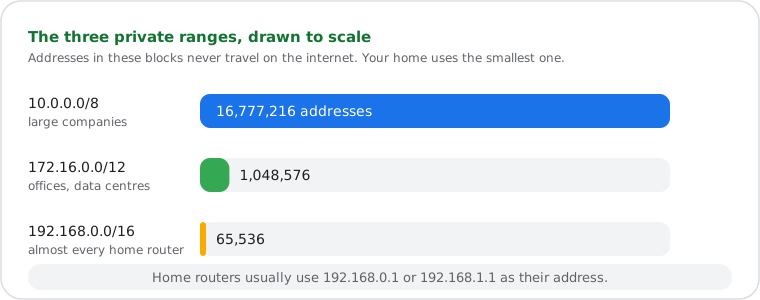
Bar chart to scale of the three private IPv4 ranges: 10.0.0.0/8 with 16,777,216 addresses, 172.16.0.0/12 with 1,048,576 and 192.168.0.0/16 with 65,536
The three RFC 1918 ranges, drawn to scale.
IP Range CIDR Block Total Addresses Legacy Class
10.0.0.0 – 10.255.255.255 10.0.0.0/8 16,777,216 Class A
172.16.0.0 – 172.31.255.255 172.16.0.0/12 1,048,576 Class B
192.168.0.0 – 192.168.255.255 192.168.0.0/16 65,536 Class C

The 192.168.0.0/16 range is the most common in home networks — most consumer routers default to a gateway address of 192.168.0.1 or 192.168.1.1. Large enterprise networks typically use the 10.0.0.0/8 range for its capacity of over 16 million addresses. The 172.16.0.0/12 range is common in medium-sized corporate and data centre environments.


CGNAT — The Hidden Third Network Layer

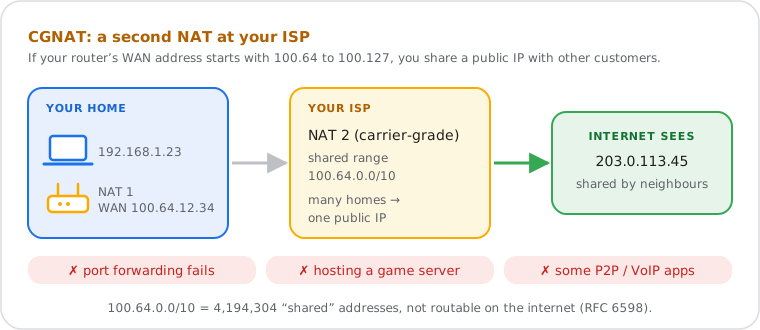
Carrier-grade NAT (CGNAT) puts many ISP customers behind one public IP. If your router’s WAN address is between 100.64.0.0 and 100.127.255.255, your ISP is using it.

Diagram of carrier-grade NAT: the home router gets a 100.64.0.0/10 address and the ISP translates it again to a public IP shared by many customers, breaking port forwarding
With CGNAT, your router does not hold a real public IP. (Documentation and shared addresses.)

Carrier-Grade NAT (CGNAT), defined in RFC 6598, introduces a separate address range outside RFC 1918 that ISPs use when they cannot provide each customer with a true public IP: 100.64.0.0/10 (100.64.0.0 to 100.127.255.255), providing 4,194,304 addresses. This range is formally called "shared address space."

When an ISP deploys CGNAT, your router receives an address from the 100.64.0.0/10 range instead of a genuine public IP. From the router's perspective, this looks like a public IP — but it is non-routable on the open internet. The ISP then applies a second NAT at the carrier level, mapping this address to a real public IP shared across multiple customers.

CGNAT is increasingly common as IPv4 exhaustion deepens. Its practical effects:

  • Port forwarding failures — your router cannot accept incoming connections because it does not hold a true public IP.
  • Peer-to-peer disruption — game servers, VoIP, and BitTorrent protocols requiring direct inbound connections do not function reliably.
  • Home VPN limitations — a VPN server hosted behind CGNAT is not directly reachable from the internet.
  • Geolocation displacement — the public IP visible externally belongs to the ISP's CGNAT device, not your router's location.

To detect CGNAT: compare your router's WAN IP address to the public IP shown on whatismyipnow.com. If the two addresses differ, your ISP is applying CGNAT.


How NAT Connects Private Networks to the Internet

NAT lets every device on your network share one public IP: the router replaces each device’s private address with the public one on the way out, and reverses it on the way back.
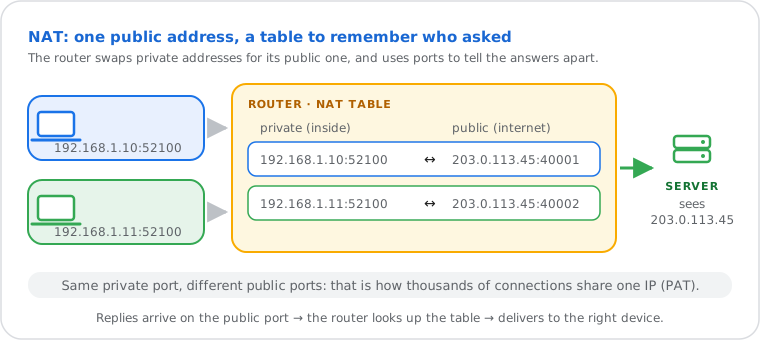
Diagram of a NAT translation table: 192.168.1.10:52100 and 192.168.1.11:52100 leave as 203.0.113.45:40001 and 203.0.113.45:40002, and replies are mapped back
NAT records each connection so many devices can share one public IP. (Documentation and private addresses.)

Network Address Translation (NAT), defined in RFC 3022, is the mechanism that allows devices holding private RFC 1918 addresses to communicate with the internet. When an internal device sends a packet to an external server, the router performs three steps:

  1. Records the source private IP and source port in its NAT translation table.
  2. Replaces the source private IP with the router's public IP and assigns a unique source port to track the connection.
  3. Forwards the modified packet onto the internet.

When the response arrives, the router checks the NAT table, reverses the translation, and delivers the packet to the correct internal device. The entire process is transparent to both the internal device and the remote server.

The most common implementation is Port Address Translation (PAT), also called NAT overload: a single public IP serves thousands of simultaneous private connections by differentiating them via unique source port assignments. A home router with 30 connected devices requires only one public IP for all outbound internet activity.

NAT has a secondary effect on IPv4 exhaustion: entire networks of devices share one public IP rather than each requiring a separate registered address. This is a primary reason IPv4 has remained viable despite the IANA pool exhaustion in 2011.


The Loopback Address

127.0.0.1, the loopback address, always means “this device”. Traffic sent to it never leaves the computer.

The loopback address 127.0.0.1 — and the full 127.0.0.0/8 range, per RFC 5735 — is distinct from RFC 1918 private addresses but shares one key property: it is non-routable and is never transmitted to any physical network interface.

Traffic sent to any address in 127.0.0.0/8 is handled entirely within the local host's network stack. It never reaches the LAN or the internet. This makes loopback the standard choice for local service communication (a web server bound to 127.0.0.1 accepts connections only from the same machine), development environments, and software testing without network exposure.

The critical distinction: RFC 1918 addresses travel over the local network between devices on the same LAN. The loopback address never leaves the individual host. Both are non-internet-routable — but loopback is host-scoped, while RFC 1918 is network-scoped.


Public IP vs Private IP — Key Differences

Attribute Public IP Address Private IP Address
Scope Global — reachable from any internet-connected device Local — visible only within the same network
Assigned by ISP, from a Regional Internet Registry (RIR) allocation Router, via DHCP or static configuration
Global uniqueness Yes — no two devices on the internet share the same public IP simultaneously No — the same address can exist across millions of separate networks
Internet-routable Yes — packets travel across the open internet No — requires NAT (RFC 3022) to reach the internet
Standard IANA global address pool, managed by five RIRs RFC 1918 (10.0.0.0/8, 172.16.0.0/12, 192.168.0.0/16)
Visible to remote servers Yes — logged by websites and services as the connection origin No — external servers see only the public IP after NAT translation
Example addresses 203.0.113.45, 8.8.8.8, 1.1.1.1 192.168.1.100, 10.0.0.5, 172.16.0.10

How to Find Your Public and Private IP Address

Find your public IP instantly and locate your private IP on Windows, macOS, and Linux.

1

Check your public IP address

Visit whatismyipnow.com — your public IP address is displayed automatically on the homepage without any input required.
2

Find your private IP on Windows

Open Command Prompt (Win+R, type cmd, Enter) and run ipconfig. Look for the IPv4 Address line under your active network adapter.
3

Find your private IP on macOS

Open Terminal and run ipconfig getifaddr en0 for Wi-Fi or en1 for Ethernet to display your current private IP address.
4

Find your private IP on Linux

Open Terminal and run ip addr show. Identify your active interface (typically eth0 or wlan0) and read the inet value listed beside it.
5

Verify any IP against RFC 1918 ranges

Use the Public vs Private IP Checker at whatismyipnow.com to confirm whether any IP address falls within an RFC 1918 private range or is globally routable.

Frequently Asked Questions

What is the difference between a public IP address and a private IP address?
A public IP address is globally routable and assigned by your ISP, enabling communication with any server on the internet. A private IP address (RFC 1918) exists only within your local network and cannot be reached from the internet directly — outbound traffic is translated to your public IP via Network Address Translation (NAT, RFC 3022).
What are the RFC 1918 private IP address ranges?
RFC 1918 reserves three address blocks: 10.0.0.0/8 (approximately 16.7 million addresses), 172.16.0.0/12 (approximately 1 million addresses), and 192.168.0.0/16 (65,536 addresses). These ranges can be freely reused across different private networks worldwide since they are never forwarded by internet routers.
Can two devices on different networks have the same private IP address?
Yes. Because RFC 1918 addresses are not routable on the internet, 192.168.1.100 can exist simultaneously on millions of home and business networks globally without conflict. Within the same local network, however, each device must hold a unique private IP.
How accurate is IP geolocation for private IP addresses?
Private IP addresses (RFC 1918 ranges) cannot be geolocated — they exist only within local networks and are never visible to external geolocation databases. Geolocation applies to public IP addresses only, with approximately 95–99% accuracy at country level and 50–80% accuracy at city level depending on the data provider.
Why does my device show a private IP but websites see a different address?
Your device uses a private IP (such as 192.168.1.x) for local network communication. When you connect to an external website, your router performs NAT — replacing your private source address with your router's public IP before the packet leaves your network. The remote server sees only the public IP, never the private one.
Do you store or log the IP addresses I look up?
No. WhatIsMyIPNow.com does not store or log IP addresses displayed or queried on this site. All results are processed in real time and no query data is retained after the session ends.
What is CGNAT and why might I have two private IP addresses?
Carrier-Grade NAT (CGNAT), defined in RFC 6598, is a second NAT layer deployed by ISPs who assign addresses from the 100.64.0.0/10 range rather than a true public IP. Your router holds this non-routable address; the ISP applies another NAT before your traffic reaches the internet. CGNAT complicates port forwarding, peer-to-peer connections, and home-hosted VPN servers.
What is the difference between a private IP address and the loopback address 127.0.0.1?
Private IP addresses (RFC 1918) enable communication between devices on the same local network — traffic travels across the LAN. The loopback address 127.0.0.1 (full range 127.0.0.0/8, per RFC 5735) allows a device to communicate with itself — no traffic leaves the host, making it suitable only for local testing and internal service communication.

Put this guide into practice

Related Tools

Public vs Private IP Checker
Enter any IP address to instantly confirm whether it falls within an RFC 1918 private range or is globally routable.
IP Geolocation Lookup
Find the country, city, ISP, and approximate location associated with any public IP address.
IP WHOIS Lookup
Identify the registered organization, network block, and abuse contact for any public IP address via RDAP (RFC 7480) and legacy WHOIS (RFC 3912).
Subnet Calculator
Calculate network address, broadcast address, and usable host range for any RFC 1918 or public CIDR block.

Related Guides

Guide IP address fundamentals explained
A complete introduction to what IP addresses are, how routing works, and what your IP reveals about your network.
Guide Static IP vs dynamic IP addresses
How ISPs assign public IPs, the DHCP lease lifecycle, and when a static assignment is necessary.
Guide What 192.168.1.1 means and how to access it
Why 192.168.1.1 is the most common RFC 1918 default gateway and how to use it to configure your router.
Guide How to change your public or private IP address
Step-by-step instructions for changing your public IP via router restart or ISP request, and your private IP via static assignment on each operating system.