What Is a Subnet Mask?
Subnets, masks and /24 prefixes explained simply, with a converter and a cheat sheet.
A subnet mask tells a device which part of an IP address is the network and which part is the device itself. In 255.255.255.0, the 255s mark the network part (the first three numbers) and the 0 the device part, so 192.168.1.0 to 192.168.1.255 is one network. The same mask is written /24.
Try:
Calculated in your browser. To split a network into subnets, use the subnet calculator.
What Is a Subnet?
A subnet (subnetwork) is a range of IP addresses that belong together, like every device on your home Wi-Fi: 192.168.1.0 to 192.168.1.255. Devices in the same subnet reach each other directly; to reach anything else they go through a router.
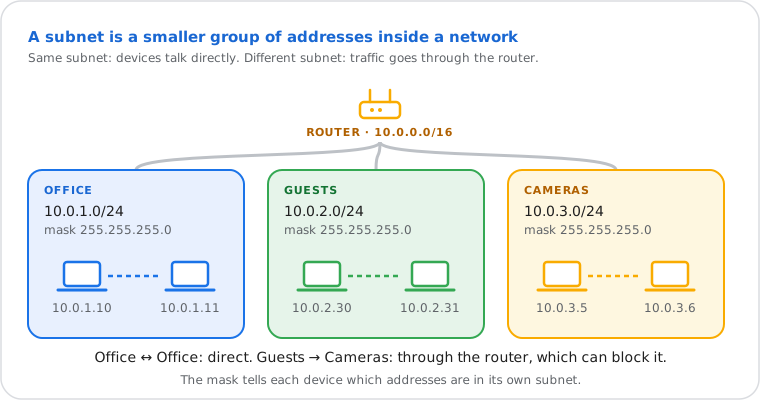
Your home network is usually one subnet of 256 addresses. Companies split their networks into many: one per floor, per department, or for guests and cameras. That keeps groups apart for security, cuts the background traffic every device has to listen to, and uses the address space efficiently. The subnet mask is how each device knows where its own subnet ends.
What Does 255.255.255.0 Mean?
Each of the four numbers is 8 bits, and 255 is 11111111: so 255.255.255.0 is 24 ones followed by 8 zeros. The ones cover the network part of the address, the zeros the device part.
| Network part | Device part | |
|---|---|---|
| IP address | 192.168.1 | .10 |
| Subnet mask | 255.255.255 | .0 |
| In binary | 11111111.11111111.11111111 | .00000000 |
A device combines its address with the mask bit by bit (a logical AND): where the mask has a 1 the address bit is kept, where it has a 0 it's cleared. What's left is the network address, here 192.168.1.0. Any address that gives the same result is on the same network; anything else goes to the default gateway.
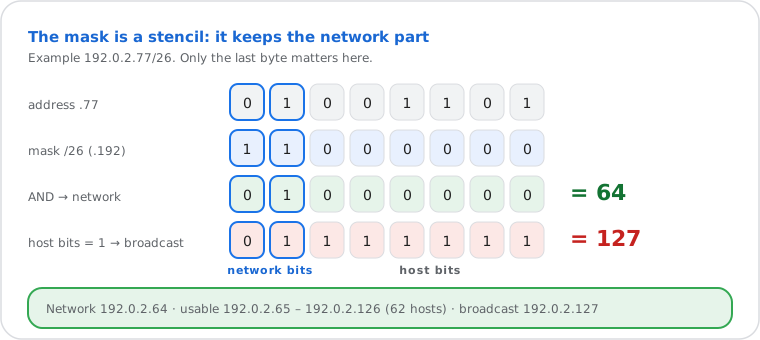
In each subnet the first address names the network and the last is the broadcast address (to reach every device), so a /24 has 256 addresses and 254 usable: 192.168.1.1 to 192.168.1.254.
Subnet Mask vs CIDR Prefix (/24)
They're the same thing written two ways: the prefix counts the 1 bits in the mask, so 255.255.255.0 is /24 and 255.255.255.192 is /26.
The short form, called CIDR notation, writes the network and its size together: 192.168.1.0/24. It
replaced the old address classes in 1993 (RFC 4632 is today's reference): before, a network could only be a /8
(class A), /16 (class B) or /24 (class C), which wasted most addresses. Now any size works. The mask's 1 bits are
always contiguous from the left, which is why only these nine numbers ever appear in a mask:
| Mask number | 0 | 128 | 192 | 224 | 240 | 248 | 252 | 254 | 255 |
|---|---|---|---|---|---|---|---|---|---|
| 1 bits | 0 | 1 | 2 | 3 | 4 | 5 | 6 | 7 | 8 |
So 255.255.255.240 is 8 + 8 + 8 + 4 = /28. Old systems such as IP address classes still explain why many networks are /8, /16 or /24.
Subnet Mask Cheat Sheet
/24 (255.255.255.0) has 254 usable hosts; every extra bit halves the subnet: /25 has 126, /26 has 62, /27 has 30, /28 has 14, /29 has 6 and /30 has 2.
| Prefix | Subnet mask | In binary | Addresses | Usable hosts |
|---|---|---|---|---|
| /8 | 255.0.0.0 | 11111111.00000000.00000000.00000000 | 16,777,216 | 16,777,214 |
| /9 | 255.128.0.0 | 11111111.10000000.00000000.00000000 | 8,388,608 | 8,388,606 |
| /10 | 255.192.0.0 | 11111111.11000000.00000000.00000000 | 4,194,304 | 4,194,302 |
| /11 | 255.224.0.0 | 11111111.11100000.00000000.00000000 | 2,097,152 | 2,097,150 |
| /12 | 255.240.0.0 | 11111111.11110000.00000000.00000000 | 1,048,576 | 1,048,574 |
| /13 | 255.248.0.0 | 11111111.11111000.00000000.00000000 | 524,288 | 524,286 |
| /14 | 255.252.0.0 | 11111111.11111100.00000000.00000000 | 262,144 | 262,142 |
| /15 | 255.254.0.0 | 11111111.11111110.00000000.00000000 | 131,072 | 131,070 |
| /16 | 255.255.0.0 | 11111111.11111111.00000000.00000000 | 65,536 | 65,534 |
| /17 | 255.255.128.0 | 11111111.11111111.10000000.00000000 | 32,768 | 32,766 |
| /18 | 255.255.192.0 | 11111111.11111111.11000000.00000000 | 16,384 | 16,382 |
| /19 | 255.255.224.0 | 11111111.11111111.11100000.00000000 | 8,192 | 8,190 |
| /20 | 255.255.240.0 | 11111111.11111111.11110000.00000000 | 4,096 | 4,094 |
| /21 | 255.255.248.0 | 11111111.11111111.11111000.00000000 | 2,048 | 2,046 |
| /22 | 255.255.252.0 | 11111111.11111111.11111100.00000000 | 1,024 | 1,022 |
| /23 | 255.255.254.0 | 11111111.11111111.11111110.00000000 | 512 | 510 |
| /24 | 255.255.255.0 | 11111111.11111111.11111111.00000000 | 256 | 254 |
| /25 | 255.255.255.128 | 11111111.11111111.11111111.10000000 | 128 | 126 |
| /26 | 255.255.255.192 | 11111111.11111111.11111111.11000000 | 64 | 62 |
| /27 | 255.255.255.224 | 11111111.11111111.11111111.11100000 | 32 | 30 |
| /28 | 255.255.255.240 | 11111111.11111111.11111111.11110000 | 16 | 14 |
| /29 | 255.255.255.248 | 11111111.11111111.11111111.11111000 | 8 | 6 |
| /30 | 255.255.255.252 | 11111111.11111111.11111111.11111100 | 4 | 2 |
| /31 | 255.255.255.254 | 11111111.11111111.11111111.11111110 | 2 | 2 |
| /32 | 255.255.255.255 | 11111111.11111111.11111111.11111111 | 1 | 1 |
Each prefix opens the subnet calculator. /31 has 2 usable addresses on point-to-point links (RFC 3021); /32 is one address.
What is a /24 subnet?
Mask 255.255.255.0: 256 addresses, 254 usable hosts (for example 192.168.1.1 to 192.168.1.254). It's the usual size of a home or office network, and the old "class C" size.
What is a /27 subnet?
Mask 255.255.255.224: 32 addresses, 30 usable. Eight /27 fit in a /24, a common size for a small office VLAN.
What is a /29 subnet?
Mask 255.255.255.248: 8 addresses, 6 usable. Internet providers often sell a block of static IPs as a /29: one address is the network, one the broadcast, usually one goes to the provider's gateway, which leaves 5 for you.
What is a /30 subnet?
Mask 255.255.255.252: 4 addresses, 2 usable. The classic size for a link between two routers; modern links often use a /31 instead (2 addresses, both usable).
How to Find Your Subnet Mask
It's in your network details, next to your IP address and router: on Windows run ipconfig and read "Subnet Mask". The steps for the device you're using are open below.
Windows 10 / 11 ipconfig
- Press Win + R, type
cmdand press Enter. - Run
ipconfigand read Subnet Mask under your Wi-Fi or Ethernet adapter.
Without commands: Settings › Network & internet › Wi-Fi (or Ethernet) › your network › Properties shows the IPv4 address and mask.
Mac System Settings
System Settings › Network › Wi-Fi › Details… next to your network › TCP/IP: read Subnet Mask.
iPhone / iPad Wi-Fi details
Settings › Wi-Fi › tap ⓘ next to your network: read Subnet Mask under IPv4 address.
Android Wi-Fi details
Settings › Network & internet › Internet › the gear next to your network (on Samsung: the gear, then View more). Depending on the phone it shows Subnet mask or a Network prefix length, like 24 (= 255.255.255.0).
Linux ip addr
Run ip -4 addr: the number after the slash in inet 192.168.1.23/24 is your prefix (/24 = 255.255.255.0).
ChromeOS Network settings
Click the clock area › your Wi-Fi network › the network's name › Network: the routing prefix (like 24) is your mask as a prefix.
The router sets the mask for you (by DHCP). To find the router's address on the same screen, see how to find your router IP.
How Subnetting Works
An IPv4 address has 32 bits; the prefix says how many are the network, and the rest number the devices: a /n has 232−n addresses, minus two for the network and broadcast.
Taking one more bit for the network doubles the number of subnets and halves each one. A /24 becomes two /25 of 128 addresses (126 usable), or four /26 of 64 (62 usable): 192.168.10.0, .64, .128 and .192. When groups need different sizes, give each only what it needs, largest first (variable length subnetting): 100, 50 and 20 hosts fit in one /24 as a /25, a /26 and a /27. The subnet calculator splits a network either way and checks that it fits.
- Usable hosts = 2host bits − 2: a /28 has 4 host bits, so 16 − 2 = 14.
- Subnets from borrowing b bits = 2b: a /24 split into /27 borrows 3 bits, so 8 subnets.
- Exceptions: a /31 uses both addresses on a link between two routers (RFC 3021); a /32 is one address.
Subnetting itself dates from 1985 (RFC 950), when single networks grew too big to manage as one.
Do You Need to Change Your Subnet Mask?
Almost never: your router hands out the right mask with your IP address. Change it only when you set a static IP (use the router's mask) or need more than 254 devices on one network.
- Setting a static IP by hand? Copy the mask and gateway your device shows now, usually 255.255.255.0 and 192.168.1.1, and pick an address outside the router's DHCP range. More in static vs dynamic IP.
- More than 254 devices? Change the router's LAN to a /23 (255.255.254.0, 510 hosts) or /22 (255.255.252.0, 1,022 hosts), or better, split them into subnets.
- Devices can't see each other? Check they're in the same subnet: same network part with the same mask.
Is There a Subnet Mask in IPv6?
Not as four numbers: IPv6 only uses the prefix length, and a home or office network is almost always a /64, which leaves 64 bits for devices.
Your provider gives your router a bigger block, often a /56 or /48, so it can make 256 or 65,536 networks of /64. See what is IPv6, or split a block with the IPv6 subnet calculator.
Frequently Asked Questions
What is a subnet mask in simple terms?
What is my subnet mask?
ipconfig), Mac and iPhone; some Android phones and Linux show it as a prefix length, like 24.Is the subnet mask the same as the default gateway?
What does a subnet mask of 255.255.0.0 mean?
What happens if the subnet mask is wrong?
Can a subnet mask be 255.255.255.255?
Next steps