1
Connect to Your VPN
Connect to your VPN and select a server in a country different from your physical location.
A Virtual Private Network (VPN) is a technology that encrypts a device's internet traffic and routes it through a remote server by establishing an encrypted tunnel using protocols such as IPsec (RFC 4301), OpenVPN, or WireGuard. The device's real IP address is replaced by the VPN server's IP, making the origin of traffic invisible to ISPs, websites, and network observers. VPNs protect data confidentiality on public networks, bypass geographic content restrictions, and prevent ISP traffic throttling. The three core mechanisms are tunneling, encryption — AES-256-GCM or ChaCha20-Poly1305 depending on the protocol — and IP address substitution.
When a device connects to a VPN, the VPN client establishes two channels to the VPN server: a control channel and a data channel. The control channel authenticates both endpoints and negotiates encryption parameters — the cipher suite, key lengths, and session lifetime. The data channel carries the actual internet traffic, encrypted using the agreed cipher before it leaves the device's network interface.
All outbound traffic is encapsulated inside encrypted packets addressed to the VPN server's IP address. The original destination — whether a website, a streaming service, or a corporate database — is inside the encrypted payload, invisible to every router and network operator between the device and the VPN server. The server decrypts the payload, reads the destination address, and forwards the request on the device's behalf using the server's own IP address.
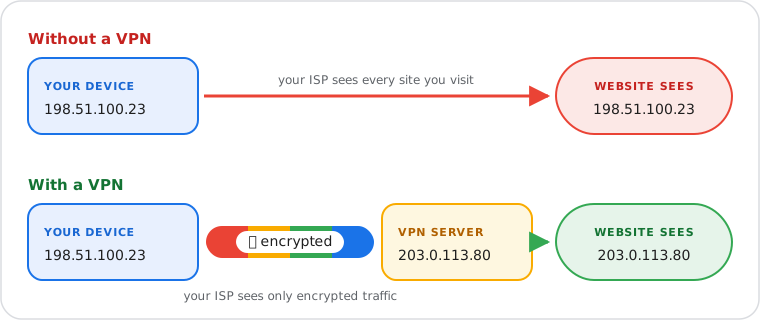
The substitution of the device's IP for the server's IP is the externally visible effect of this routing. Websites, APIs, and CDNs log the VPN server's IP, not the connecting device's IP. A device connecting through a VPN server registered in the United Kingdom appears to originate from the United Kingdom — the server's IP belongs to a UK-registered network block in RIPE NCC. This is the mechanism behind geographic content restriction bypassing: the destination server receives a request from a jurisdiction where the content is accessible.
The substitution is not total anonymity. It shifts which party has visibility into the device's connection origin. The VPN provider itself sees the real IP used to authenticate the VPN session, the server chosen, and the connection timestamp. A verified no-logs policy — supported by an independent audit — constrains what the provider retains and is the primary trust signal when selecting a provider.
Three protocol-level gaps can expose the device's real IP despite an active VPN tunnel. DNS leaks occur when DNS queries bypass the encrypted tunnel and reach the ISP's resolver — the queried domains are then visible to the ISP even though the traffic content itself is encrypted. WebRTC leaks occur in browsers: the WebRTC protocol uses STUN servers to discover local and public IP addresses for peer media connections, and this discovery mechanism can expose the device's real IP to any page using WebRTC APIs. IP leaks occur when the VPN connection drops unexpectedly and traffic briefly flows over the real IP before the client reconnects. A kill switch — a firewall rule at the OS level that blocks all non-VPN traffic — prevents this third category entirely.
The VPN protocol determines how the encrypted tunnel is established, which cipher protects data in transit, and which network environments the connection can traverse. Three protocols dominate consumer and enterprise deployments in 2026.
| Protocol | OSI Layer | Default Cipher | RFC / Standard | Best Use Case |
|---|---|---|---|---|
| WireGuard | Layer 3 | ChaCha20-Poly1305 | Linux kernel 5.6 (2020) | High-speed personal VPN, mobile devices |
| OpenVPN | Layers 4–7 | AES-256-GCM or ChaCha20-Poly1305 | RFC 2246 (TLS control channel) | Firewall traversal, open-source enterprise environments |
| IKEv2/IPsec | Layer 3 | AES-256-GCM | RFC 4301 (IPsec), RFC 7296 (IKEv2) | Enterprise remote access, mobile reconnection (MOBIKE RFC 4555) |
WireGuard's minimal codebase — approximately 4,000 lines compared to OpenVPN's substantially larger footprint — is a security advantage in itself: less code means a smaller attack surface and faster security review cycles. Its default cipher, ChaCha20-Poly1305, is an AEAD (Authenticated Encryption with Associated Data) algorithm that combines encryption and authentication into a single pass, eliminating the need for a separate HMAC computation. ChaCha20-Poly1305 performs significantly better than AES on hardware without AES-NI acceleration instructions, making WireGuard the default protocol of choice for mobile devices and ARM-based hardware.
IKEv2/IPsec operates at Layer 3 of the OSI model, encrypting the entire original IP packet including headers. Key exchange is governed by IKEv2 (RFC 7296), which performs a Diffie-Hellman exchange to derive session keys without transmitting them over the network. MOBIKE (RFC 4555) extends IKEv2 to support seamless IP address changes when a mobile device switches between Wi-Fi and cellular data — maintaining the VPN session without requiring a full reconnection. The data channel uses AES-256-GCM (RFC 4106) as the AEAD cipher.
OpenVPN wraps traffic inside TLS, making it visually indistinguishable from standard HTTPS connections to deep packet inspection systems and firewalls. This allows OpenVPN to traverse restrictive network environments that would identify and block protocols with a recognizable VPN signature. Its codebase has been independently audited multiple times by security research teams, making it the reference implementation in enterprise environments where third-party security review is a procurement requirement.
A kill switch is an OS-level firewall rule that blocks all outbound internet traffic the moment the VPN tunnel becomes inactive. On Linux this is implemented via iptables or nftables rules bound to the VPN network interface; on Windows via the Windows Filtering Platform; on macOS via the pf packet filter. The rule drops all traffic not routed through the VPN tunnel interface, ensuring that a brief disconnection does not expose the real IP during the reconnection window. Any VPN used on public or untrusted networks must have the kill switch enabled by default — it is not optional for meaningful leak protection.
A no-logs policy is a provider's technical and legal commitment not to retain records of user connections — specifically: real IP addresses, connection timestamps, session durations, and traffic content or metadata. Practical enforceability depends on two factors: jurisdiction and independent audit. Providers incorporated outside EU and US data retention mandates cannot be legally compelled to produce data they do not hold. NordVPN is incorporated in Panama; ExpressVPN is incorporated in the British Virgin Islands — both jurisdictions lack data retention laws applicable to VPN providers. Independent audits by firms including Deloitte verify that the provider's server infrastructure and logging configuration match the stated no-logs policy, not just that the policy document exists.
When a VPN is active, all DNS queries must resolve through the VPN provider's DNS servers inside the encrypted tunnel — not through the DNS resolver assigned by the ISP or local DHCP server. DNS leak protection enforces this by overriding the system's DNS configuration for the duration of the VPN session and binding DNS traffic to the VPN network interface. Without this protection, the ISP's resolver receives every domain lookup and can reconstruct the browsing pattern from DNS query logs even though the payload traffic is encrypted. Run the WebRTC Leak Test and Proxy / VPN Checker to verify both DNS and IP leak status on your active connection.
NordVPN and ExpressVPN are among the few consumer VPN providers with independently audited no-logs policies verified by third-party security auditors. Both are incorporated in jurisdictions without EU or US data retention obligations — NordVPN in Panama, ExpressVPN in the British Virgin Islands — meaning neither can be compelled to produce connection records that their infrastructure does not retain.
WireGuard and IKEv2/IPsec support · Independently audited no-logs policy · Panama jurisdiction
Independently audited TrustedServer infrastructure · Lightway protocol (WireGuard-class speed) · British Virgin Islands jurisdiction
A personal or consumer VPN connects a single device to a commercial VPN provider's server infrastructure. All traffic from the device is routed through the provider's server, replacing the device's IP with the server's IP. This architecture is designed for individual privacy, bypassing geographic content restrictions, and securing connections on public Wi-Fi networks. Consumer providers including NordVPN and ExpressVPN operate this model at scale across globally distributed server infrastructure.
A remote access VPN connects individual endpoint devices — laptops, smartphones, tablets — to an organization's private network over the internet. The VPN client on the endpoint authenticates against the organization's VPN gateway using credentials and, in modern deployments, multi-factor authentication before access to internal resources is granted. This is the corporate "VPN into the office" architecture. It typically uses IPsec (RFC 4301) or SSL/TLS as the underlying protocol and integrates with identity providers such as Active Directory or SAML-based SSO.
A site-to-site VPN establishes a persistent encrypted link between two or more private networks — typically connecting branch offices to a corporate headquarters. Both endpoints of the connection are network gateways (routers or firewall appliances), and the VPN tunnel carries traffic between entire network subnets rather than individual devices. No VPN client software is required on endpoint devices; all encryption and routing is handled at the gateway level. This architecture replaces expensive MPLS leased lines for inter-office connectivity in many enterprise deployments.
A VPN masks the device's IP address and encrypts traffic in transit. It does not provide comprehensive anonymity, and several identification vectors remain active regardless of VPN state.
Browser fingerprinting identifies devices through the combination of browser version, installed fonts, canvas API rendering output, WebGL renderer string, screen resolution, and hardware concurrency — none of which are affected by IP address masking or traffic encryption. A device with a statistically unique browser fingerprint can be re-identified across sessions regardless of VPN use or IP rotation. Run the Browser Fingerprint Test to see the full set of device attributes a website can collect beyond the IP address.
Cookies and authenticated session tokens persist across VPN connections. A session initiated before enabling the VPN — or logged into an account — remains tied to that account's identity for the authenticated session duration. The service provider correlates account activity regardless of which IP the requests originate from once the session is established.
DNS-over-HTTPS (DoH) and DNS-over-TLS (DoT) encrypt DNS queries at the application layer independently of the VPN tunnel. If a browser is configured to use a DoH resolver directly, those DNS queries may bypass the VPN client's DNS leak protection entirely depending on how the VPN enforces DNS routing. Verify that DNS queries are routing through the tunnel by running the WebRTC Leak Test and checking the DNS server field in the results.
Confirm your VPN is active and leak-free in five steps using free tools at whatismyipnow.com.