An email header analyzer parses the hidden metadata prepended to every email by each mail
transfer agent (MTA) in transit, converting raw RFC 5322 text into a structured breakdown
of the delivery chain. Results include the originating IP address, all mail server hops
with timestamps, and authentication verdicts for SPF (RFC 7208), DKIM (RFC 6376), and
DMARC (RFC 7489) — the three protocols that determine whether an email is authentic or spoofed.
Standard
Purpose
RFC 5322
Defines email message format and header field structure
RFC 5321
SMTP — governs email transmission between mail servers
RFC 8601
Authentication-Results header format (SPF/DKIM/DMARC verdicts)
RFC 7208
SPF — authorizes which IPs may send mail for a domain
DMARC — policy combining SPF and DKIM alignment results
How to Analyze an Email Header
In Gmail, click the three-dot menu on the email and choose "Show original." In Outlook, open the email,
go to File → Properties, and copy the text from the Internet Headers box. In Apple Mail, select
View → Message → Raw Source.
1
Copy the Full Header Block
Select all header text from the first "Received:" line through the "Subject:" line.
Copy everything — partial headers produce incomplete authentication and routing results.
2
Paste and Analyze
Paste the copied header block into the text area above and click "Analyze Email Headers"
to parse the full delivery chain, extract the originating IP, and read SPF, DKIM, and DMARC verdicts.
3
Investigate the Originating IP
Review the originating IP address and authentication verdicts. Use the IP Blacklist Checker or
IP WHOIS Lookup links in the results to investigate any suspicious sending server further.
What the Email Header Analysis Results Mean
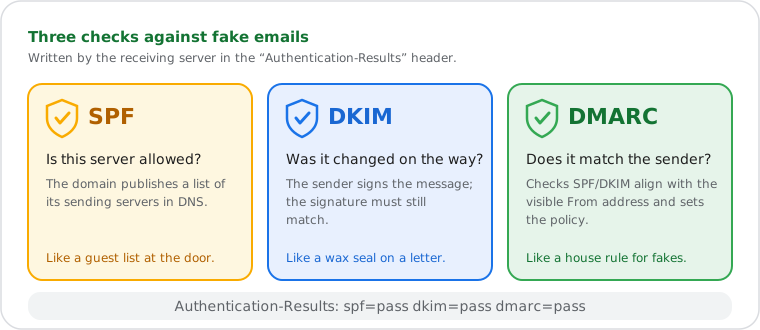
SPF, DKIM and DMARC: three checks against fake emails, recorded in Authentication-Results.
Field
Meaning
What to Look For
Originating IP
IP address of the first external mail server that transmitted the message
If it differs from the claimed sender domain's infrastructure, the email may be spoofed
Mail Server Hops
Chain of MTAs the email passed through, read bottom-to-top (oldest first)
Unexpected servers or delays greater than 10 minutes between hops indicate routing issues
SPF Result
Whether the sending IP is listed in the domain's SPF DNS record (RFC 7208)
Whether the cryptographic signature added by the sending server is valid (RFC 6376)
pass = message unaltered in transit; fail = signature invalid or key mismatch
DMARC Result
Combined policy verdict based on SPF and DKIM domain alignment (RFC 7489)
pass = email meets domain policy; fail = quarantine or reject may apply
Return-Path
Address where bounce messages are sent; set by the sending MTA
Return-Path domain differing from the From: domain is a common phishing indicator
Message-ID
Unique identifier assigned by the originating mail server (RFC 5322)
Format <random@domain> — free-email or random-character domains are common in spam
Authentication-Results
Header added by the receiving MTA summarizing all auth check verdicts (RFC 8601)
All three — spf, dkim, dmarc — should read pass for legitimate bulk email since February 2024
How Email Header Analysis Works
Email headers are structured per RFC 5322 (Internet Message Format), with each field
defined as a name-value pair separated by a colon. Long header values may be folded
across multiple lines — any line beginning with whitespace (space or tab) is a
continuation of the previous header, not a new field. Analyzers must unfold headers
before parsing to avoid truncated values.
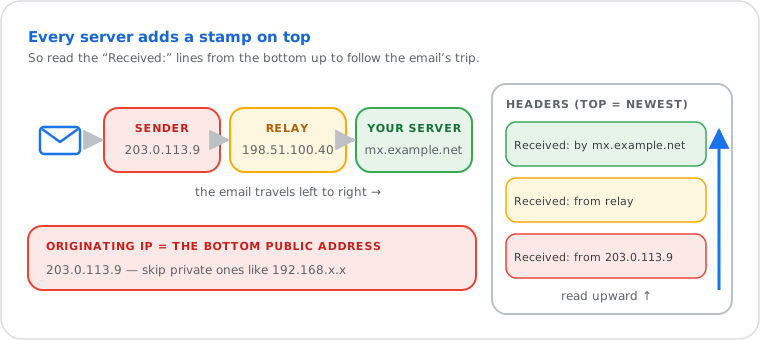
Each server stamps the top of the headers: read them bottom-up to find the originating IP. (Documentation addresses.)
Every MTA that handles a message prepends a new Received: header recording
the server's fully qualified domain name (FQDN), IP address in brackets, and a timestamp.
Headers stack newest-to-oldest from top to bottom — the first Received:
line was added by the recipient's server, the last by the originating server. The
originating IP is the deepest non-RFC-1918 IP address in brackets
(RFC 1918 private ranges — 10.x.x.x, 172.16–31.x.x,
192.168.x.x — indicate internal relay hops and should be skipped).
Authentication results are written to the Authentication-Results: header
(RFC 8601) by the receiving MTA after evaluating SPF, DKIM, and DMARC.
This header contains key-value pairs such as spf=pass,
dkim=pass, and dmarc=pass. A separate
Received-SPF: header may also appear from per-hop SPF evaluation.
The DKIM-Signature: header contains the cryptographic hash,
signing domain (d= tag), selector (s= tag), and
algorithm (typically a=rsa-sha256).
Note on Gmail and Microsoft 365: Both providers replace the
originating Received: entry with their own infrastructure IPs.
For Gmail users, the true originating IP (the user's sending server) may appear in
X-Originating-IP: or as the deepest non-Google IP in the Received chain.
This is expected behavior — Google's servers act as the submission MTA.
Common Uses for Email Header Analysis
Phishing investigation. A finance team member receives an invoice
from what appears to be a known supplier. The From: address looks correct, but the
email header analyzer shows the originating IP belongs to a server in a jurisdiction
unrelated to the supplier, and SPF returns fail — the sending IP is not
listed in the supplier's domain's SPF record. The DMARC verdict confirms
fail. The employee reports the phishing attempt before the invoice
is actioned.
Email deliverability debugging. A system administrator reports that
transactional password-reset emails are landing in spam for Microsoft 365 recipients.
Pasting the header reveals dkim=fail in Authentication-Results
— the DKIM selector no longer matches a published DNS TXT record. The DMARC policy
is p=quarantine. The sysadmin republishes the correct DKIM key,
re-tests, and confirms all three verdicts return pass.
Mail server delay diagnosis. A developer reports that automated
alert emails take 18–25 minutes to arrive during peak hours. The hop chain timestamps
show a 17-minute gap between two consecutive Received: headers —
the delay occurs at the internal relay MTA, not at the external provider. The exact
timestamp delta identifies the bottleneck, which the sysadmin resolves by adjusting
the relay queue retry interval.
Frequently Asked Questions
What is an email header?
An email header is the block of metadata prepended to every email message, defined by RFC 5322
(Internet Message Format). It records the sender, recipient, subject, date, and — critically —
a Received: entry added by every mail transfer agent (MTA) that handled the message in transit.
Unlike the email body, headers cannot be altered retroactively, making them the authoritative
record of a message's delivery path and authentication status.
How do I find email headers in Gmail, Outlook, and Apple Mail?
In Gmail, open the email, click the three-dot menu (⋮) in the top-right corner of the message,
and select "Show original" — the full raw header opens in a new tab. In Outlook (web), open the
message, click the three-dot menu, and choose "View message source." In Outlook (desktop), open
the email, go to File → Properties, and copy the Internet Headers box. In Apple Mail, select
the message and choose View → Message → Raw Source.
What do SPF, DKIM, and DMARC results mean in an email header?
SPF (RFC 7208) checks whether the sending server's IP address is authorized by the sender's
domain DNS record — a "pass" means the IP is listed, a "fail" means it is not.
DKIM (RFC 6376) verifies a cryptographic signature added by the sending mail server; "pass" means
the message content was not altered in transit. DMARC (RFC 7489) combines SPF and DKIM results
with domain alignment policy — a "fail" means the email does not meet the domain's authentication
requirements and may be quarantined or rejected. Since February 2024, Google and Yahoo require
all three to pass for bulk senders.
Why is the originating IP different from the sender's email address?
The From: address in an email can be set to any value — it is not verified by SMTP itself (RFC 5321).
The originating IP, extracted from the oldest Received: header, is the actual server that transmitted
the message. When these two disagree — the From: domain claims one company but the sending IP
belongs to an unrelated server — this is a strong indicator of email spoofing or phishing.
SPF "fail" in the Authentication-Results confirms the sending IP is not authorized by the claimed domain.
How accurate is this email header analyzer?
The analyzer parses headers according to RFC 5322 and RFC 8601 and extracts exactly what the
mail servers reported — it reads the SPF, DKIM and DMARC verdicts written by the receiving
server and does not re-check them itself. Accuracy depends on header completeness:
Gmail, Outlook, and most enterprise MTAs produce fully structured headers. Some email clients
omit or reformat headers, which may cause fields to show "not found." The originating IP
extracted is the oldest public IPv4 or IPv6 address in the Received chain — correct for all
standard internet-routed email. Headers from Gmail users will show Google infrastructure IPs,
not the sender's personal IP, by design.
Do you store or log the email headers I paste?
Email header analysis runs entirely in your browser — the header text you paste is processed
client-side in JavaScript and is never transmitted to or stored on WhatIsMyIPNow servers.
To show the country and provider of the sending server, only that IP address (not the header) is
sent to our server, which looks it up in its local GeoLite2 database. No email content, no sender
addresses, and no header data are logged.
The originating IP extracted from an email header identifies the sending server. This guide explains what an IP address is, what it exposes (ISP, country, ASN), and what it cannot reveal (personal identity).
When email is sent through a VPN or anonymizing proxy, the originating IP in the header reflects the VPN exit node, not the sender's actual location. This guide explains how VPN IP masking works and what it means for email tracing.