1
Enter the Website or Domain Name
Type any domain name (e.g. google.com) or paste a full URL — the tool strips the protocol and path automatically, keeping only the hostname.
Website to IP Lookup |
A website to IP lookup finds the numeric IP address
that a website's domain name points to — translating something like
google.com
into an address like 142.250.185.78.
This is also called a domain to IP lookup.
Both terms describe the same process: querying the Domain Name System (DNS)
to find which server IP address a domain currently resolves to.
Every website you visit requires this translation.
When you type a URL into your browser, DNS resolves the domain name
to an IP address behind the scenes — the browser then connects to that IP
to load the page.
This tool makes that resolution visible, returning all
IPv4 (A record) and IPv6 (AAAA record)
addresses the domain uses, via a live query to
Google's public DNS resolver (8.8.8.8).
Find the IPv4 and IPv6 addresses of any website or domain in seconds — no technical knowledge required.
Do it yourself
Every major operating system includes built-in command-line tools
that perform DNS resolution. Here are the commands for each platform —
replace example.com with the domain you want to look up.
nslookup -q=A example.com

nslookup -q=AAAA example.com

nslookup example.com
Results appear under Non-authoritative answer. "Non-authoritative" means the response came from a caching resolver, not the domain's own nameserver — the data may be up to TTL seconds old.
Resolve-DnsName example.com -Type A

Resolve-DnsName example.com -Type AAAA
dig example.com A

dig example.com AAAA

dig example.com A && dig example.com AAAA
Results appear under the ANSWER SECTION.
The number before IN A is the TTL in seconds —
how long this result is cached by your resolver.
nslookup example.comThe online tool above is faster and returns results from a neutral external resolver — not your local ISP's resolver, which may return different results due to caching or ISP-specific DNS policies.
When a domain resolves to more than one IP address, it is using one of two standard techniques:
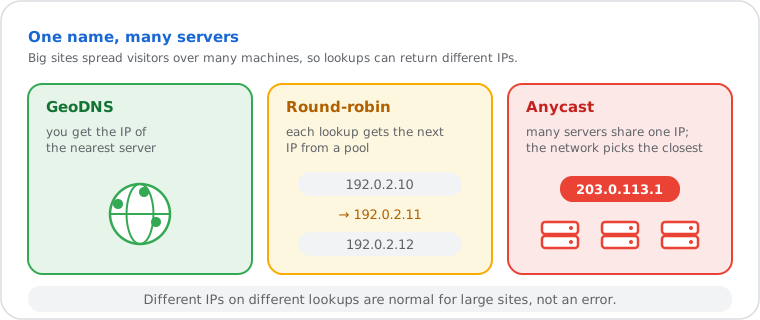
| Technique | How It Works | Who Uses It |
|---|---|---|
| GeoDNS | Returns the IP of the nearest server based on the resolver's location | Google, Facebook, Cloudflare, Netflix |
| Round-Robin DNS | Rotates through a pool of IPs on each query to distribute server load | Load-balanced web servers, cloud platforms |
| CDN Anycast | Multiple servers share the same IP — routing is handled at the network level | Cloudflare, Fastly, Akamai |
This is why a lookup for google.com returns different IPs each time — you are seeing the normal behavior of a globally distributed infrastructure, not an error.
Verifying a DNS Change After Hosting Migration: You move a site to a new server and update the A record. A domain to IP lookup checks whether the new IP is being returned by DNS. If the old IP still appears, your DNS TTL is still active — resolvers are serving the cached record. Use our DNS Lookup with Authoritative DNS to confirm the change is live at the source before waiting for global propagation.
Network Troubleshooting: A website is unreachable. Resolving the domain confirms whether DNS resolution is returning an IP at all. If an IP is returned, DNS is working — the problem is at the network or server level. Next step: use our Ping to test reachability to that IP, and Traceroute to identify where the connection breaks.
Security and Hosting Analysis: Identifying the infrastructure behind a domain. Resolving to an IP, then running an IP Location Lookup reveals the hosting provider and country. An IP WHOIS Lookup confirms the organization legally registered to that IP block — useful for identifying cloud providers, CDNs, or infrastructure shared across multiple domains.
Big websites don’t have one IP address. google.com, facebook.com and other sites behind a CDN answer with different IPs depending on where you are and when you ask, so the reliable answer is a live lookup: click a site below.
nslookup -q=A google.com for IPv4 or nslookup -q=AAAA google.com for IPv6. On Mac or Linux, open Terminal and run: dig google.com A or dig google.com AAAA. In PowerShell: Resolve-DnsName google.com -Type A. These commands query your system's default DNS resolver. Results may differ from this tool due to resolver location and caching differences.