What Is Latency?
Ping, jitter and lag explained, what counts as a good ping, and how to lower yours.
Latency is the time data takes to travel from your device to a server and back, measured in milliseconds (ms); "ping" is the everyday name for it. Under 20 ms is excellent, 20 to 50 ms is good for gaming and video calls, and above 100 ms you start to notice lag.
Measure your latency now
Times 12 small requests from your browser to the nearest Cloudflare data centre and shows the median (latency) and how much it varies (jitter). Nothing is sent to us. For a ping to any server from many countries, use our ping test; for latency during a download, the speed test.
What Is Latency in Networking?
Latency is delay: the time between sending something and getting the answer. Networks measure it as the round trip time (RTT), from your device to a server and back.
When you click a link, press a key in a game or speak in a call, the data crosses your Wi-Fi, your router, your provider's network and several others before it reaches the server, and the answer comes back the same way. Each part adds a little delay. You feel it as lag in games, as people talking over each other in calls, and as a short wait before a page starts loading.
Latency vs Bandwidth: What's the Difference?
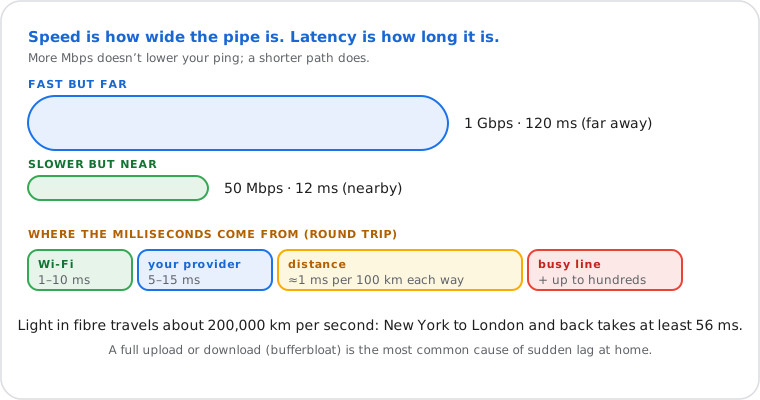
Bandwidth (speed, in Mbps) is how much data gets through per second; latency (in ms) is how long each piece takes to arrive. A fast connection to a faraway server still has high latency.
| Latency (ping) | Bandwidth (speed) | |
|---|---|---|
| Measured in | milliseconds (ms) | megabits per second (Mbps) |
| Matters most for | games, calls, remote desktop | downloads, streaming, backups |
| Lower or higher is better? | lower | higher |
| Changes with distance? | yes | barely |
What Is a Good Ping?
Under 20 ms is excellent, 20 to 50 ms is good, 50 to 100 ms is fine for most things except fast games, and above 150 ms calls and games feel laggy.
| Ping | Rating | What it feels like |
|---|---|---|
| Under 20 ms | Excellent | Instant, even in competitive shooters |
| 20 – 50 ms | Good | Smooth gaming and calls |
| 50 – 100 ms | OK | Fine for browsing, streaming and slower games |
| 100 – 150 ms | Noticeable | Small delays in games and calls |
| Over 150 ms | High | Lag in games; people talk over each other in calls |
For calls, the ITU's G.114 recommendation sets the comfortable limit at 150 ms one way, from mouth to ear (codec and network together), and calls more than 400 ms one way unacceptable. Streaming video doesn't care much: it buffers ahead.
What Is Jitter? And Packet Loss?
Jitter is how much latency changes from one packet to the next; packet loss is the share of packets that never arrive. Both cause stutter even when the average ping is low.
- Jitter under 10 ms is good, under 30 ms is acceptable for calls. Above that, voices break up and games jump. Wi-Fi and a busy line are the usual causes.
- Packet loss should be 0%. Even 1 to 2% causes rubber-banding in games and gaps in calls. A weak Wi-Fi signal, a faulty cable or an overloaded network are the usual causes; our ping test shows it.
What Causes High Latency?
Distance to the server, Wi-Fi, a line busy with other downloads, the type of connection (satellite, mobile), a VPN, and the route the data takes.
| Cause | Typical effect |
|---|---|
| Distance | Light in fibre covers about 200 km per millisecond: roughly 1 ms per 100 km each way. New York to London and back takes at least 56 ms. |
| Wi-Fi | +1 to 10 ms on a good signal; much more and unsteady with walls, distance or interference |
| A busy line | Uploads and downloads fill the router's queue ("bufferbloat"): +50 to several hundred ms while they run |
| Connection type | Fibre lowest; cable and DSL a little higher; 4G/5G 20 to 60 ms; low-orbit satellite (like Starlink) 25 to 60 ms; geostationary satellite 600 ms or more |
| VPN | Adds the trip to the VPN server: little if it's nearby, a lot if it's in another country |
| Routing | Your provider may send data a long way round; traceroute shows where the time adds up |
How to Lower Your Ping
Use a cable instead of Wi-Fi, stop other downloads while you play, pick the nearest game server, and turn off the VPN; if latency jumps during downloads, enable your router's SQM or QoS.
- Plug in a cable, or use 5 GHz Wi-Fi close to the router.
- Stop other heavy traffic: cloud backups, game updates, 4K streams on other devices.
- Choose the nearest server or region in the game or app.
- Turn off the VPN, or connect to a VPN server close to you and to the game server.
- Fix bufferbloat: if the speed test shows latency rising a lot under load, turn on SQM (Smart Queue Management) or QoS in the router.
- Restart the router and update its firmware; replace an old one that struggles with many devices.
- Still high? Run a traceroute: if the delay starts at your provider, contact them with the result.
How to Test Your Latency
Use the button at the top, our online ping test, or the ping command: ping google.com shows the round trip of each packet in ms.
Windows Command Prompt
ping -n 10 google.com sends 10 packets; read "Average" in the summary and "Lost" for packet loss.
Mac / Linux Terminal
ping -c 10 google.com sends 10 packets; the last line shows min/avg/max and the standard deviation (a measure of jitter).
Phone, tablet, Chromebook In the browser
Use the button at the top, our ping test (from probes in many countries) or the speed test, which also measures latency while downloading.
Some servers don't answer ping at all: no reply doesn't mean they're down. To see the delay at each step of the route, use traceroute.
Frequently Asked Questions
Is latency the same as ping?
Does faster internet lower my ping?
Why is my ping high when my speed is good?
What is a good ping for gaming?
Does Wi-Fi increase ping?
Can ping be 0 ms?
Next steps