DNS Speed Test |
Free, no sign-up, about 20 seconds. Your browser contacts each DNS service directly, so they see your IP address; nothing is stored here.
- Cloudflare 1.1.1.1
- Google 8.8.8.8
- Quad9 9.9.9.9
- OpenDNS 208.67.222.222
- AdGuard 94.140.14.14
- Control D 76.76.2.0
- CleanBrowsing 185.228.168.9
- Your current DNS
Which DNS Server Is the Fastest?
The fastest DNS server is the one with a server closest to you, and that depends on where you are and on your internet provider. This DNS speed test times seven public DNS services and your current DNS from your own connection, then shows the fastest with its addresses.
Big public DNS services use anycast: the same address, such as 1.1.1.1 or 8.8.8.8, is answered by the nearest of many servers around the world. A service with a server in your city answers in a few milliseconds; one whose nearest server is in another country takes longer. That's why a ranking measured somewhere else, even a good one, may not be yours, and why "the fastest DNS near me", a DNS speed test "for my location" or "the fastest DNS in India" can only be answered by testing from where you are.
Speed isn't the only thing to compare. Quad9 and CleanBrowsing block malicious domains, AdGuard blocks ads, OpenDNS blocks phishing; Cloudflare, Google and Control D (free, unfiltered) block nothing. The best DNS servers guide compares their privacy, filtering and features.
How This DNS Speed Test Works
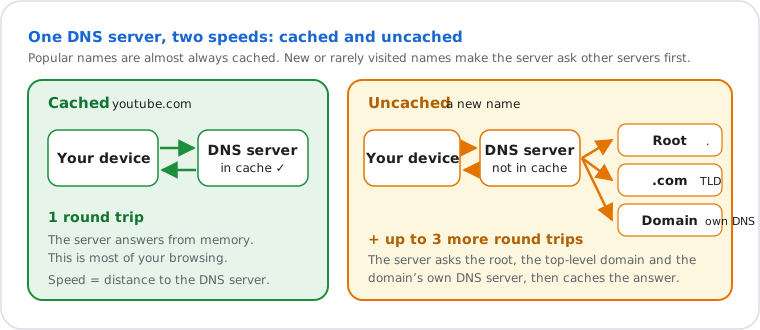
Your browser sends real DNS lookups to each service, six rounds in a new random order, and keeps the median time: one figure for popular names the service has cached, one for new names it must look up.
| Column | What is timed |
|---|---|
| Cached | Lookups of popular names (google.com, youtube.com, wikipedia.org and others), which every big DNS service keeps in memory. This is what most of your browsing feels like. Below it, the fastest and slowest of the six. |
| Uncached | Lookups of new random names under our own test domain. No one asked for them before, so the service must ask our DNS server, in the US East (Virginia). Every service makes the same trip, so the comparison stays fair; from far away, all the times are higher. |
| First request | The first lookup, which also opens the connection: finding the service's address, then the TCP and TLS handshakes. Your browser does this once and reuses the connection. |
| Answered | Lookups that got an answer within 3 seconds. A service that misses more than one in five is ranked last, however fast its other answers were. |
Ranking: by the cached time, with a quarter of the uncached time added, because most lookups hit the cache but new names still happen on every page with ads, images or scripts from other sites.
Your current DNS: the browser looks up new names under the same test domain through your system, as any website would, and our DNS server tells which resolver asked (as in the DNS leak test). The time is approximate: it goes through your browser and system, and includes failing the request once the name turns out not to exist.
What a browser can't measure: a web page can't send plain DNS (UDP port 53, RFC 1035), only DNS over HTTPS (RFC 8484). So the times above include a short HTTPS step that plain DNS doesn't have, usually a millisecond or two on an open connection, and the same for every service. To time plain DNS, use the commands below. The services you test see your IP address, as they would if you used them.
What Is a Good DNS Response Time?
For cached names, under 20 ms is excellent and under 50 ms is good. Over 100 ms is slow: a closer DNS server would help.
| Cached lookup | Rating | What it usually means |
|---|---|---|
| under 20 ms | Excellent | A server in your city or your provider's network |
| 20 – 50 ms | Good | A server in your region; you won't notice the difference |
| 50 – 100 ms | Fair | The nearest server is far away, or busy Wi-Fi adds delay |
| over 100 ms | Slow | Another country, a congested link or a VPN; try the faster servers in the table |
Uncached lookups always take longer, since the server waits for other DNS servers; in our test they also include the trip to Virginia. Compare them between services rather than with these ratings. A low time matters less than a full "Answered" column: a DNS server that sometimes doesn't answer makes pages hang for seconds.
Does a Faster DNS Make Your Internet Faster?
Only a little: a faster DNS shortens the lookup that starts each new connection, not your download speed, upload speed or ping in games.
| What you notice | Does a faster DNS help? |
|---|---|
| Opening a site you haven't visited today | Yes, by the difference in lookup time, usually a few to a few tens of milliseconds |
| Pages that hang before they start loading | Yes, if your current DNS is slow or misses answers: see DNS server not responding |
| Download and upload speed | No: measure them with the speed test |
| Ping and lag in online games | No: the game talks to its server without DNS once connected |
| Video buffering | Rarely: many streaming services pick a video server near your DNS server, so a distant DNS server can even make it worse |
So switch if your current DNS is clearly slower in the test, misses answers, or you want filtering or encryption; don't expect a faster connection. Latency to the sites themselves matters much more.
How to Test DNS Speed on Your Computer
Time one lookup against one DNS server with a single command; run it twice, because the first answer may be uncached and the second cached. The command for your system is open below.
Windows (PowerShell)
- Right-click Start and open Terminal or PowerShell.
- Run the command, then again with 8.8.8.8, 9.9.9.9 or your provider's DNS server. It prints the time in milliseconds.
(Measure-Command { Resolve-DnsName example.com -Server 1.1.1.1 -DnsOnly }).TotalMilliseconds-Server sends the lookup to that DNS server; the time includes a few milliseconds of PowerShell's own
work, the same for every server. Your current servers are listed by Get-DnsClientServerAddress.
Mac
Open Terminal and run the command; dig comes with macOS. It prints a line such as
;; Query time: 12 msec.
dig @1.1.1.1 example.com | grep "Query time"Your current DNS servers: scutil --dns | grep nameserver.
Linux
The same dig command; if it's missing, install dnsutils (Debian, Ubuntu) or
bind-utils (Fedora, RHEL).
dig @1.1.1.1 example.com | grep "Query time"Your current DNS servers: resolvectl status.
Phone (Android, iPhone)
Phones have no built-in DNS command: the test at the top of this page is the simplest way, in your phone's browser. Test once on Wi-Fi and once on mobile data, since each network gives you a different DNS server. The result gives the Android Private DNS hostname of the fastest service.
For a long benchmark of hundreds of DNS servers, plain DNS, DNS over TLS and DNS over HTTPS, GRC's DNS Benchmark (Windows) does it for a one-time $9.95 since version 2; the old free version was withdrawn.
Why DNS Speed Test Results Change
Results move with your Wi-Fi, the time of day and your route to each service; test two or three times, at different hours, before switching.
- Wi-Fi: a weak or busy Wi-Fi signal adds delay to every lookup. Test close to the router, or on a cable.
- VPN: with a VPN on, every lookup goes through the VPN server first, so you measure from its country.
- Mobile data or another network: each network has its own route to each service; the fastest at home may not be the fastest at work.
- Evening peaks: busy hours on your provider's network slow everything, DNS included.
- Anycast: a service can send you to a different server from one hour to the next, after routing changes.
After the Test: Switch to the Fastest DNS
Copy the two addresses of the fastest server and set them on your router for every device at home, or on one device.
- Follow how to change DNS settings for your router, Windows, Mac, iPhone or Android.
- On Android, Private DNS takes a hostname instead, such as one.one.one.one or dns.google, and encrypts your lookups.
- Flush the DNS cache, then run this test again: "Your current DNS" should now name the new service.
Frequently Asked Questions
What is the fastest DNS server?
Is Cloudflare 1.1.1.1 faster than Google 8.8.8.8?
How do I test my DNS speed?
What is a good DNS response time?
Will changing DNS make my internet faster?
What is the fastest DNS for gaming, PS5 or Xbox?
How do I test DNS speed on Wi-Fi?
Is there a DNS speed test app or APK?
Which Private DNS is fastest on Android?
Is a DNS ping test the same as a DNS speed test?
How do I know which DNS server I'm using?
Can I test my internet provider's DNS?
Is this DNS speed test accurate?
Next steps