127.0.0.1 and localhost — Your Computer's Own Address
127.0.0.1 is the loopback address: the address every computer uses to talk to itself. Its name is
localhost, and its IPv6 version is ::1. Traffic sent there never leaves the
device, so 127.0.0.1:3000 or localhost:8080 means "a program on this computer,
on port 3000 or 8080". It's the same on every computer, and nobody else can reach it.
How Loopback Works
The system hands traffic for 127.0.0.1 straight back to the same computer: it never reaches the Wi-Fi, the router or the internet.
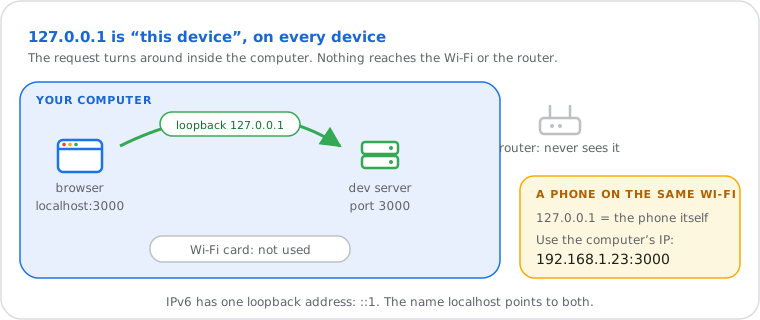
That's why developers use it: a website, API or database can run on your laptop and be tested in your browser,
with no internet connection and invisible to everyone else. Every device has it, even with no network card:
phones, game consoles, routers. ping 127.0.0.1 answers in under a millisecond because nothing
leaves the machine.
What 127.0.0.1:Port Means
The number after the colon is the port: it says which program on your computer to talk to.
| Address | Usually |
|---|---|
localhost:3000 | Node.js apps, React, Next.js, Ruby on Rails |
localhost:5173 | Vite (Vue, React, Svelte projects) |
localhost:8000 | Django, python -m http.server, PHP's built-in server (often) |
localhost:5000 | Flask, .NET (older templates) |
localhost:8080 | Tomcat, Spring Boot, many proxies and Java servers |
localhost:8888 | Jupyter Notebook |
localhost:80, :443 | A web server on the standard ports (the browser hides them) |
127.0.0.1:3306, :5432, :6379 | MySQL, PostgreSQL, Redis (databases, not opened in a browser) |
127.0.0.1:49152 to :65535 | A random temporary port a program picked for itself: debuggers, editors, sign-in helpers |
Saw something like 127.0.0.1:62893 or 127.0.0.1:49342 in an error or a log? It's a temporary port from the dynamic range (49152 to 65535, set aside by RFC 6335) that some program on your computer opened, often a code editor's debugger or a local helper app. The number changes each time and is nothing to worry about; if a tool can't connect to it, restart that tool.
Ports in general, and which ones are open from the internet: what port forwarding is and the port checker.
localhost Refused to Connect? Try These Fixes
"Refused to connect" (ERR_CONNECTION_REFUSED) means nothing is listening on that port: start the server, or use the port it actually prints.
- Is the server running? Look at the terminal where you started it: it prints the address, such as
Local: http://localhost:5173/. If it crashed, the error is there. - Right port? If the port was busy, many tools move to the next one (3001, 5174…): use the address they print.
- See what's listening on a port:
netstat -ano | findstr :3000(Windows); the last number is the PID, which you can stop withtaskkill /PID 1234 /F. "Address already in use" means another program holds the port. - localhost fails but 127.0.0.1 works? localhost may go to the IPv6 address
::1while the server listens only on IPv4. Openhttp://127.0.0.1:port, or start the server on both. - http or https: most development servers use
http://. Type it in full; anhttps://address shows an error if the server has no certificate. - Firewall, antivirus or VPN: rarely, they block local ports; allow the program, or pause them to test.
- "localhost sent an invalid response" or a blank page: the port belongs to another kind of program (a database, for example), not a web server.
Open It From Your Phone or Another Computer
Use the computer's local IP instead of 127.0.0.1, and start the server so it listens on all addresses (0.0.0.0).
- Find the computer's local IP: Windows
ipconfig("IPv4 Address"), Mac System Settings › Wi-Fi › Details › TCP/IP. It looks like192.168.1.23. - Start the server on all addresses: for example
npm run dev -- --host(Vite),python -m http.server 8000 --bind 0.0.0.0,python manage.py runserver 0.0.0.0:8000(Django). - On the phone, on the same Wi-Fi, open
http://192.168.1.23:8000. - Allow it through the firewall if your system asks (private networks only).
Only devices on your own network can reach it this way. Showing it to someone on the internet needs port forwarding or a tunnelling service, and real care with what you expose.
127.0.0.1 vs 0.0.0.0 vs 192.168.x.x vs Your Public IP
127.0.0.1 is this device only, 192.168.x.x your home network, the public IP the whole internet; 0.0.0.0 means "all addresses" when a server starts.
| Address | Who can reach it |
|---|---|
127.0.0.1, ::1, localhost | This device only |
0.0.0.0 (or ::) | Not a real destination: told to a server, it means "listen on every address of this device" |
192.168.x.x, 10.x.x.x | Devices on your home or office network (private addresses) |
| Your public IP | The whole internet, through your router (see yours) |
localhost in the Hosts File
The hosts file maps names to addresses before DNS is asked: it contains 127.0.0.1 localhost, and pointing a site there blocks it.
- Where it is:
C:\Windows\System32\drivers\etc\hostson Windows (edit as administrator),/etc/hostson Mac and Linux. - Block a site: add
0.0.0.0 example.com(or127.0.0.1): the browser then looks for it on your own computer and fails. Ad-blocking hosts lists work this way. - Test a site locally:
127.0.0.1 myapp.testlets you open your project under a friendly name. - Don't remove the localhost lines; some programs need them. Browsers treat localhost as local whatever the file says.
How names normally become addresses: what DNS is.
Is 127.0.0.1 Safe? Beware of Scams
Yes: nothing outside your device can reach 127.0.0.1. Anyone claiming "your IP 127.0.0.1 has been hacked" is running a scam.
- Tech-support scams show 127.0.0.1 in a pop-up or on a call to look technical. It's every computer's own address; it proves nothing. Hang up, close the page, and never install remote-access software for a stranger.
- 127.0.0.1 in your router's or a website's logs just means the device talked to itself.
- A real risk: starting a development server on 0.0.0.0 on public Wi-Fi exposes it to everyone on that network. Keep it on 127.0.0.1 when you're away from home.
Your real public address, the one the internet sees: what is my IP.
What Is 127.0.0.1, Technically?
One address of the block 127.0.0.0/8, which RFC 1122 reserves for loopback; the name localhost is reserved by RFC 6761.
The whole block, 127.0.0.0 to 127.255.255.255 (about 16.7 million addresses), loops back, and a packet with one
of them must never appear on a network; 127.0.0.1 is simply the one everyone uses. The IANA special-purpose
registry (RFC 6890) lists it, and IPv6 has a single loopback address, ::1 (RFC 4291). Some
systems use other loopback addresses for themselves: many Linux systems add 127.0.1.1 for the
computer's own name, and some resolvers listen on 127.0.0.53.