1
Enter a Domain Name
Type any domain name into the input field — e.g., google.com, github.com, or mail.example.com.
NS Lookup |
NS lookup queries the Domain Name System for the NS (Name Server) resource records defined in RFC 1034 and RFC 1035. NS records identify which name servers are authoritative for a domain — these servers hold the zone file containing all other DNS records for that domain, including A, MX, CNAME, and TXT records. A lookup returns one or more nameserver hostnames and their TTL, expressed in seconds.
| Field | Meaning | Example |
|---|---|---|
| Record Type | Always NS — indicates a Name Server record | NS |
| Nameserver | Fully qualified hostname of the authoritative name server | ns1.google.com |
| TTL | Time to live in seconds — how long resolvers cache this record before re-querying | 86400 (24 hours) |
Enter any domain name and run a live NS record query in seconds.
NS lookup results can differ depending on the DNS resolver selected. Recursive resolvers such as Google (8.8.8.8) and Cloudflare (1.1.1.1) may serve cached NS records up to the record's TTL. Authoritative DNS mode bypasses all intermediate caching by discovering the domain's own name servers first and querying them directly.
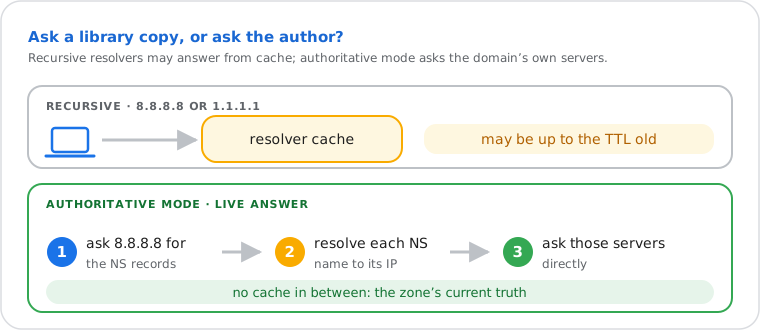
The authoritative discovery process runs in two steps: first, Google 8.8.8.8 is queried for the domain's NS records; each NS hostname is then resolved to an IP address via an A record lookup; those name server IPs are queried directly per RFC 1035. This guarantees a live, uncached response from the zone's primary source of truth.
| Resolver | IP Address | Query Type | May Be Cached? |
|---|---|---|---|
| 8.8.8.8 | Recursive | Yes — up to TTL | |
| Cloudflare | 1.1.1.1 | Recursive | Yes — up to TTL |
| Quad9 | 9.9.9.9 | Recursive | Yes — up to TTL |
| OpenDNS | 208.67.222.222 | Recursive | Yes — up to TTL |
| Yandex | 77.88.8.8 | Recursive | Yes — up to TTL |
| Authoritative DNS | Domain's own NS servers | Direct zone query | Never — live zone data |
Do it yourself
All major operating systems include command-line DNS tools that can query NS records directly. The online tool queries from a neutral external resolver — results may differ from your local resolver due to caching.
nslookup -q=ns google.com
nslookup -q=ns google.com 8.8.8.8
nslookup -q=ns google.com 1.1.1.1
Use -q=ns to explicitly request NS records. Append a resolver IP address
after the domain name to query a specific DNS server — e.g. Google (8.8.8.8) or
Cloudflare (1.1.1.1).
Resolve-DnsName google.com -Type NS
Resolve-DnsName google.com -Type NS -Server 8.8.8.8
Resolve-DnsName google.com -Type NS -Server 1.1.1.1
dig google.com NS
dig google.com NS @8.8.8.8
dig google.com NS @1.1.1.1
dig google.com NS +short
dig is the preferred tool for sysadmins and developers — it exposes the full
NS response including TTL, response flags, and the authority section. The +short
flag returns nameserver hostnames only, without the full answer block. On macOS,
dig is pre-installed. On Ubuntu/Debian, install it with
apt install dnsutils.
Verifying a domain registrar transfer. When moving a domain to a new registrar or hosting provider, the name servers must be updated at the registrar level. A migration that fails silently typically means the NS records have not propagated. Running an NS lookup against multiple resolvers — including Authoritative DNS — confirms whether the new name servers are live before further troubleshooting.
Diagnosing email delivery failures. Before investigating MX records, the name servers must be reachable and returning correct zone data. A mail server administrator investigating bounce messages typically starts with NS lookup to confirm the domain is delegated correctly, then proceeds to MX lookup and reverse DNS verification.
Detecting unauthorized DNS changes. A security engineer conducting a routine domain audit uses NS lookup to verify that the authoritative name servers match the approved registrar configuration. Unexpected name servers — particularly those pointing to unknown providers — may indicate DNS hijacking or an unauthorized domain transfer.