Open Port Checker & Port Scanner |
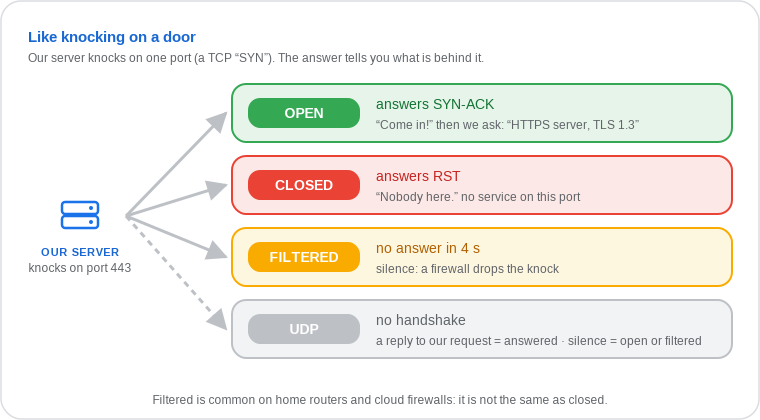
An open port checker tests whether a port on your IP address or server, IPv4 or IPv6, can be reached from the internet. We connect from our server, outside your network, and report open (a program answered), closed (the device refused) or filtered (no answer within 4 seconds, usually a firewall). For an open port, we also say which service answered.
What Your Result Means
Open means a program accepted our connection; closed means the device refused it; filtered means nothing answered.
Open
The full TCP handshake finished: a program accepted our connection. We then read its greeting or ask it politely what it is (SSH, mail, web, TLS, Remote Desktop, Minecraft…). If you didn't expect this port to be open, close it or restrict it in your firewall.
Closed
The device is reachable, but it refused the connection on this port (a TCP reset). Nothing is listening, or the program only listens locally.
Filtered
Nothing came back within 4 seconds. A firewall, a router without a forwarding rule, or your internet provider is dropping the packets. This is the most common result when port forwarding is missing.
No reply UDP
UDP has no handshake. Unless the service answers our request, "open" and "filtered" look the same from outside. DNS, NTP, Minecraft Bedrock and Steam game servers answer; WireGuard never does.
How to Check If a Port Is Open
Enter the address and the port, then click Check port.
- The address is your public IP, already filled in. To test a server, type its domain or IP instead.
- Type the port, or click a popular one such as 25565 Minecraft.
- Click Check port and read the result. For a port that isn't open, the checks to do are listed under it.
More options holds UDP (DNS, NTP, game servers, VPNs), more presets, and several ports at once, separated by commas: up to 3 on another address, up to 10 on your own IP. To see what's open on your own connection, use the Scan my IP tab.
To test your own port forwarding, the program must be running on the device the port is forwarded to, and the test must come from outside your network, which is what this tool does.
Send someone a link that opens this page with the address and port already filled in: they only have to click Check port.
Handy when you help a friend with a game server, or answer on a forum. Fill in the form, then click Copy link to this check (next to the popular ports) and paste the link in your message. On the Scan my IP tab, Copy link to this scan does the same with the ports you ticked. A link never runs a test on its own: the person who opens it clicks the button.
Open an example to try it, copy it to send, or make your own.
To make your own by hand, change the address after host= and the ports after port= or ports= (up to 3 on another address). Add &proto=udp for a UDP check.
Port Scanner: Scan Your IP for Open Ports
The Scan my IP tab is a port scanner for your own connection: it tests up to 10 ports at once, to find any left open by mistake.
Ten are ticked by default because bots try them on every address: 21 (FTP), 22 (SSH), 23 (Telnet), 80 and 8080 (web), 443 (HTTPS), 445 (Windows file sharing), 3306 (MySQL), 3389 (Remote Desktop) and 5900 (VNC). Untick the ones you don't care about, or add your own, such as 25565 for a Minecraft server or 32400 for Plex.
- Open and expected (your web server, your game server): fine, keep the software up to date.
- Open and not expected: a device or a forwarding rule exposes it. Remove the rule in your router or block the port in the firewall.
- Closed or filtered: nothing reachable from the internet on that port.
The scan only runs on the IP address you connect from, never on someone else's: scanning other people's systems without permission may break their terms or local laws.
Port Forwarding Not Working? Check These 6 Things
Most failed tests come from one of six causes, in this order.
Setting up a rule for the first time? See how to set up port forwarding, step by step.
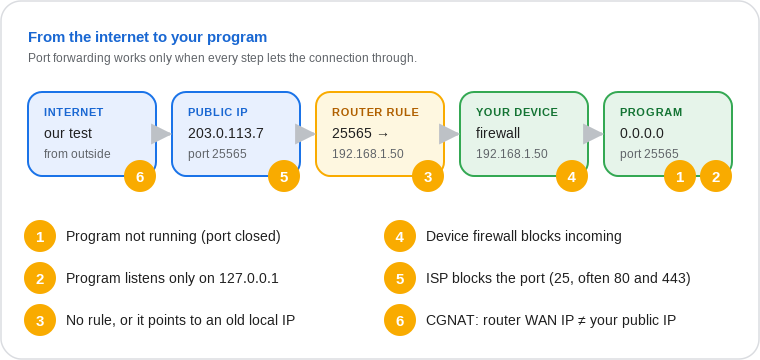
- The program is running. Start the game server, camera or app before testing: with nothing listening, the port is closed.
- It listens on 0.0.0.0. A program bound to 127.0.0.1 (localhost) only accepts connections from the same device.
- The rule points to the right local IP. Local IPs change: find your router and local IP, then reserve that IP for the device in the router.
- The device's firewall allows it. Windows Defender Firewall, the macOS firewall and ufw block incoming connections until you allow the program or port.
- Your provider doesn't block it. Nearly every home provider blocks port 25; some block 80, 443 and Windows file sharing. Try another port to find out.
- You're not behind CGNAT. If the WAN IP on your router's status page differs from your public IP, your provider shares one address between customers and forwarding can't work without them (what CGNAT is, and how to check).
Common Ports and What They Are For
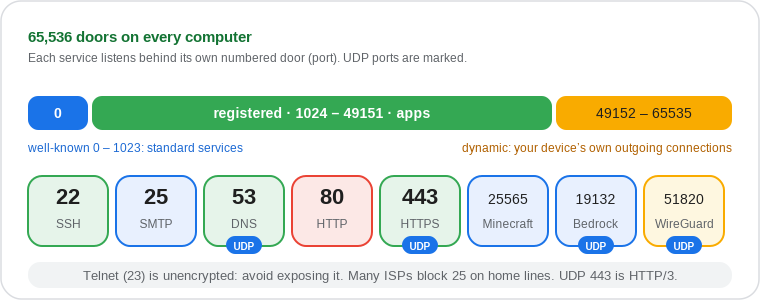
Each service listens on a known port: 80 and 443 for websites, 22 for SSH, 25 for mail between servers, 53 for DNS.
A port is a number from 0 to 65535 that tells a computer which program should receive the traffic; TCP and UDP each have their own 65,536 ports. IANA keeps the official list. Ports 0–1023 are "well-known" (system services), 1024–49151 "registered" (applications), and 49152–65535 "dynamic", used for the temporary source port of each outgoing connection.
| Port | Service | Open to the internet? |
|---|---|---|
| 20/21 TCP | FTP | Only if you run an FTP server; prefer SFTP (22) |
| 22 TCP | SSH, SFTP | For servers, with key-based login |
| 23 TCP | Telnet | Never: no encryption; use SSH |
| 25 TCP | SMTP (server to server) | Mail servers only; blocked on many home lines |
| 53 TCP/UDP | DNS | DNS servers only |
| 67/68 UDP | DHCP | Never: local network only |
| 80 TCP | HTTP | Web servers (usually redirects to 443) |
| 110 / 143 TCP | POP3 / IMAP (unencrypted) | Mail servers; prefer 995 / 993 |
| 123 UDP | NTP (time) | Time servers only |
| 161 UDP | SNMP (device monitoring) | Never |
| 443 TCP (UDP for HTTP/3) | HTTPS | Web servers |
| 445 TCP | SMB (Windows file sharing) | Never |
| 465 TCP | SMTP submission over TLS | Mail servers |
| 500 / 4500 UDP | IPsec VPN (IKE) | VPN gateways |
| 587 TCP | SMTP submission | Mail servers |
| 993 / 995 TCP | IMAPS / POP3S | Mail servers |
| 1194 UDP (or TCP) | OpenVPN | VPN servers |
| 1433 TCP | Microsoft SQL Server | Almost never: keep databases private |
| 3306 / 5432 TCP | MySQL / PostgreSQL | Almost never: keep databases private |
| 3389 TCP | Remote Desktop (RDP) | Avoid; use a VPN instead |
| 5900 TCP | VNC | Avoid; use a VPN instead |
| 8080 TCP | HTTP alternate | Test and admin servers |
| 25565 TCP | Minecraft Java | Game servers |
| 19132 UDP | Minecraft Bedrock | Game servers |
| 27015 UDP/TCP | Steam / Source games | Game servers |
| 32400 TCP | Plex | Media servers |
| 51820 UDP | WireGuard VPN | VPN servers |
What is port 80?
Port 80 is the standard port for HTTP, unencrypted web traffic. Most sites keep it open only to redirect visitors to HTTPS on port 443. Leaving it open is fine for an updated web server; on a home connection without one, don't forward it.
What is port 443?
Port 443 is the standard port for HTTPS, encrypted web traffic over TLS. HTTP/3 also uses UDP 443. On an open 443, this checker shows the TLS version and the certificate the server sends; to read a certificate file, use the CSR & certificate decoder.
What is port 22?
Port 22 is used by SSH and SFTP for remote login and file transfer. If it's open, use key-based login and limit failed attempts; the checker shows the SSH software the server announces.
What is port 53?
Port 53 is DNS. Lookups normally use UDP 53 and switch to TCP 53 for large answers and zone transfers. Only a DNS server should have it open to the internet; an open resolver on a home connection can be abused for DDoS amplification. Encrypted DNS uses other ports: 853 for DNS over TLS, 443 for DNS over HTTPS.
What is port 445?
Port 445 is SMB, Windows file and printer sharing. It should never be reachable from the internet: the WannaCry ransomware spread through it in 2017, and many internet providers block it. Share files over a VPN instead.
What is port 25? And 587 or 465?
Port 25 carries mail between mail servers (SMTP). Many home internet providers and cloud hosts block outgoing 25 to stop spam, which is why email apps send through port 587 (submission with STARTTLS) or 465 (submission with TLS from the start, recommended by RFC 8314). Use 587 or 465 in your mail app; port 25 only matters if you run a mail server.
What is port 23?
Port 23 is Telnet, a remote login protocol from 1969 that sends everything, passwords included, in plain text. Botnets scan it constantly for routers and cameras with default passwords. It should be closed; use SSH (22).
What is port 3389?
Port 3389 is Windows Remote Desktop (RDP). Exposed RDP is one of the most common ways ransomware gets in, through password guessing and RDP flaws. Don't forward it: reach your PC through a VPN, or a remote access service with two-factor login.
What is port 21?
Port 21 is FTP's control channel (port 20, or a random port in passive mode, carries the files). FTP sends passwords unencrypted; use SFTP on port 22 or FTPS instead.
What is port 8080?
Port 8080 is the usual alternative to port 80 for HTTP: development servers, proxies, Tomcat and router admin pages use it. It's not more secure than 80; if a device's admin page is open on 8080 from the internet, close it.
What are ports 143 and 993?
Both are IMAP, which keeps mail on the server and in sync across devices: 143 unencrypted (or upgraded with STARTTLS), 993 with TLS from the start. Mail apps should use 993; POP3, which downloads mail to one device, uses 110 and 995.
Do it yourself
Check a Port Without an Online Tool
Use Test-NetConnection on Windows or nc on macOS and Linux, but remember they test from inside your network.
Windows PowerShell
Test-NetConnection -ComputerName example.com -Port 443TcpTestSucceeded : True means open. Built into Windows 8 and later.
Windows Command Prompt
telnet example.com 443A blank screen means open. Turn on the Telnet Client first in Windows features.
Mac / Linux Netcat
nc -zv example.com 443succeeded means open, Connection refused means closed. For UDP: nc -zuv example.com 53 (same limits as above: silence proves nothing).
Mac / Linux curl
curl -v --connect-timeout 4 telnet://example.com:22A raw TCP connection to any port, where netcat isn't installed.
Tested from your own network, a forwarded port can look open even when the internet can't reach it (or the reverse, because many routers don't loop back). Only a test from outside, like this one, proves port forwarding works.
How This Port Checker Works
We open a connection from our server to your address and port and report what happens within 4 seconds; an open port then gets a short service check.
| Where the test runs | Our server in the United States (AWS, N. Virginia); "Test from 10 countries" adds probes elsewhere, from your browser |
| Protocols | TCP; UDP with real requests for DNS (53), NTP (123), Minecraft Bedrock (19132) and Steam/Source games (27015), a one-byte datagram on other ports |
| Timeout | 4 seconds per port to connect (UDP: 2 tries of 2 seconds), then about 2 seconds for the service check |
| Service check | Reads the greeting SSH, FTP, mail, VNC and MySQL servers send; otherwise sends an HTTP HEAD, a TLS handshake (443, 993, 995, 465, 8443…), an RDP connection request (3389) or a Minecraft status request (25565). Never a password or a login |
| Results | Open · Closed · Filtered; for UDP: Answered · Closed (port unreachable) · No reply |
| Ports per check | Up to 3 on another address; up to 10 on your own IP (Scan my IP), tested at the same time |
| Targets | Public IPs and hostnames only (private, local and reserved addresses refused); Scan my IP only on your own IP |
| Limits | 20 checks and 100 ports per 10 minutes per visitor |
| What we keep | Tested addresses: not saved. Your IP: in memory for 10 minutes (rate limit). Standard server and Cloudflare access logs. |
The service check identifies the software a server announces; it doesn't scan for vulnerabilities. Last reviewed 15 November 2026.
Frequently Asked Questions
How many ports are there?
Is my port open?
How do I check if port forwarding is working?
Why does my port show closed when the program is running?
Can you check UDP ports?
Is this a port scanner?
Is it legal to check open ports?
Can you check if my Minecraft server is online?
Next steps