What Is Port Forwarding?
And how to set it up on any router, check that it can work on your connection, and test it.
Port forwarding is a rule on your router that sends incoming connections on one port to one device at home, so a game server, a camera or an app can be reached from the internet. You add it in your router's settings: the port, the protocol (TCP or UDP) and the device's local IP address.
Can port forwarding work on your connection?
Your public IP: 216.73.216.87 (what the internet sees).
Log in to the router (find its address) and look for "Internet", "WAN" or "Broadband" on the status page. Compared in your browser: nothing is sent.
How Does Port Forwarding Work?
Your router shares one public IP between every device at home, so when a connection arrives from the internet it doesn't know which device it's for, and drops it. A forwarding rule tells it: "port 25565 goes to 192.168.1.50".
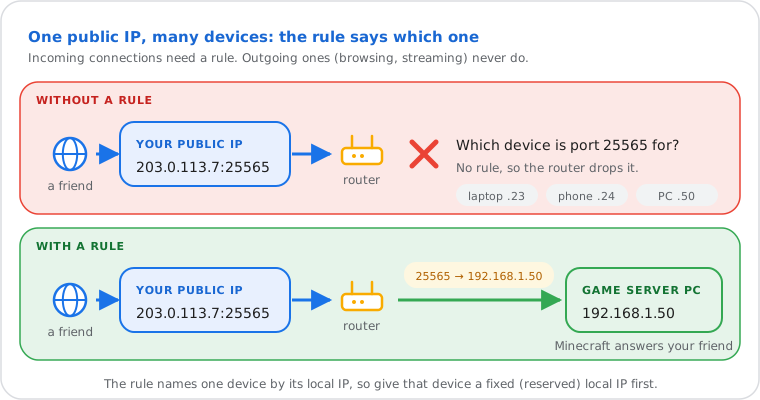
Inside your home, each device has a private address like 192.168.1.50. The router translates between them and your one public address (that's NAT). When you open a website, the router remembers the request and lets the answer back in, so browsing, streaming and most online games need no rule. Only connections that start outside need one: a friend joining your server, your phone reaching a camera at home.
A port is the number that says which program a connection is for, from 0 to 65535: 443 for HTTPS, 25565 for a Minecraft Java server. TCP and UDP are the two kinds of traffic; a rule needs the right one, and some apps use both.
Do You Need Port Forwarding?
Only to run something that others connect to from outside: a game server, remote access to a camera, NAS or media server, or a website at home.
| You need a rule to… | You don't need one to… |
|---|---|
| Host a Minecraft, Valheim or other game server | Play on official game servers, browse, stream, video call |
| Reach Plex, a NAS or a camera from outside | Use apps whose cloud service relays the connection for you |
| Run a web server or a VPN server at home | Use a VPN app to connect out to a VPN provider |
| Fix a "Strict" or "Type 3" NAT on a console, when UPnP doesn't | Download games or updates |
For private access to your own devices, a VPN into your home network (WireGuard, Tailscale or your router's VPN server) is often the safer choice: one protected entrance instead of a port per device.
How to Port Forward: Step by Step
Give the device a fixed local IP, log in to your router, add a rule with the port, protocol and that IP, allow the port in the device's firewall, then test from outside.
- Give the device a fixed local IP. In the router's DHCP settings, reserve its current address (often called "Address reservation" or "Static lease"), so the rule doesn't break when the address changes. More in static vs dynamic IP.
- Log in to your router. Open its address in your browser, usually 192.168.1.1 or 192.168.0.1: find your router's IP and how to log in. Some providers use an app instead (table below).
- Open the port forwarding page. It's called Port Forwarding, Virtual Server, NAT Forwarding or Port Sharing depending on the brand.
- Add the rule (fields below) and save. Some routers need a restart.
- Allow the port on the device. On Windows, the first time a server starts, accept the Windows Defender Firewall prompt for private and public networks, or add an inbound rule for the port.
- Test from outside your network with the box below. Testing from inside your own network can fail even when the rule works, because many routers don't loop traffic back to themselves (no "NAT loopback").
| Field | What to enter |
|---|---|
| Name / Service | Any label, like "Minecraft" |
| External (WAN) port | The port people connect to, like 25565. Some routers take a range (start and end) |
| Internal (LAN) port | The port the program listens on; usually the same number |
| Protocol | TCP, UDP or Both, as the app's documentation says |
| Internal IP / Device | The device's reserved local IP, like 192.168.1.50 |
Where Is Port Forwarding on My Router?
Usually under Advanced, then NAT, Firewall or WAN; on mesh systems and provider boxes it's often in the app instead of a web page.
| Router or provider | Usual place (names vary by model and firmware) |
|---|---|
| TP-Link | Advanced › NAT Forwarding › Virtual Servers · Deco app: More › Advanced › Port Forwarding |
| Netgear | Advanced › Advanced Setup › Port Forwarding / Port Triggering |
| ASUS | Advanced Settings › WAN › Virtual Server / Port Forwarding |
| Linksys | Security › Apps and Gaming › Single Port Forwarding |
| AVM FRITZ!Box | Internet › Permit Access › Port Sharing |
| Google / Nest Wifi | Google Home app › Wi-Fi › Settings › Advanced networking › Port management |
| eero | eero app › Settings › Network settings › Reservations & port forwarding |
| Xfinity | Xfinity app › WiFi › View WiFi equipment › Advanced settings › Port forwarding |
| AT&T gateway | 192.168.1.254 › Firewall › NAT/Gaming |
| BT Smart Hub | Advanced settings › Firewall › Port forwarding |
Can't find it? Search your model name with "port forwarding" on the maker's support site, or check whether your provider's box is in bridge mode behind your own router (then the rule goes on your router).
Which Ports to Forward for Games and Apps
A Minecraft Java server uses TCP 25565, Bedrock UDP 19132, Plex TCP 32400 and WireGuard UDP 51820; consoles list several ports.
| Game or app | Port | Protocol and notes |
|---|---|---|
| Minecraft Java server | 25565 | TCP |
| Minecraft Bedrock server | 19132 | UDP (19133 for IPv6) |
| Plex Media Server | 32400 | TCP; set it under Remote Access, which then tests it |
| WireGuard VPN | 51820 | UDP; the usual default, whatever your config's ListenPort says |
| Web server | 80, 443 | TCP; some providers block 80 on home lines |
| Xbox (Microsoft's list) | 88, 500, 3544, 4500 · 3074 · 53 · 80 | UDP 88, 500, 3544, 4500 · TCP and UDP 3074 and 53 · TCP 80 |
| PlayStation 5 (Sony's list) | 80, 443, 3478–3480 · 3478, 3479, 49152–65535 | TCP 80, 443, 3478–3480 · UDP 3478, 3479, 49152–65535 |
Consoles usually get an Open NAT from UPnP alone; forward their ports only if the NAT type stays Strict or Type 3, and only to one console per port. A program can use another port than its default: its settings or the game's support page are the reference.
How to Port Forward a Minecraft Server
Forward TCP 25565 (Java) or UDP 19132 (Bedrock) to the computer running the server, allow the server in its firewall, then give friends your public IP.
- Reserve the server computer's local IP in the router (step 1 above).
- Add a rule: 25565, TCP for Java, or 19132, UDP for Bedrock, to that IP.
- In
server.properties, keepserver-portat the same number and leaveserver-ip=empty. - Start the server and accept the firewall prompt for Java (or
bedrock_server.exe). - Test 25565 with the box above. Open? Friends connect to 216.73.216.87; players at home use the computer's local IP.
Your public IP can change; a free dynamic DNS name gives friends one address that follows it. Behind CGNAT (below), use a tunnel service made for game servers or a hosted server instead.
Can't Port Forward? CGNAT and Double NAT
If your router's internet IP isn't your public IP, a second NAT sits in front of it: your provider's (CGNAT) or another router at home (double NAT). A rule on your router alone can't work then.
- CGNAT: the router's internet IP starts with 100.64 to 100.127 (the shared range of RFC 6598), or is another public IP than yours. The provider shares one public IP between customers, so only the provider could forward a port. Ask for a public IPv4 address (some give one free, some sell it as a "static IP"), or use IPv6, a tunnel, or a VPN with port forwarding. More in public vs private IP.
- Double NAT: the router's internet IP is private (10.x, 172.16–31.x or 192.168.x, the ranges of RFC 1918): it sits behind your provider's modem-router. Put the provider's box in bridge mode, or forward the port on both: first to your router, then to the device.
- IPv6: there's no NAT, so no forwarding: each device has its own public address and you allow the port in the router's IPv6 firewall instead. Friends then need IPv6 too.
Port Forwarding Not Working?
Check that port forwarding can work on your connection (box at the top), that the rule points to the device's current local IP, and that the program is running and allowed in the firewall.
Then test from outside, not from your own Wi-Fi. A "filtered" result usually means a missing rule, a firewall or CGNAT; "closed" means the rule works but nothing listens. The six checks on the port checker page go through each cause in order, with the fix.
Is Port Forwarding Safe?
It's safe for a port whose program is meant to be public and kept up to date; every forwarded port is a door anyone on the internet can knock on.
- Never forward Remote Desktop (3389), Windows file sharing (445), Telnet (23), or your router's or camera's admin page. Attackers scan the whole internet for these within hours. Use a VPN to reach them.
- Forward only the ports the program needs, to one device, and delete rules you no longer use.
- Keep the program updated and use strong passwords; for SSH, keys only.
- UPnP lets programs open ports by themselves: convenient for consoles, but any program on your network can do it. Turn it off if you don't need it.
Port Forwarding vs Port Triggering, DMZ and UPnP
Port forwarding is a fixed rule; port triggering opens a port only while a device uses another one; UPnP lets apps add rules themselves; DMZ sends everything to one device.
| Method | What it does | When to use it |
|---|---|---|
| Port forwarding | Always sends one port to one device | Servers, cameras, Plex |
| Port triggering | Opens a port only after a device sends traffic out on a "trigger" port | Rare: some old games |
| UPnP | Programs ask the router to open ports for them, for as long as they need | Consoles, game clients |
| DMZ host | Sends every unsolicited connection to one device: no protection at all | Avoid; last resort for a console only |
Frequently Asked Questions
What ports are forwarded on my router?
Does port forwarding slow down my internet?
Do I need a static IP for port forwarding?
Is port forwarding the same as opening a port?
Can I port forward without access to my router?
Does port forwarding work with a VPN?
Next steps