What Is CGNAT?
Carrier-grade NAT explained: how to tell if you're behind it, what it breaks, and every way around it.
CGNAT (carrier-grade NAT) means your internet provider shares one public IPv4 address between many customers by putting your router behind its own NAT. Browsing works normally, but port forwarding, hosting a server and some games stop working, because connections from the internet can't reach your router. You can tell by comparing your router's internet address with your public IP, below.
Am I behind CGNAT?
- Your public IP216.73.216.214
- NetworkAmazon.com, Inc.
Find it on your router's status page (often "Internet", "WAN" or "Connection status"): how to open your router. Examples:
The check runs in your browser and compares the address you enter with the public IP our server sees. Nothing is sent or stored.
How CGNAT Works
Normally your router has a public IP and translates it for the devices at home (NAT). With CGNAT, the provider adds a second translation: your router gets an address from the provider's network, and the provider's equipment shares one public IP between many customers.
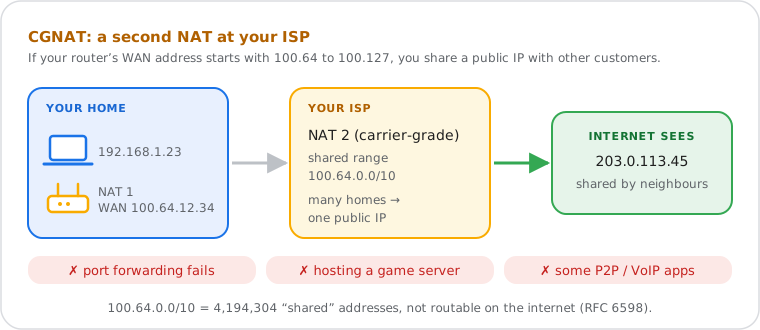
- Why providers do it: there aren't enough IPv4 addresses for every customer. Sharing one between many keeps IPv4 working while the internet moves to IPv6.
- The 100.64.0.0/10 range: RFC 6598 (2012) reserved 100.64.0.0 to 100.127.255.255 as "Shared Address Space" for the link between your router and the provider's NAT. It's separate from the home ranges of RFC 1918 (192.168.x.x, 10.x.x.x), so the two never collide.
- Outgoing traffic works: the provider's NAT remembers each connection you open and sends the replies back, like your router does at home.
- Incoming traffic doesn't: when someone on the internet connects to the shared IP, the provider's NAT doesn't know which of its customers should get it, so it drops the connection.
What CGNAT Breaks
Anything that needs connections from the internet to reach you: port forwarding, servers at home, some game features and remote access to cameras or storage.
| What | Behind CGNAT |
|---|---|
| Port forwarding | Rules on your router have no effect: our port checker shows the port closed or filtered. |
| Game servers, hosting lobbies | Friends can't join a server you host; consoles report a strict or moderate NAT type. |
| Plex, Jellyfin, home servers | Remote access fails unless the app uses its own relay. |
| Cameras, recorders, storage drives | Direct remote access fails; apps that go through the maker's cloud still work. |
| Remote desktop, SSH, VPN server at home | Can't be reached from outside. |
| Captchas and IP blocks | You share an IP, so another customer's behaviour can bring captchas or a block onto you. |
| IP location | The shared IP's location is the provider's, often a city away (see My Location). |
Browsing, streaming, video calls, online games through the game's own servers and cloud apps all work normally.
How to Get Around CGNAT
Ask your provider for a public IPv4 address first; if that's not possible, use IPv6, a VPN with port forwarding, or a tunnel.
- Ask for a public IPv4 address. Many providers give one on request, sometimes for free, sometimes as a paid "static IP" option. Call support and say you need a public IP for port forwarding. Starlink, for example, uses CGNAT by default and offers a public IPv4 option on its Priority plans.
- Use IPv6. IPv6 has enough addresses for every device, so there's no CGNAT: open the port in your router's IPv6 firewall instead. It only helps if the people connecting to you also have IPv6. Check yours with our IPv6 test.
- A VPN with port forwarding. Some VPN services give you a port on their public IP and send its traffic to you through the tunnel. A VPN without port forwarding doesn't help.
- A tunnel or relay service. Tunnels (such as Cloudflare Tunnel or ngrok) publish a web or game server through an outgoing connection; mesh VPNs (such as Tailscale or ZeroTier) connect your own devices to each other wherever they are.
- Your own server in the cloud. A small rented server with a public IP can forward traffic to you through a VPN you set up between the two.
Changing your router doesn't help: the second NAT is at your provider. Neither does turning on UPnP, which only opens ports on your own router.
CGNAT vs Double NAT
Both mean two NATs between you and the internet; the difference is who owns the second one, and so whether you can fix it yourself.
| Double NAT at home | CGNAT | |
|---|---|---|
| Router's WAN address | 192.168.x.x, 10.x.x.x | 100.64.x.x to 100.127.x.x (usually) |
| Second NAT | Your provider's modem-router, in your home | Your provider's network |
| Fix | Put the modem-router in bridge mode, or use only one router | Ask your provider for a public IP |
If your router's WAN address is a private one, log in to the device in front of it (the provider's box) and look at its internet address: a public IP there means double NAT at home; 100.64.x.x means CGNAT as well.
Who Uses CGNAT?
Almost every mobile network, most satellite and fixed-wireless services, and a growing number of fibre and cable providers, especially newer ones with few IPv4 addresses.
- Mobile data and 5G home internet: CGNAT for IPv4 almost everywhere; many also give phones IPv6.
- Satellite: Starlink's default policy is CGNAT with 100.64.0.0/10 addresses, with IPv6 on every plan.
- Fibre and cable: depends on the provider and sometimes the plan; some put new customers behind CGNAT and give a public IP on request.
Whether a provider uses CGNAT can change: the check above tells you about your connection today.
Is CGNAT Bad?
Not for everyday use: it's a way to stretch IPv4. It only matters if you need connections from the internet to reach you.
- Security: devices behind CGNAT can't be reached from the internet, which blocks some attacks, but keep your router and devices updated anyway: malware still gets in through what you open or download.
- Privacy: sharing an IP doesn't make you anonymous. Providers usually log which customer used the shared IP and port at each moment, and websites still track you with cookies and fingerprints. See what someone can do with your IP.
- Performance: usually unnoticeable; very busy CGNAT equipment can add a little latency or limit how many connections you open at once.
Frequently Asked Questions
What is CGNAT?
How do I know if I'm behind CGNAT?
Does CGNAT affect gaming?
Can I port forward with CGNAT?
Is 100.64.x.x a private IP?
Does a VPN get around CGNAT?
Next steps