CSR & Certificate Decoder |
A CSR decoder shows what a certificate signing request contains (domain names, organization, country, public key and signature) so you can catch mistakes before ordering a certificate. Paste a CSR or a certificate above: it's decoded in your browser and checked for weak keys, SHA-1, missing names and expiry.
What Is a CSR?
A certificate signing request (CSR) is the file you send to a certificate authority to get an SSL/TLS certificate: it holds your public key and the names the certificate should cover.
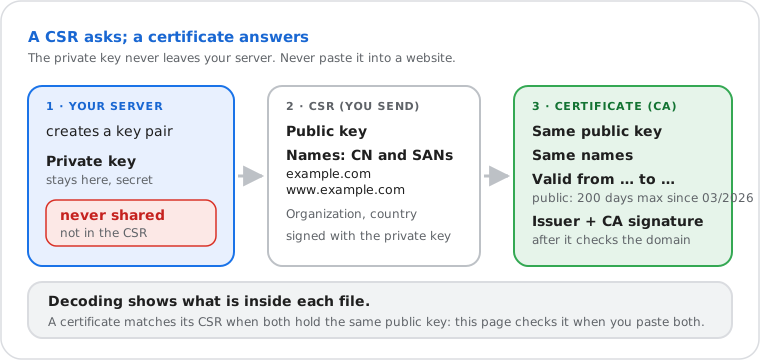
Your server, hosting panel or OpenSSL creates two keys. The private key stays secret on the server. The
CSR carries the public key and the names, and is signed with the private key to prove you hold it. The
format is PKCS #10 (RFC 2986), usually sent as Base64 text between -----BEGIN CERTIFICATE REQUEST-----
and -----END CERTIFICATE REQUEST-----. The authority checks that you control the domain,
then returns a certificate (X.509, RFC 5280) with the same public key and names, a validity period and its
own signature.
What the Decoder Shows
Every field the certificate authority will read, with what it should contain.
| Field | What it should contain |
|---|---|
| Common name (CN) | The main domain, such as www.example.com or *.example.com. Kept for compatibility: browsers read the SANs. |
| Subject alternative names (SAN) | Every name the certificate must cover: example.com and www.example.com are two names. |
| Organization (O) | The legal company name, checked for OV and EV certificates; ignored for domain-validated (DV) ones. |
| Organizational unit (OU) | Dropped from public certificates since 1 September 2022 (ballot SC47): leave it empty. |
| City, state (L, ST) | Full names, not abbreviations, for OV and EV certificates. |
| Country (C) | Two letters (ISO 3166): US, GB, FR. "USA" or "UK" is an error. |
| Public key | RSA 2048 bits or more, or ECDSA P-256 / P-384. |
| Signature | SHA-256 or stronger, and valid: it proves the request wasn't changed. |
| Certificate only | Issuer, validity dates, serial number, key usages, OCSP and CRL addresses, validation level (DV, OV, EV), Certificate Transparency timestamps, SHA-256 fingerprint. |
Do it yourself
How to Generate a CSR
Most hosting panels (cPanel's SSL/TLS page, Plesk) and servers (IIS) create the CSR and key for you, and our CSR generator makes both in your browser. With OpenSSL 1.1.1 or newer, one command makes both, with the SANs:
openssl req -new -newkey rsa:2048 -nodes -keyout example.com.key -out example.com.csr -subj "/CN=example.com" -addext "subjectAltName=DNS:example.com,DNS:www.example.com"For a smaller, faster ECDSA key, replace -newkey rsa:2048 with -newkey ec -pkeyopt ec_paramgen_curve:P-256. Keep example.com.key on the server; send only example.com.csr.
How to Decode a CSR or Certificate With OpenSSL
openssl req -in example.com.csr -noout -text -verifyopenssl x509 -in certificate.crt -noout -textFor a binary (DER) file add -inform der. To check that a certificate, its CSR and its private key belong together, compare the hash of their public keys; the three lines must print the same value:
openssl req -in example.com.csr -noout -pubkey | openssl sha256openssl x509 -in certificate.crt -noout -pubkey | openssl sha256openssl pkey -in example.com.key -pubout | openssl sha256Common CSR and Certificate Problems
Most rejected orders and browser errors come from a few mistakes the decoder flags.
| Problem | Why it matters | Fix |
|---|---|---|
| RSA key under 2048 bits | Refused by every public authority | Create a new key and CSR with rsa:2048 or ECDSA P-256 |
| SHA-1 or MD5 signature | Broken hash functions, refused | Recreate the CSR; OpenSSL uses SHA-256 by default |
| Missing SANs, or no www | The certificate won't cover the name visitors type | Add every name with -addext "subjectAltName=…" |
| Country written in full | "USA" or "United Kingdom" is invalid | Use the two-letter code: US, GB |
| Certificate doesn't match the key | The server refuses to start, or browsers show an error | Paste the CSR and the certificate above to compare their keys; reissue with the right CSR |
| Chain in the wrong order | Some clients reject the connection | Server certificate first, then each intermediate |
| Expired or about to expire | Browsers block the site | Renew; with lifetimes of 200 days and less, automate it (ACME) |
PEM, DER, CRT, PFX: Certificate File Formats
The extension doesn't say what's inside: a .crt or .cer file can be PEM text or binary DER.
| Format | What it is | On this page |
|---|---|---|
| PEM .pem .crt .cer .csr | Base64 text between BEGIN and END lines; can hold several certificates | Paste or open it |
| DER .der .cer | The same data in binary | Open the file |
| PKCS #7 .p7b .p7c | A bundle of certificates, no key | Convert first: openssl pkcs7 -print_certs -in file.p7b |
| PKCS #12 .pfx .p12 | Certificate and private key, protected by a password | Not read here (it contains the key). Extract the certificate: openssl pkcs12 -in file.pfx -clcerts -nokeys |
How This Decoder Works
| Part | Detail |
|---|---|
| Where | In your browser. The text or file never leaves your device; the page works offline once loaded. |
| Formats | CSRs (PKCS #10, RFC 2986) and X.509 certificates (RFC 5280), as PEM text or PEM/DER files, several blocks at once. |
| Signatures | Checked with the browser's Web Crypto API: the CSR's own signature; a certificate's when its issuer is pasted below it, or when it's self-signed. RSA (PKCS #1 v1.5), ECDSA P-256/P-384/P-521, and Ed25519 where the browser supports it; RSA-PSS is shown but not checked. |
| Checks | RSA under 2048 bits, curves other than P-256/384/521, SHA-1 and MD5, country codes, missing SANs, common name not among the SANs, OU, expiry and lifetime, chain order, CSR and certificate key match. |
| Not done | Revocation (OCSP, CRL) and browser trust: use the SSL checker on a live site for those. Private keys and PFX files are never read. |
| Tested against | OpenSSL 3.0 output for the same files (names, SANs, keys, extensions, fingerprints, signatures). |
| Last verified | 22 November 2026 |
Frequently Asked Questions
What is a CSR decoder?
Is it safe to paste my CSR here?
How do I check that a certificate matches my CSR?
Why does my CSR need a subject alternative name (SAN)?
What key size should a CSR use?
How long are SSL certificates valid?
Next steps