What Can Someone Do With Your IP Address?
Less than most people fear. Your IP address shows your approximate area and your internet provider, not your name or home address: only your provider can link it to you, and it does so for the police or a court. The real risks are smaller and fixable: someone flooding your connection (mostly gamers), probing your router for open ports, or banning your address.
Your IP right now216.73.216.87
- ProviderAmazon.com, Inc.: a datacenter network, often a VPN or proxy, so your own provider is hidden
- Approximate areaColumbus, Ohio, United States: where your provider's network is registered, often a nearby city, never your street
- HostnameNone: nothing more to read there
- Your name, address, phoneNot in it. Only your provider holds that link.
This is what every website you visit sees, from our own lookup (MaxMind GeoLite2); nothing is stored. How accurate is IP location?
What Someone Can and Can't Do With Your IP
They can learn your area and provider and target your connection; they can't identify you, read your traffic or walk into a protected device.
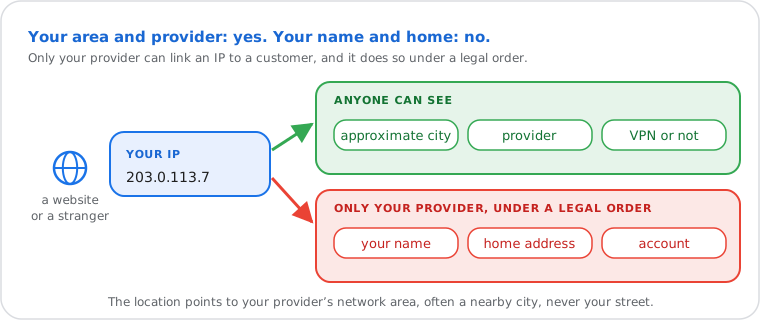
| Someone with your IP can | Someone with your IP can't |
|---|---|
| See your approximate city or region, and country | Find your street address or name |
| See your internet provider (and whether you use a VPN) | Read your messages or HTTPS browsing |
| Block or ban your address on a site, game or server | See your browsing history |
| Flood your connection (DDoS) to knock it offline | Take over a device that exposes nothing |
| Scan it for open ports and exposed devices | Get your identity from your provider (only police and courts can) |
| Match your visits across sites that compare logs | Know which device or person at home used it |
The Real Risks, and How Serious They Are
The two that matter in practice are a flooded connection and an exposed device. Both are rare for most people and easy to fix.
- DDoS (flooding your connection): someone sends so much traffic that your internet stops for a while. It mostly happens to gamers and streamers after an argument. A router restart often gives you a new address; a VPN hides the real one in games.
- Open ports and exposed devices: automated scanners try every address on the internet all day, yours included, knowing it or not. They only get in through something you've opened: a forwarded port, old remote management, a camera or NAS with a default password. Check which ports are open from the outside.
- Finding you by combining clues: your area plus your username, photos or posts can narrow things down, especially in a small town. The IP is one clue; your public profiles are usually the bigger ones.
- Bans and blocks: sites block addresses that misbehave. On shared addresses (mobile networks, CGNAT) you can be caught by someone else's ban.
- Legal identification: with a court order or police request, your provider can say which customer had an address at a given time. That's how copyright notices and criminal investigations reach a person.
Phishing emails that say "we have your IP address, pay or we'll publish your data" are bluffing: the IP doesn't give them that. Don't pay and don't reply.
How People Get Your IP Address
Anything you connect to sees it: websites, apps, game servers. Other people see it when you connect to them directly.
| Where | Who sees your IP |
|---|---|
| Websites and apps | The site, and the ad, analytics and image services on the page. Normal, and why websites can show it to you. |
| Online games, voice chat | The game's servers; other players too when the game or call connects players directly (peer-to-peer) |
| Torrents | Everyone sharing the same file |
| Big webmail services such as Gmail usually leave your IP out of emails you send; some mail programs and servers include it in the headers (see an email's headers) | |
| Links and images | Whoever runs the server: a link or a remote image in an email or chat logs your IP when opened. Some mail apps hide it by loading images through a proxy |
| Your router's logs, your provider | Your provider always knows it: it gave it to you |
Can You Find Out Who's Behind an IP Address?
You can see the provider and approximate area of an address, not the person. Abuse goes to the provider or the police, who can act on it.
- Look an address up: IP lookup shows its provider, area and whether it's a VPN or datacenter; IP WHOIS shows who it's registered to and their abuse contact.
- Spam or hacking from an address: send the evidence (time with time zone, logs, email headers) to the abuse contact. Providers act against their customers' abuse.
- Threats or harassment: report to the platform and the police; they can ask the provider who it was.
- Don't try to trick someone into revealing theirs with logging links: it's often against the platform's rules, can break privacy laws, and tells you no more than the above.
Someone Has Your IP Address: What to Do
Usually nothing urgent. If you feel targeted, get a new IP, check your router, and report threats.
- Get a new IP: restart your router; most home connections get a new address (not if yours is static). Other ways: how to change your IP address.
- Check your router: remove port forwards you don't need, turn off UPnP and remote management if unused, update the firmware, change the admin password (checklist).
- Check what's open: run the port checker on ports your devices use.
- Being flooded during games? Use a VPN while playing, and ask your provider: they can filter attacks.
- Threats: save the messages and report them to the platform and the police.
How to Protect Your IP Address
A VPN hides it from sites and other players; a secure router makes knowing it useless.
- VPN: sites, games and peers see the VPN server's address instead (what a VPN does and doesn't hide). Then check it works and that WebRTC doesn't leak your real one.
- Every way to hide it, compared: how to hide your IP address.
- Router: automatic updates, a strong admin password, no forwarded ports you don't use.
- Messages: be wary of links from strangers, and turn on your mail app's option to protect your IP or block remote images.
How IP Location Works
Location databases map blocks of addresses to the place their provider uses them, from registry records, provider data and measurements.
Providers receive blocks of addresses from regional registries and use each block in an area. Databases such as MaxMind's (which this site uses) record where each block is used; the country is almost always right, the city often only approximately, and mobile and satellite addresses can point hundreds of kilometres away. Many customers can share one address (mobile networks and CGNAT), which is another reason an IP isn't a person. Your own address, explained: what is an IP address?