192.168.1.254 — BT, EE, Plusnet and AT&T Settings
192.168.1.254 opens the settings of a provider's box: BT Hub Manager on BT, EE and Plusnet hubs, the AT&T gateway, and Free and Bouygues boxes in France. Open it while connected, and use the admin password or access code printed on the box (not the Wi-Fi key) to change settings.
Didn't open? Try the other usual addresses: 192.168.1.1192.168.0.110.0.0.1 or find yours in 30 seconds.
How to Log In to 192.168.1.254
Connect to the hub or gateway, type http://192.168.1.254 in the address bar, and enter the code from its label when asked.
- Connect to the hub's Wi-Fi or plug into one of its ports. Turn off any VPN.
- Type
192.168.1.254in the address bar (not the search box). On BT this opens Hub Manager; on AT&T, the gateway's status page. - Accept the security warning if one appears: the page is inside your home, with no public certificate.
- Enter the code when asked. BT shows its pages first and asks for the admin password when you open a setting; AT&T asks for the Device Access Code the same way.
Prefer an app? My BT (BT), the EE app, and AT&T Smart Home Manager change Wi-Fi and see devices without the code.
Which Password or Code Do You Use?
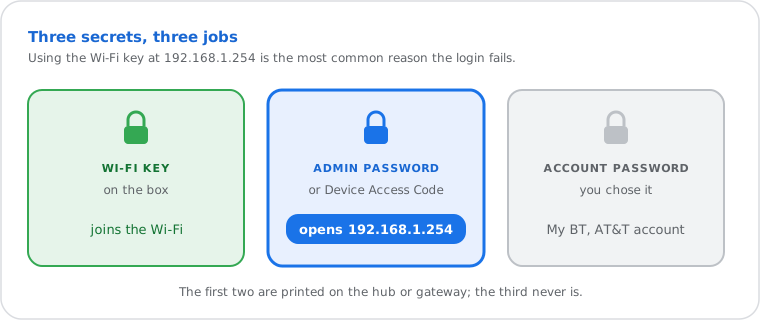
The admin password or Device Access Code printed on the box. Not the Wi-Fi key, and not your account password.
| Box | What opens the settings | Where it is |
|---|---|---|
| BT Smart Hub, Smart Hub 2, Smart Hub 3 | Admin password | Pull-out settings card on the back of the hub (also in the card's QR code) |
| Older BT Home Hubs | Admin password | Label on the hub |
| EE Smart Hub | Admin password | Card or label on the back of the hub |
| Plusnet Hub | Admin password | Label or card on the hub |
| AT&T gateways (BGW210, BGW320 and others) | Device Access Code | Label on the side or bottom of the gateway |
| Free Freebox (France) | Freebox OS password | Set at first visit; also at mafreebox.freebox.fr |
Scanning the BT card: point your phone's camera at its QR code: the text it shows has the Wi-Fi name, the Wi-Fi password and, at the end, the admin password. Handy when the print has faded.
Changed it and forgot? Holding the reset pin (about 20 seconds on BT hubs, until the lights change) puts the printed password or code back, and also erases your custom Wi-Fi name and password. On a provider box, ask the provider before resetting: they can often help remotely.
Change Your Wi-Fi Name and Password
BT: Advanced Settings › Wireless. AT&T: Home Network › Wi-Fi. Enter the code, change, save.
- Open 192.168.1.254.
- BT, EE, Plusnet: Advanced Settings › Wireless, then the admin password. AT&T: Home Network › Wi-Fi, then the Device Access Code.
- Change the network name and password (12 characters or more, WPA2 or WPA3). BT hubs show one name for both bands; if yours lists 2.4 GHz and 5 GHz separately, change both.
- Save, then reconnect every device with the new password.
Port Forwarding and Using Your Own Router
AT&T: Firewall › NAT/Gaming. BT: the Firewall section of Advanced Settings. For your own router, AT&T uses IP Passthrough.
- Port forwarding on AT&T: Firewall › NAT/Gaming, enter the Device Access Code, choose or create the service, and pick the device under "Needed by Device". Older gateways call it Applications, Pinholes and DMZ.
- Port forwarding on BT: Advanced Settings › Firewall, then add the ports for the device. Full walkthrough and the usual game ports: how to set up port forwarding; then check the port.
- Your own router behind AT&T: the gateway has no true bridge mode; turn on IP Passthrough for your router. The gateway page stays at 192.168.1.254 from a device plugged into the gateway.
- Your own router with BT: on full fibre, a router of your own can take the hub's place at the fibre box; otherwise keep the hub and use your router as an access point, so the two don't route twice.
192.168.1.254 Not Working? Try These Fixes
Usually the device isn't on the hub's network, something sits between you and the hub, or the address was mistyped.
- On the right network? On the hub's Wi-Fi or cable, with mobile data and VPN off.
- Own router or mesh in front? Your device then talks to that router instead (often 192.168.1.1 or 192.168.0.1). Plug a laptop straight into the hub to reach 192.168.1.254.
- Typed right?
192.168.1.254, not192.168.l.254(letter l),192.168.1.25or192.168.254.1. The last one is a real address, but another router's. - http or https: most gateways use
http://; some newer AT&T models ask forhttps://192.168.1.254. - Restart the hub (power off 30 seconds). Then try another browser.
Find Your Router's Real Address
Your device knows it: it's the "Default Gateway" (Windows) or "Router" (Apple) in your network details.
On Windows: open Command Prompt, type ipconfig and read "Default Gateway".
Other devices, step by step: how to find your router's IP address.
Why .254 Instead of .1?
Just a choice: 192.168.1.254 is the last usable address of the private network 192.168.1.0/24 (RFC 1918), and some providers put the router there.
The router sits at the top and hands your devices addresses lower down (AT&T gateways, for example, usually start at 192.168.1.64). Like any 192.168.x.x address it only works inside your home; websites see your public IP address. More: public vs private IP addresses and what the /24 means.
Frequently Asked Questions
What is 192.168.1.254?
What is the BT Hub admin password?
What is the AT&T Device Access Code?
Why won't 192.168.1.254 open?
ipconfig or in your Wi-Fi details.