10.0.0.1 — Xfinity and Rogers Gateway Admin Tool
10.0.0.1 opens the Admin Tool of Xfinity (Comcast) gateways, and of Rogers and Shaw gateways in Canada. Sign in with the username admin and your Admin Tool password. Everyday changes (Wi-Fi password, devices, port forwarding) are in the provider's app; the Admin Tool is for bridge mode, status and a few advanced settings.
Not on Xfinity or Rogers? Your router probably uses 192.168.1.1192.168.0.1192.168.1.254 (find yours in 30 seconds).
How to Log In to 10.0.0.1
On Xfinity, turn on Admin Tool access in the app, then open http://10.0.0.1 and sign in as admin.
- Xfinity only: allow access first. In the Xfinity app, open the WiFi tab and turn on Admin Tool access (Xfinity may have switched it off). The app may ask you to create the Admin Tool password at that point.
- Connect a phone or computer to the gateway's Wi-Fi or a cable. For bridge mode changes, use a cable.
- Open
http://10.0.0.1in the address bar. Rogers asks forhttps://10.0.0.1; accept the security warning (Advanced › Proceed), it's normal on a home network. - Sign in: username
adminand the password below. - When you're done on Xfinity, turn Admin Tool access back off in the app, as Xfinity advises.
Username and Password for 10.0.0.1
Username admin. Password: the one you set, the code on the gateway sticker, or "password" on older gateways after a reset.
| Gateway | Password to try |
|---|---|
| Xfinity, access just turned on in the app | The Admin Tool password you created in the app |
| Xfinity, newer gateways | The case-sensitive default password printed on the sticker on the bottom or side |
| Xfinity, older gateways after a factory reset | password (all lowercase) |
| Rogers Xfinity Gateway | The unique code printed on the bottom of the gateway |
| Older Rogers Ignite and Shaw gateways | password, then you're asked to choose a new one |
Not the same as: your Wi-Fi password, or your Xfinity or MyRogers account password. Those open different things.
Forgot it? A factory reset brings back the default: hold the reset pin (or, on some Xfinity gateways, the WPS button) for 30 to 60 seconds. It also erases your Wi-Fi name and password and turns bridge mode off.
The App or the Admin Tool?
The app for Wi-Fi, devices and port forwarding; 10.0.0.1 for bridge mode, the connection status and the admin password.
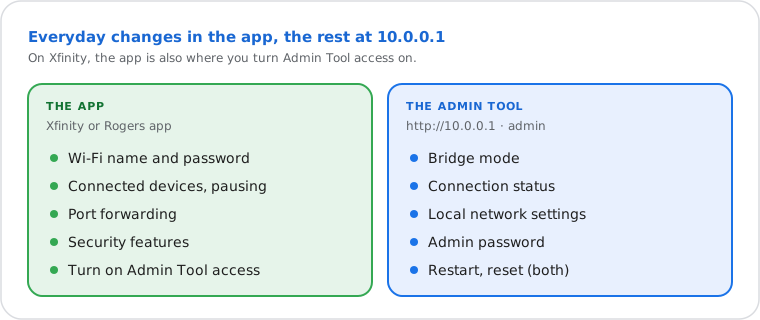
- Wi-Fi name and password: Xfinity app › WiFi, then your network's settings. On Rogers, the Rogers app (Ignite HomeConnect on older gateways).
- Port forwarding on Xfinity: app › WiFi › View WiFi equipment › Advanced settings › Port forwarding (step by step).
- Bridge mode, status, admin password: the Admin Tool at 10.0.0.1.
- Reset or restart: both. Rogers: Admin Tool › Troubleshooting › Reset/Restore Gateway.
Bridge Mode: Use Your Own Router
Admin Tool › Gateway › At a Glance › Bridge Mode › Enable. The gateway becomes a plain modem and your router does the rest.
- Plug your own router's WAN (internet) port into the gateway.
- Sign in at 10.0.0.1, open Gateway › At a Glance and set Bridge Mode to Enable.
- The gateway's Wi-Fi turns off. Restart your router so it gets the public IP; your devices now use your router's address.
What you give up: the provider's Wi-Fi features (Xfinity's app controls, device pausing, Advanced Security, its hotspot) stop working in bridge mode. To undo it, plug a computer into the gateway with a cable, sign in at 10.0.0.1 and set Bridge Mode to Disable. If the Admin Tool won't let you in, a factory reset clears bridge mode.
In bridge mode, 10.0.0.1 may still answer from a device plugged into the gateway, which is handy to read its connection status. Cable modems you own show the same at 192.168.100.1.
10.0.0.1 Not Working? Try These Fixes
Most often the Admin Tool is switched off in the app, the device isn't on the gateway's network, or your router isn't an Xfinity or Rogers gateway at all.
- Turn on Admin Tool access in the Xfinity app (WiFi tab), then try again.
- Check the connection: on the gateway's Wi-Fi or a cable, mobile data and VPN off. Behind your own router or mesh, you reach that router instead.
- "Username or password is incorrect": try the sticker code, then
password, then the one you created. Watch for a space added by autofill, and try a private window without password managers. - Typed right?
10.0.0.1: four numbers.10.0.0.0.1or10.0.0.ldon't exist. - Other gateways: some routers use 10.0.0.138 or 10.0.1.1 instead (older Telstra modems, Apple AirPort). Default Gateway tells you.
Find Your Router's Real Address
Your device knows it: it's the "Default Gateway" (Windows) or "Router" (Apple) in your network details.
On Windows: open Command Prompt, type ipconfig and read "Default Gateway".
Other devices, step by step: how to find your router's IP address.
What Is 10.0.0.1, Technically?
The first address of 10.0.0.0/8, the largest private range in RFC 1918; Xfinity gateways use 10.0.0.1 for themselves.
Your devices get nearby addresses such as 10.0.0.2 to 10.0.0.253. Private addresses never travel on the internet, so millions of homes use 10.0.0.1 at once; websites see your public IP address instead. Is an address private or public? Check it here.