1
Read the Verdict
Read the verdict: Proxy detected, Tor detected, VPN or proxy likely, or No proxy detected. Each of the three checks below it shows what it found.
Proxy Checker |
Proxy Checker tells you whether your connection goes through a proxy, Tor or a VPN, using three checks on the IP address websites see: proxy addresses in the X-Forwarded-For header, the Tor Project's exit node list, and whether the IP belongs to a datacenter or VPN-provider network. A VPN or proxy that uses a home IP address and adds no header cannot be detected this way.
Open the Proxy Checker page. It shows the IP address websites see and checks it automatically.
What each check can see depends on the type of proxy. The header check depends on what the proxy writes in X-Forwarded-For; the network check depends on where the proxy's IP comes from.
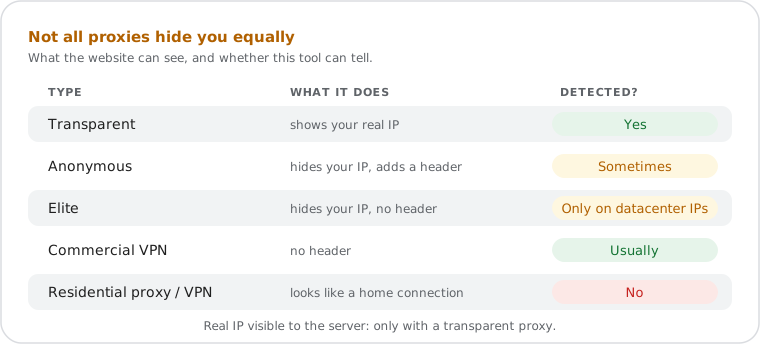
| Proxy Type | X-Forwarded-For Header | Real IP Visible to Server | Detected by This Tool |
|---|---|---|---|
| Transparent | Present — includes real client IP | Yes | ✅ Yes |
| Anonymous | Present — proxy IP or a fake address, real IP hidden | No | Only if it adds an address other than its own, or runs on a datacenter network |
| Elite (High-Anonymity) | Absent — suppressed by the proxy | No | Only if it runs on a datacenter network |
| Commercial VPN | Absent | No | Usually — most exit from datacenter networks |
| Residential proxy or VPN | Absent | No | ❌ No — looks like a home connection |
A "No proxy detected" result therefore means your connection is direct, or you use a proxy or VPN with a home IP address that adds no header. These two cases look the same from the server.
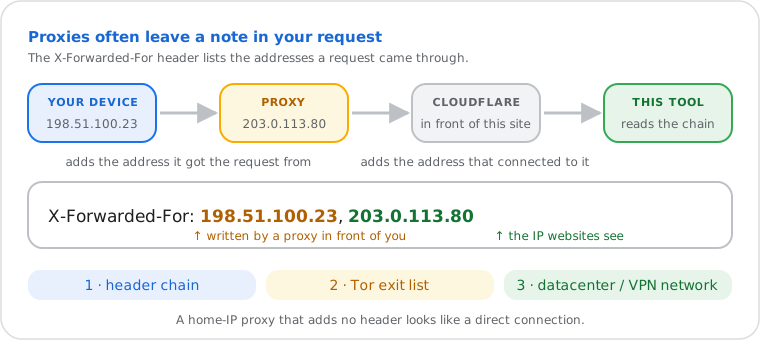
When an HTTP request passes through a proxy server, the proxy typically appends its IP address
and the original client IP to the X-Forwarded-For header before forwarding the
request. The result is a comma-separated chain of IP addresses recording every intermediate hop.
RFC 7239 (Forwarded HTTP Extension) standardizes this concept through the formal
Forwarded header, though X-Forwarded-For remains the dominant
de facto implementation across proxy software.
This site runs behind Cloudflare, which adds the address that connected to it (the IP websites see) to the end of the header. This tool reads the full X-Forwarded-For chain and labels each address: your IP, Cloudflare's published IPv4 and IPv6 ranges (this site's own network), or an address added before your request reached Cloudflare. That last kind was written by a proxy in front of you, and is usually the address the proxy received your request from — your device or the previous hop — not the proxy itself. Only IP addresses are read; anything else in the header is shown as "Not an IP address".
The two other checks look at the IP itself. The Tor check compares it with the Tor Project's public list of exit nodes, downloaded again every hour. The network check finds the IP's autonomous system (ASN) in the GeoLite2 database and looks it up in a list of about 940 hosting, datacenter and VPN-provider networks. The same two checks power the Privacy line on the What Is My IP page.
Corporate network audit. A sysadmin at a mid-size company notices unexpected source IPs in application logs from internal users. Running Proxy Checker from a workstation inside the network shows "Proxy detected": the corporate firewall added the workstation's internal address (such as 10.0.4.17) to the X-Forwarded-For header — confirming that outbound traffic goes through a proxy before reaching the internet. This is expected behavior in many enterprise environments and is used for traffic filtering and logging.
Verifying proxy type before a privacy-sensitive task. A user has configured an anonymous proxy for a specific browsing session. Before proceeding, they visit Proxy Checker. The header check is clean, but the verdict is "VPN or proxy likely": the proxy's IP belongs to a hosting network. Websites using the same kind of network data will treat the visit as proxied. The user now knows the real IP is hidden, but the proxy itself is visible.
ISP transparent proxy discovery. A user in a region where ISPs commonly intercept traffic expects to see "No Proxy Detected." Instead, the header check lists an address added by a proxy, often a private or carrier-grade NAT address (such as 100.64.12.9) from the ISP's network. This confirms the ISP is routing connections through a transparent caching or content-filtering proxy — a practice common in some regions that most users are unaware of. RFC 7239 permits intermediaries to document themselves in the Forwarded header precisely for transparency in such deployments.