DNS_PROBE_FINISHED_NXDOMAIN: What It Means and How to Fix It
Check whether the site exists, find out whose side the problem is on, then fix it.
DNS_PROBE_FINISHED_NXDOMAIN means the DNS server said the site's name doesn't exist. Check the spelling first, then test the domain below: if it exists, the problem is on your side, and clearing the DNS cache, turning off a VPN or blocker, or switching to a public DNS server fixes it. If it doesn't exist, only the site owner can fix it.
What Does DNS_PROBE_FINISHED_NXDOMAIN Mean?
It means your browser couldn't find the site's IP address because a DNS server answered NXDOMAIN, "non-existent domain": as far as that server knows, the name doesn't exist.
Every visit starts with a DNS lookup that turns the name, such as example.com, into an IP address (how DNS works). NXDOMAIN is DNS answer code 3, "Name Error" in RFC 1035. When the lookup fails, Chrome runs a quick test, the "DNS probe": it asks your own DNS server and Google Public DNS (8.8.8.8) for google.com, a name that surely exists. If your DNS server answers that test correctly, it's working, so Chrome concludes that the site's name really doesn't exist and shows DNS_PROBE_FINISHED_NXDOMAIN. On Android, Chrome often can't test your DNS server; then Google's answer alone decides.
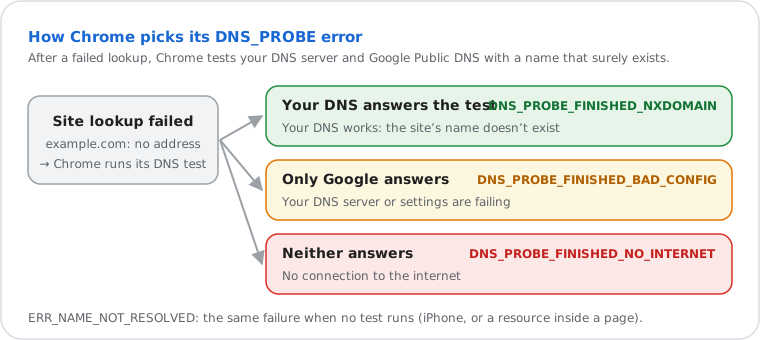
Edge, Brave, Opera and Vivaldi are built on the same engine (Chromium) and usually show the same code. Firefox says "Hmm. We're having trouble finding that site", and Safari says "Safari Can't Find the Server": the same problem in other words.
Whose Side Is It On? The Usual Causes
If the test above finds the domain, the cause is on your side; if it says the domain doesn't exist, it's the address or the website.
| Cause | Side | What to do |
|---|---|---|
| A typo in the address, or an old link | Address | Check each letter and the ending (.com, .co, .net) |
| Domain expired or not registered | Website | The owner renews it; look up the expiry with domain WHOIS |
| New domain or new subdomain without DNS records | Website | The owner adds an A or CNAME record (see site owners) |
| A wrong or old answer in a cache | You | Clear Chrome's and your device's DNS cache |
| VPN, ad blocker or security app | You | Turn it off for a minute and reload |
| Your DNS server blocks the domain | You | Quad9, ad-blocking DNS and parental controls answer "doesn't exist" for what they block |
| Your DNS server is failing | You | Restart the router, or switch to 1.1.1.1 or 8.8.8.8 |
How to Fix DNS_PROBE_FINISHED_NXDOMAIN, in Order
Start with the quick checks; each step fixes a different cause, so reload the site after each one.
- Check the address and test the domain with the check at the top of this page. If the domain doesn't exist, stop here: nothing on your device can fix it.
- Try another device or mobile data. If the site opens there, the problem is on this device; if it fails on every device at home, it's the router or your provider's DNS.
- Turn off your VPN, ad blocker or antivirus web protection for a minute, and reload.
- Clear Chrome's DNS cache: open
chrome://net-internals/#dnsand click Clear host cache (in Edge,edge://net-internals/#dns). - Check Chrome's secure DNS: Settings › Privacy and security › Security › Use secure DNS. A custom provider that blocks sites can answer "doesn't exist"; choose "OS default (when available)" to test.
- Flush your device's DNS cache: on Windows,
ipconfig /flushdns; every system in how to flush DNS. - Restart the router: unplug it for 30 seconds. It keeps its own DNS cache.
- Switch to a public DNS server: Cloudflare 1.1.1.1 or Google 8.8.8.8, on the device or the router (how to change DNS). If the site opens now, your previous DNS server was the problem.
- Reset the network settings if nothing else worked: the commands are below, and more in DNS server not responding.
Steps for Windows, Mac, Android and iPhone
The steps for the system you're using are open below.
Windows 11 and 10
- Right-click Start and open Terminal (Admin) or Command Prompt (Admin).
- Run these commands one by one, then restart the computer:
ipconfig /flushdns
ipconfig /release
ipconfig /renew
netsh winsock reset
ipconfig /release disconnects you for a moment; /renew reconnects.
netsh winsock reset clears network settings that VPNs and security apps sometimes leave behind.
Mac
- Open Terminal, run the command and type your password:
sudo dscacheutil -flushcache; sudo killall -HUP mDNSResponder- Turn Wi-Fi off and on from the menu bar.
- Still failing: System Settings › Network › Wi-Fi › Details › DNS, and add 1.1.1.1 and 8.8.8.8.
Android
- Turn Airplane mode on, wait 10 seconds, turn it off.
- Check Settings › Network & internet › Private DNS (on Samsung: Connections › More connection settings). A provider hostname that blocks sites can cause the error: set it to Automatic to test (what Private DNS is).
- Turn off VPN and ad-blocking apps.
- In Chrome: Settings › Privacy and security › Delete browsing data › Cached images and files.
iPhone and iPad
Chrome on iPhone doesn't run the DNS test, so it shows a plain error such as ERR_NAME_NOT_RESOLVED; Safari says it can't find the server.
- Turn Airplane mode on and off in Control Center.
- Turn off any VPN (Settings › VPN) and ad-blocking or security apps.
- On Wi-Fi: Settings › Wi-Fi › (i) › Configure DNS › Automatic, or Manual with 1.1.1.1 and 8.8.8.8.
- Still failing: Settings › General › Transfer or Reset iPhone › Reset › Reset Network Settings (Wi-Fi passwords are deleted).
Your Own Site Shows DNS_PROBE_FINISHED_NXDOMAIN
If the test above says your domain or subdomain doesn't exist, the fix is in your DNS: the domain's name servers, or a missing record.
- Is the domain still registered? Look up its status and expiry with the domain WHOIS lookup. An expired domain stops resolving.
- Do its name servers point to your DNS host? The NS lookup shows them; they must match the ones your host (GoDaddy, Cloudflare, your web host) gives you. A new domain often still points to the registrar's parking servers.
- Is there a record for the name? Add an A record (or CNAME) for the domain itself (
@) and forwww. WordPress sites need both if the site's address uses www. Check with the DNS lookup. - Just fixed it? DNS servers that already answered NXDOMAIN keep that answer for the negative-caching time in your SOA record (RFC 2308). Follow it with the DNS propagation checker.
ERR_NAME_NOT_RESOLVED is the same failure without Chrome's DNS test: the name couldn't be turned into an address. The other DNS_PROBE codes say where the test failed.
| Error | What Chrome's test found | Fix |
|---|---|---|
| DNS_PROBE_FINISHED_NXDOMAIN | Your DNS server works and says the name doesn't exist | The steps on this page |
| ERR_NAME_NOT_RESOLVED | No test (iPhone, or a resource inside a page); the name didn't resolve | The same steps; developers: check the host name in the failing request |
| DNS_PROBE_FINISHED_BAD_CONFIG | Your DNS server fails, Google Public DNS works | Restart the router or switch DNS: DNS server not responding |
| DNS_PROBE_FINISHED_BAD_SECURE_CONFIG | Chrome's secure DNS provider fails, Google Public DNS works | Settings › Privacy and security › Security › Use secure DNS: choose "OS default (when available)" or another provider in "Select DNS provider" |
| DNS_PROBE_FINISHED_NO_INTERNET | Neither answers: no connection | Check Wi-Fi and the router |
| DNS_PROBE_STARTED | The test is still running | Reload; if it stays, follow the steps above |
Frequently Asked Questions
What does DNS_PROBE_FINISHED_NXDOMAIN mean?
Is DNS_PROBE_FINISHED_NXDOMAIN my problem or the website's?
How do I fix DNS_PROBE_FINISHED_NXDOMAIN in Chrome?
How do I fix DNS_PROBE_FINISHED_NXDOMAIN on Android?
What is ERR_NAME_NOT_RESOLVED?
What is NXDOMAIN?
I just bought my domain. Why does it show DNS_PROBE_FINISHED_NXDOMAIN?
Can a DNS server block a site with NXDOMAIN?
What is an NXDOMAIN attack?
Next steps