How to Flush DNS (Clear the DNS Cache)
One command per system, what the DNS cache is, and when clearing it actually helps.
To flush DNS on Windows, open Command Prompt and run ipconfig /flushdns. On a Mac, run
sudo dscacheutil -flushcache; sudo killall -HUP mDNSResponder in Terminal. On a phone, turn Airplane
mode on and off. Chrome keeps its own cache: open chrome://net-internals/#dns and click
Clear host cache.
No button can do it for you
A web page can't clear your device's DNS cache, so this page shows the command for your system (it's open below) with a copy button. To see whether a site's address has really changed, look it up with our DNS lookup or the DNS propagation checker.
Flush DNS Commands for Every System
One command per system: run it, then reload the site. On phones there's no command: Airplane mode on and off, or a restart, is the usual way to clear it.
| System | Flush DNS command | Where to run it |
|---|---|---|
| Windows 11 and 10 | ipconfig /flushdns | Command Prompt (cmd) |
| Windows, PowerShell | Clear-DnsClientCache | PowerShell or Windows Terminal |
| Mac (macOS) | sudo dscacheutil -flushcache; sudo killall -HUP mDNSResponder | Terminal, then your password |
| Linux | sudo resolvectl flush-caches | Terminal (systemd-resolved) |
| Chrome, Edge | chrome://net-internals/#dns | Address bar › Clear host cache (Edge: edge://) |
| Firefox | about:networking#dns | Address bar › Clear DNS Cache |
What Is the DNS Cache?
The DNS cache is a short list of website addresses your device remembers, so it doesn't ask a DNS server again every time you open the same site.
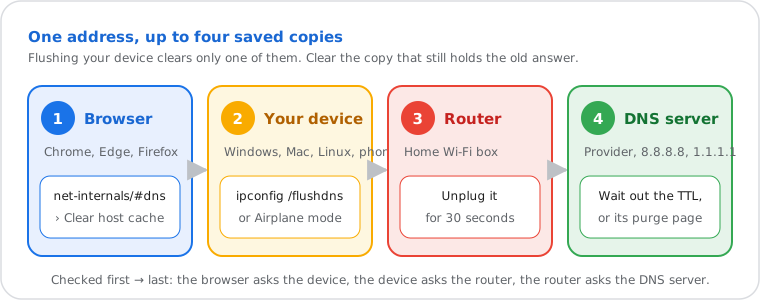
When you open a site, your device asks a DNS server for its IP address and keeps the answer for as long as the site's owner allows: the TTL (time to live) that comes with every DNS answer, defined in RFC 1035. It can be a minute or a day. Your browser keeps a second copy, your router often a third, and your DNS server a fourth.
Flushing empties your device's copy. The next lookup goes back to the DNS server and gets the current address.
When Flushing DNS Helps, and When It Doesn't
Flush it when a site moved, won't open on one device only, or shows an old version; it won't make your internet faster.
| Situation | Does flushing help? |
|---|---|
| A site moved to a new server or host | Yes: your device drops the old address |
"DNS server not responding", DNS_PROBE_FINISHED_NXDOMAIN | Often, together with a router restart: see DNS server not responding and DNS_PROBE_FINISHED_NXDOMAIN |
| You just changed your DNS server | Yes: answers from the old server are cleared |
| A site opens on your phone but not on your computer | Yes, on the computer |
| Your whole internet is slow | No: DNS is only the first step; run a speed test. If only the start of each page is slow, compare DNS servers with the DNS speed test |
| The site is down for everyone | No: the problem is on its side |
| You suspect a forged answer (DNS cache poisoning) | Yes on your device; DNS servers that validate DNSSEC (RFC 4033) reject forged answers |
How to Flush DNS on Your System
The steps for the system you're using are open below.
Windows 11 and 10
- Press the Windows key, type cmd and open Command Prompt.
- Run the command below. Windows answers "Successfully flushed the DNS Resolver Cache."
ipconfig /flushdnsIn PowerShell, Clear-DnsClientCache does the same. To see what's in the cache first, run
ipconfig /displaydns.
Mac
- Open Terminal (Applications › Utilities, or Spotlight: Cmd + Space, "Terminal").
- Run the command below and type your password (nothing shows while you type). There's no confirmation message.
sudo dscacheutil -flushcache; sudo killall -HUP mDNSResponderLinux
Most current distributions (Ubuntu, Fedora, Debian with systemd-resolved) cache DNS in systemd-resolved:
sudo resolvectl flush-cachesresolvectl statistics shows the cache size before and after. Some systems have no local DNS cache at
all; then there's nothing to flush, and only the browser keeps one.
iPhone and iPad
- Turn Airplane mode on in Control Center, wait 10 seconds, turn it off.
- Still the old site: restart the iPhone. iOS has no command to clear the DNS cache, so these are the usual ways.
Android
- Turn Airplane mode on, wait 10 seconds, turn it off, or restart the phone.
- In Chrome on Android, open
chrome://net-internals/#dnsand tap Clear host cache.
ChromeOS
Open chrome://net-internals/#dns in a tab and click Clear host cache, or restart the Chromebook.
Clear the Browser's DNS Cache: Chrome, Edge and Firefox
Browsers keep their own DNS cache, separate from the system's: clear it too when one site still shows its old address.
- Chrome: open
chrome://net-internals/#dns› Clear host cache, thenchrome://net-internals/#sockets› Flush socket pools so open connections to the old address close. - Edge: the same pages at
edge://net-internals/#dnsandedge://net-internals/#sockets. - Firefox: open
about:networking#dns› Clear DNS Cache. - Safari: uses the Mac's cache: the Terminal command above clears it.
Clearing the DNS cache doesn't delete your history, cookies or saved passwords.
The Router's DNS Cache
Most home routers keep a DNS cache too: restarting the router clears it.
Unplug the router for 30 seconds and plug it back in. Do this when every device at home gets the old address, or right after changing the DNS server on the router.
Clear a Domain From Google's or Cloudflare's DNS Cache
If you use Google Public DNS or Cloudflare 1.1.1.1, they keep their own copy of each answer; both offer a free page to clear one domain from it.
- Google Public DNS (8.8.8.8): the Flush Cache page at
developers.google.com/speed/public-dns/cache: enter the domain, pick the record type (A, AAAA, MX…), confirm. After a change of registrar or DNS host, flush the main domain first, then its subdomains. - Cloudflare (1.1.1.1): the Purge Cache page at
one.one.one.one/purge-cache: enter the domain and the record type. Cloudflare said in 2018 that its resolver keeps answers for at most 3 hours anyway.
This clears their copy for everyone using them, which is what site owners need after moving a site or changing mail (MX) records. Your own device still needs its local flush, above.
Still the Old Site After Flushing?
Then a cache you don't control still holds the old answer: your DNS server's, until the TTL runs out.
- Check what the world sees: the DNS propagation checker asks DNS servers in many countries. If most show the new address, yours will follow.
- Check what one server answers, and the TTL left, with the DNS lookup.
- Don't want to wait: switch to a public DNS server, which may already have the new answer, then flush again.
Frequently Asked Questions
What does flushing DNS do?
Is it safe to flush DNS?
How often should I flush DNS?
Why does a site still load the old address after flushing?
How do I see what's in my DNS cache?
What is DNS cache poisoning?
Do I need administrator rights to flush DNS?
Next steps