What Is Private DNS?
Android's Private DNS, its three modes, the best hostnames, and DNS over HTTPS on computers and iPhones.
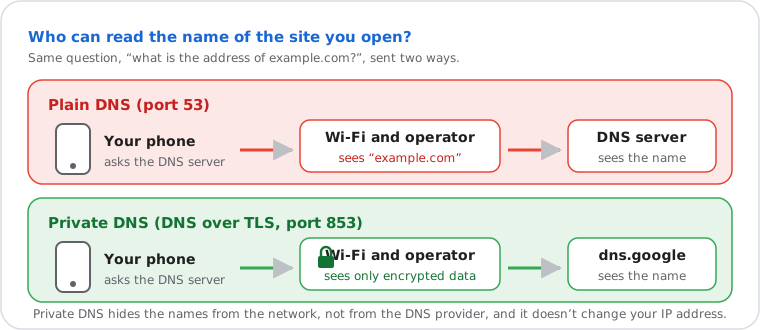
Private DNS is an Android setting that encrypts your phone's DNS lookups, the questions "what's the address of this
site?", so your Wi-Fi network and your mobile operator can't read or change them. Set it to a provider's hostname,
such as dns.google or one.one.one.one: Settings › Network & internet › Private DNS.
Computers and iPhones do the same with DNS over HTTPS, which Chrome calls secure DNS.
Which DNS service answers your lookups right now?
A web page can't see whether your phone encrypts its DNS, but our DNS leak test shows which DNS service answers you: your provider's, a public one like Cloudflare or Google, or your VPN's.
Private DNS Modes: Off, Automatic and Provider Hostname
Android offers three choices; only "Private DNS provider hostname" guarantees your lookups are encrypted.
| Mode | What it does | Encrypted? |
|---|---|---|
| Off | Uses the DNS server of your Wi-Fi or mobile network, unencrypted | No |
| Automatic (default) | Tries to encrypt with your network's DNS server; falls back to unencrypted if it can't | Only if your network supports it |
| Private DNS provider hostname | Always uses the provider you enter, encrypted with DNS over TLS; no answer if it can't be reached | Yes |
How to Set Up Private DNS on Android
Settings › Network & internet › Private DNS › Private DNS provider hostname › type the hostname › Save.
Pixel and most Android phones
- Open Settings › Network & internet › Private DNS.
- Choose Private DNS provider hostname and type one from the table below, for example
dns.google. - Tap Save. It applies on Wi-Fi and mobile data, for every app.
Samsung Galaxy
Settings › Connections › More connection settings › Private DNS › Private DNS provider hostname › type the hostname › Save.
Xiaomi, Oppo, vivo, realme, OnePlus, Infinix and others
The menu name changes from brand to brand (Connection & sharing, More connections, Other wireless connections…): open Settings and type Private DNS in its search bar, then choose "Private DNS provider hostname".
Private DNS takes a hostname, not an IP address: typing 8.8.8.8 there doesn't work.
Best Private DNS Hostnames
Pick by what you want blocked: nothing, malicious sites, ads, or adult content too. The hostname is sometimes called the "Private DNS code" or name.
| Provider | Private DNS hostname | Blocks |
|---|---|---|
| dns.google | Nothing | |
| Cloudflare | one.one.one.one | Nothing |
| Quad9 | dns.quad9.net | Malware and phishing domains |
| AdGuard | dns.adguard-dns.com | Ads, trackers and phishing |
| Cloudflare, malware | security.cloudflare-dns.com | Malware |
| Cloudflare, family | family.cloudflare-dns.com | Malware and adult content |
| AdGuard Family | family.adguard-dns.com | Ads, trackers, adult content |
Every IPv4, IPv6 and DNS over HTTPS address: best free public DNS servers. Which one is fastest from where you are: the DNS speed test.
Private DNS for Ad Blocking, Speed and Gaming
For fewer ads, use AdGuard's hostname; for speed, pick the provider that answers fastest where you are; for gaming, Private DNS doesn't change your ping.
- Ad blocking:
dns.adguard-dns.comrefuses the names of known ad and tracking servers, in every app and browser on the phone. Some ads served from the same servers as the content stay, and a few apps or sites may break: switch back todns.googleto test. - "High-speed internet": no DNS setting raises your download speed. A fast DNS provider only shortens the lookup before each new connection, a few to a few dozen milliseconds. Our DNS speed test shows which provider answers fastest from your connection.
- Gaming: your ping in a match depends on the route to the game server, not on DNS. DNS can only make matchmaking, store and downloads start a little sooner: best DNS for gaming.
"Private DNS Server Cannot Be Accessed"
Android can't reach the hostname you set, so it has no DNS on this network: check the hostname, try another network, or switch to Automatic.
- Check the hostname: just the name, such as
dns.google, with nohttps://and no slash. - Try mobile data: if it works there, the Wi-Fi blocks port 853, which Private DNS uses (common on work, school and hotel networks). Set Private DNS to Automatic on that network.
- Try another provider: switch to a different hostname from the table above.
- Still failing: Settings › System › Reset options › Reset Bluetooth & Wi-Fi (older Android: Reset Wi-Fi, mobile & Bluetooth). More fixes: DNS server not responding.
Private DNS on iPhone
iPhones have no Private DNS switch: encrypted DNS comes from a configuration profile or an app from the DNS provider.
- An app: Cloudflare's 1.1.1.1 app turns on encrypted DNS for the whole iPhone.
- A profile: some DNS providers offer a configuration profile to install. Installed profiles appear in Settings › General › VPN & Device Management, where you can remove them.
- Unencrypted only: Settings › Wi-Fi › ⓘ › Configure DNS changes the DNS server for one Wi-Fi network, without encryption: how to change DNS.
"This Network Is Blocking Encrypted DNS Traffic" on iPhone
Your iPhone is set to use encrypted DNS and this network stops it, so it falls back to normal DNS there: the network can see the names of the sites you visit.
The warning appears under Settings › Wi-Fi, below the network's name. It's not an attack. iOS doesn't encrypt DNS on its own: the warning shows up when a profile, an app or a VPN asked for encrypted DNS and the network's router or firewall blocks it. What to do:
- On a public or work network: nothing is wrong with your phone; the network filters DNS. If privacy matters there, use a VPN, which encrypts everything.
- On your home network: restart the router; then look in its settings for a "security", "web protection" or parental filter that blocks encrypted DNS, and turn it off, or update the router.
- Check what set it up: Settings › General › VPN & Device Management. Remove a DNS profile you no longer use, or open the app that installed it.
- Still there: Settings › General › Transfer or Reset iPhone › Reset › Reset Network Settings (you'll need to enter Wi-Fi passwords again).
Private DNS, DNS over TLS and DNS over HTTPS
Private DNS is DNS over TLS (DoT, port 853); computers and browsers mostly use DNS over HTTPS (DoH, port 443). Both encrypt the same questions; classic DNS sends them in the clear on port 53.
| Classic DNS | DNS over TLS | DNS over HTTPS | |
|---|---|---|---|
| Standard | RFC 1035 | RFC 7858 | RFC 8484 |
| Port | 53 | 853 | 443 |
| Encrypted | No | Yes | Yes |
| Configured with | An IP (8.8.8.8) | A hostname (dns.google) | A URL (https://dns.google/dns-query) |
| Where | Everywhere | Android Private DNS, routers, Linux | Chrome, Edge, Firefox, Windows 11, iPhone profiles |
Because DNS over HTTPS uses the same port as every secure website, a network can't easily single it out or block it; DNS over TLS has its own port, 853, which is why some Wi-Fi networks block Private DNS. Speed is about the same as classic DNS.
How to Turn On DNS over HTTPS on a Computer
Turn it on in the browser for that browser only, or in Windows 11 for every app.
Chrome, Edge and Firefox (one browser)
- Chrome: Settings › Privacy and security › Security › Use secure DNS › "Select DNS provider" (Cloudflare, Google…), or keep "OS default (when available)".
- Edge: Settings › Privacy, search, and services › Security › Use secure DNS.
- Firefox: Settings › Privacy & Security › DNS over HTTPS › Increased or Max Protection.
Windows 11 (every app)
Settings › Network & internet › Wi-Fi or Ethernet › your connection's properties › DNS server assignment
› Edit › Manual › IPv4 on › enter 1.1.1.1 (or 8.8.8.8, 9.9.9.9) › DNS over HTTPS: On (automatic template)
› Save. Do the same for the alternate address.
How to Turn Off Private DNS or Secure DNS
Set Private DNS to Automatic or Off on Android, turn "Use secure DNS" off in Chrome or Edge, or remove the profile on iPhone.
- Android, every app: Settings › Network & internet › Private DNS › Off or Automatic.
- Chrome on Android: Chrome's menu › Settings › Privacy and security › Use secure DNS › off.
- Chrome on a computer: Settings › Privacy and security › Security › Use secure DNS › off.
- Firefox: Settings › Privacy & Security › DNS over HTTPS › Off.
- Windows 11: DNS server assignment › Edit › DNS over HTTPS › Off, or set DNS back to Automatic (DHCP).
Turn it off when a work, school or hotel network needs its own DNS (to reach internal sites, or to sign in on a Wi-Fi portal), or when a family filter on the router must apply: Private DNS and secure DNS go around the router's DNS.
What Private DNS Hides, and What It Doesn't
It hides your lookups from the network and your operator, but your DNS provider still sees them, and your operator still sees which IP addresses you connect to.
| Who | Plain DNS | Private DNS or DoH | VPN |
|---|---|---|---|
| Your Wi-Fi network | Sees the names | Doesn't see the names | Sees nothing |
| Your internet or mobile provider | Sees the names | Sees the IP addresses, often the site names | Sees only the VPN |
| The DNS provider | Sees the names | Sees the names | The VPN's DNS sees them |
| Websites | See your IP | See your IP | See the VPN's IP |
Site names often stay visible because the start of each secure connection still carries the site's name, for the server to pick the right certificate. To hide your IP address too, you need a VPN: see what a VPN does.
Private DNS vs Public DNS, and Private DNS on Company Networks
"Private DNS" has a second meaning: a DNS server only a company's own network can use, for its internal names.
- Public DNS (Google, Cloudflare, Quad9) answers anyone on the internet. Android's Private DNS is a way to use one of them with encryption.
- A company's private DNS (a private zone in AWS, Azure or Google Cloud, or an office DNS server) answers only
its own network, for names like
intranet.example.internal. That's why a work laptop or phone may need the network's own DNS, with Private DNS on Automatic.
Frequently Asked Questions
What is Private DNS?
Should Private DNS be on or off?
What does Private DNS mode Automatic mean?
What is the best Private DNS for Android?
What does "Private DNS server cannot be accessed" mean?
Does Private DNS make the internet faster?
What is encrypted DNS traffic?
What does "Use secure DNS" mean in Chrome?
Is Private DNS the same as a VPN?
Next steps