Online Traceroute |
Traceroute (or trace route) shows the path packets take to a destination, one router (hop) at a time, with the time each hop
takes to answer. This one traces from three places at once, to IPv4 or IPv6 destinations, and names the network
behind every hop, so you can see where a slow or broken connection goes wrong. On Windows the command is
tracert.
What Is Traceroute?
Traceroute sends packets with a growing time-to-live (TTL: 1, 2, 3…); each router that drops one sends back an error, revealing its address and how long it took to reach it.
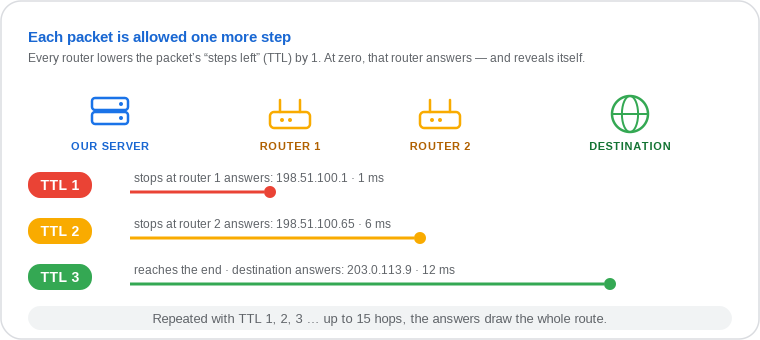
Every router lowers the TTL by one; when it reaches zero, the router discards the packet and replies "time exceeded" (ICMP, RFC 792). Repeating this with TTL 1, 2, 3 and so on lists every router up to the destination, which answers last. Each row of the result is one of those routers: its address, its name when it has one, and the round-trip time.
How to Read Traceroute Results
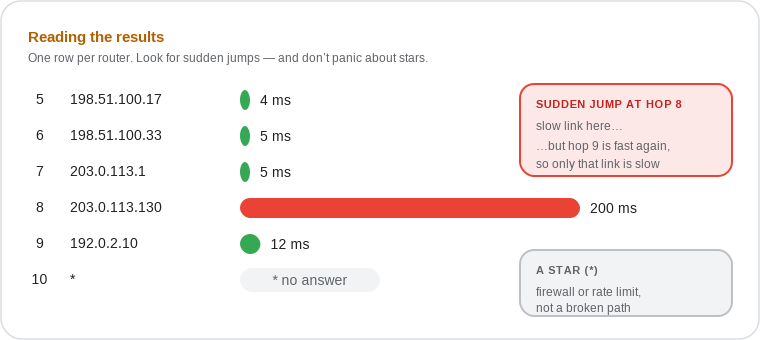
Read down the list: a rise in time that stays high on every later hop shows where delay is added; a single slow hop followed by fast ones is harmless.
| You see | What it means |
|---|---|
* * * in the middle | The router didn't answer probes. Normal if later hops answer |
* * * to the end | The target or a firewall drops this kind of probe. Try TCP on port 443 before concluding it's down |
| A jump that stays | Distance or a slow link: an ocean crossing adds 70 to 150 ms. The result names the two networks on each side |
| One slow hop, then fast ones | That router answers probes at low priority. It doesn't slow your traffic |
| "Private network" hops first | Routers inside the probe's own network (10.x, 172.16–31.x, 192.168.x) |
| "Carrier NAT" hop | A 100.64.x–100.127.x address: the provider shares one public IPv4 address between many customers (CGNAT) |
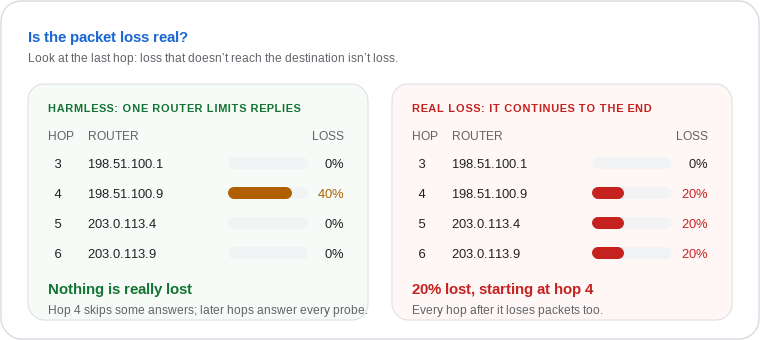
| Loss at one hop only (MTR) | The router limits replies to probes. Real loss continues to the destination; under 1% is fine, above 2–5% hurts calls and games |
| City codes in router names | Names like ae1.iad, fra or lax often carry airport codes (Washington Dulles, Frankfurt, Los Angeles): a better hint of where a router is than IP location data |
Traceroute only shows the way there. The replies can come back on a different path, so a jump can also come from the return route, which is invisible here. Tracing from several places, and from the other end when you can, gives the full picture.
Traceroute vs MTR: Which One to Use
Use traceroute to see the path; use MTR when you suspect packet loss or an unstable connection, because it sends several packets to every hop.
MTR (My Traceroute) combines traceroute and ping: for each hop it shows the share of packets lost, the average, best and worst time, and jitter (how much the time varies). Choose MTR above, and up to 16 packets per hop under Protocol and options. The result tells real loss, which continues to the destination, from routers that only limit how often they answer probes.
Traceroute vs Ping
Ping tells you whether a host answers and how fast; traceroute tells you the path and which hop adds the delay.
Start with the ping test: if the time is good and nothing is lost, you're done. If a place is slow or loses packets, press Trace from here on that row to trace from the same place. To find the IP behind a website first, use Website to IP; to see who owns a hop, the IP WHOIS lookup.
Do it yourself
Traceroute and Tracert Commands: Windows, Mac and Linux
On Windows, run tracert example.com in Command Prompt; on macOS and Linux, run traceroute example.com in Terminal; add -d (Windows) or -n to skip router names and go faster.
Windows Command Prompt
tracert example.com
tracert -d example.com      (no router names: faster)
tracert -6 example.com      (IPv6)
pathping example.com        (trace, then loss per hop: like MTR, takes a few minutes)
In PowerShell: Test-NetConnection example.com -TraceRoute lists the hops (add
-Hops 15 to limit them). Open Command Prompt by typing cmd in the Start menu.
macOS / Linux Terminal
traceroute example.com
traceroute -n example.com               (no router names)
sudo traceroute -I example.com          (ICMP, like tracert)
sudo traceroute -T -p 443 example.com   (TCP to port 443: gets through most firewalls; Linux)
traceroute6 example.com                 (IPv6 on macOS; traceroute -6 on Linux)
On a Mac, open Terminal from Applications > Utilities. On Linux, "traceroute: command not found" means
it isn't installed: sudo apt install traceroute (Debian, Ubuntu) or
sudo dnf install traceroute (Fedora, Red Hat). tracepath example.com (part of the
iputils tools) traces without sudo.
| What you want | Windows tracert | macOS / Linux traceroute |
|---|---|---|
| Skip router names (faster) | -d | -n |
| Maximum number of hops (default 30; 64 on macOS) | -h 20 | -m 20 |
| Wait per reply | -w 2000 (milliseconds) | -w 2 (seconds) |
| Probes per hop (default 3) | always 3 | -q 1 |
| IPv4 or IPv6 only | -4 / -6 | -4 / -6 (Linux), traceroute6 (macOS) |
| Probe type | ICMP only | UDP by default, -I ICMP, -T TCP (Linux) |
What is mtr?
mtr combines traceroute and ping: it traces the path and keeps sending probes, updating each hop's
loss and average time. Run mtr example.com (Linux, or macOS with Homebrew), or
mtr -rwc 100 example.com for a report you can send to your provider; on Windows, use
pathping or WinMTR. The MTR mode above does the same from other countries.
Why Trace From Several Places?
Routes depend on where you start: a site can be fast from the US and slow from Asia, and big sites answer from a different server in each region.
Tracing from three continents at once shows whether a problem is everywhere (the target or its host) or only on
one path (a network between that region and the target). With services on anycast or a CDN, such as
1.1.1.1 or google.com, each place reaches a different nearby server, which shows as a
different address at the end of each route. To see how the internet reaches your own connection, press
Your IP.
How This Traceroute Works
| Runs on | A network of measurement probes in data centers and on home connections around the world. Your browser asks the probes directly; our server doesn't run the trace |
|---|---|
| From | One probe in each place you pick: Virginia, Germany and Singapore by default, or up to 5 places of your choice |
| Protocols | ICMP (default), UDP or TCP to a port of your choice; IPv4 or IPv6 for domain names. MTR: 3 to 16 packets per hop |
| Hop details | Router names from reverse DNS on the probe; network (ASN), operator and country from the GeoLite2 database on our server (this product includes GeoLite2 data created by MaxMind, available from maxmind.com). Router locations are approximate: big networks register many routers in one country |
| Diagnosis | Rules in your browser: where the time rises and stays high, slow-answering routers, where the trace stops, and (MTR) loss that continues to the end |
| Limits | 250 probe tests an hour per IP address; each place is one test |
| Stored | Nothing on our side; the share link holds the test settings, not a saved result |
| Last verified |
Frequently Asked Questions
How do I run a traceroute?
tracert example.com (Windows), or open Terminal and type traceroute example.com (Mac, Linux).How does traceroute work?
What does * * * mean in a traceroute?
What is the difference between tracert and traceroute?
tracert is the Windows command and sends ICMP probes; traceroute on Linux and macOS sends UDP probes by default (-I switches to ICMP, -T to TCP).What does "Unable to resolve target system name" mean in tracert?
tracert 8.8.8.8 to test without DNS, and flush your DNS cache if the name was just created or changed.Why does one hop show high latency when the next ones are fine?
What is the difference between traceroute and MTR?
Can traceroute show where a website is located?
Can traceroute show my own route to a website?
tracert or traceroute on your computer, or trace to your IP from here to see how the internet reaches you.Next steps