CSR Generator |
You changed the form: click "Create CSR and key" again to update them.
CSR: send it to your certificate authority
Check it before you order: paste it in the CSR decoder.
Private key: save it now, keep it secret
It exists only in this tab: reload or close the page and it is gone, and the certificate will be useless without it. PKCS #8 PEM, read by Apache, Nginx, HAProxy and OpenSSL.
A CSR generator creates the private key for your SSL certificate and the certificate signing request (CSR) you send to the certificate authority. The CSR carries your domain names and public key; the private key stays with you and goes on your server next to the certificate.
Prefer to create the key on your server? The same CSR with OpenSSL 1.1.1 or newer:
openssl req -new -newkey rsa:2048 -nodes -keyout example.com.key -out example.com.csr -subj '/CN=example.com'How to Get an SSL Certificate With Your CSR
Create the CSR and key, send the CSR to the authority, prove you control the domain, then install the certificate with the key.
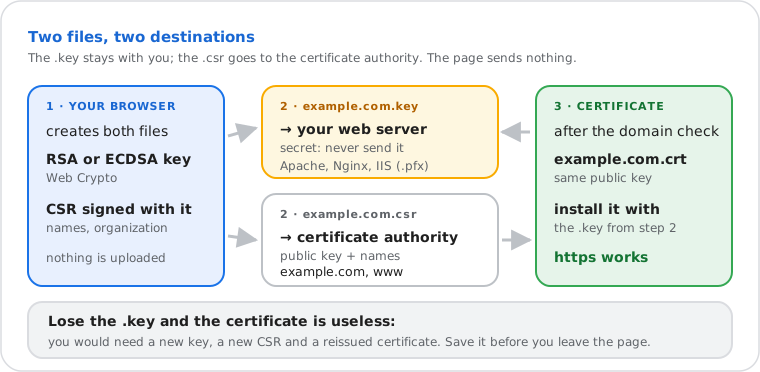
- Fill in the form above and click "Create CSR and key". Download the private key first.
- Paste the CSR (including the BEGIN and END lines) into your certificate authority's order form.
- Prove you control the domain: an email to an admin address, a DNS TXT record, or a file on the website. OV and EV certificates also check your organization.
- Install the certificate on your server with the private key (and the intermediate certificates the authority sends).
- Check the installed site with the SSL certificate checker.
Generate a CSR With OpenSSL (Linux, macOS, Windows)
One command creates the private key and the CSR on your server, so the key never leaves it.
openssl req -new -newkey rsa:2048 -nodes -keyout example.com.key -out example.com.csr -subj "/C=US/O=Example Inc/CN=example.com" -addext "subjectAltName=DNS:example.com,DNS:www.example.com"| Part | What it does |
|---|---|
req -new | Makes a new certificate request (CSR) |
-newkey rsa:2048 | Creates a new 2048-bit RSA key at the same time. For ECDSA P-256: -newkey ec -pkeyopt ec_paramgen_curve:P-256 |
-nodes | Leaves the key without a password, so the web server can start on its own (OpenSSL 3 also accepts -noenc) |
-keyout · -out | File names for the private key and the CSR |
-subj | Country, organization and common name; skips the questions OpenSSL would otherwise ask |
-addext | The extra names (SANs) the certificate must cover; needs OpenSSL 1.1.1 or newer |
The form above writes this command with your own values. On Windows, OpenSSL comes with Git for Windows (Git Bash). Check the result with openssl req -in example.com.csr -noout -text -verify, or paste it in the CSR decoder.
Generate a CSR on IIS (Windows Server)
IIS Manager creates the key and the CSR itself and keeps the key in Windows.
- In IIS Manager, select the server, open Server Certificates and click Create Certificate Request…
- Fill in the common name (your domain), organization, city, state and country. IIS asks for every field; public authorities ignore the organizational unit.
- Choose the Microsoft RSA SChannel provider and a bit length of 2048, then save the request as a file and send its content to the authority.
- When the certificate arrives, click Complete Certificate Request… in the same place, then add an https binding to the site.
The IIS wizard has no field for extra names (SANs). To include them, create the CSR here or with OpenSSL, then join the certificate and key into a .pfx file and import it in Server Certificates:
openssl pkcs12 -export -out example.com.pfx -inkey example.com.key -in example.com.crt -certfile intermediate.crtCSR Fields: What to Enter
Only the domain name is required. The organization fields matter for OV and EV certificates; DV certificates ignore them.
| Field | What to enter | Example |
|---|---|---|
| Common name (CN) | The main domain. Browsers read the SANs, so it is copied there too | example.com |
| Extra names (SANs) | Every other name the certificate must cover; a wildcard covers one level | www.example.com |
| Organization (O) | Your company's exact legal name (OV, EV) | Example Inc |
| City (L) · State (ST) | Where the company is registered, written in full | San Francisco · California |
| Country (C) | Two-letter ISO code; the UK is GB | US |
| Organizational unit (OU) · Email | Not used by public authorities any more (OU removed in 2022, ballot SC47): left out | — |
RSA or ECDSA: Which Key for Your Certificate?
| Key | Good for |
|---|---|
| RSA 2048 | The safe default: accepted by every authority and client, including very old ones. The minimum authorities accept |
| ECDSA P-256 | Smaller certificates and faster handshakes, at the same security as RSA 3072; supported by all current browsers |
| RSA 3072 · 4096 | Policies that require more than 2048 bits; slower handshakes on busy servers |
| ECDSA P-384 | Policies that require a 192-bit security level |
The CSR is signed with SHA-256 (SHA-384 for P-384). Built in your browser: the key, the CSR and what you type stay on your device. Last verified 22 November 2026.
Frequently Asked Questions
How do I generate a CSR?
Is it safe to generate a CSR online?
How do I generate a CSR with OpenSSL?
openssl req -new -newkey rsa:2048 -nodes -keyout example.com.key -out example.com.csr with your names in -subj and -addext "subjectAltName=…" (OpenSSL 1.1.1 or newer). The form on this page writes the full command with your values, ready to paste on Linux, macOS or Windows.Which key should I choose for my CSR?
How do I make a CSR for a wildcard certificate?
*.example.com as the domain. A wildcard covers one level of subdomains (www.example.com, shop.example.com) but not example.com itself, so add example.com as an extra name.Do I need a new CSR to renew my certificate?
Why is there no Organizational Unit (OU) field?
Next steps