Online Ping Test |
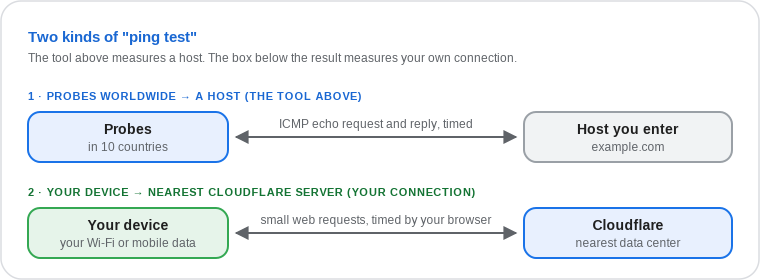
Your own ping: the latency from this device to the nearest Cloudflare data center, which serves this site, measured with 10 small HTTPS requests (a little above an ICMP ping). For download and upload speed, use the speed test.
A ping test sends small packets to a host and times the replies: the round-trip time in milliseconds shows latency, and missing replies show packet loss. This one pings from 10 countries at once, so you see whether a host is up everywhere and how fast it answers from each region. It pings IPv4 and IPv6 addresses, and a domain over either version. Under 50 ms is good for most uses; under 20 ms is excellent for gaming.
What Is a Ping Test?
Ping sends an ICMP echo request (RFC 792) and measures how long the echo reply takes to come back: that round-trip time is the ping, in milliseconds.
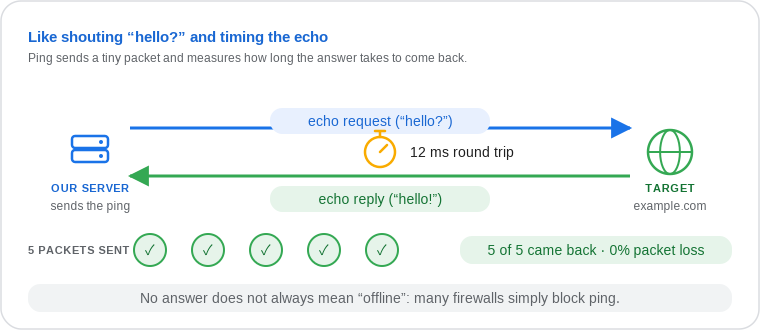
Each probe sends 3 packets by default (up to 16) and reports the minimum, average and maximum round trip, how many packets were lost, and the jitter. Repeating it from many places at once separates a problem with the host (no reply from anywhere) from a problem on one route (no reply from one region).
How to Read Ping Results
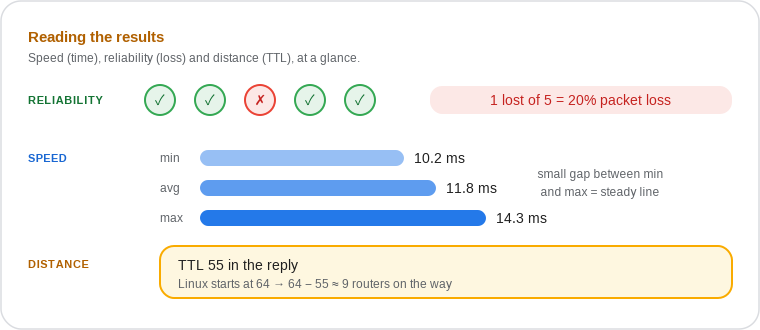
Look at packet loss first (it should be 0%), then the average time; big differences between replies (jitter) cause lag even when the average is low.
| Value | What it tells you |
|---|---|
| Packet loss | Requests with no reply. 0% is normal; under 1% is fine; a few percent is felt in calls and games; 100% means no reply at all (often blocked ping). |
| Average | The typical round trip. Mostly set by distance. |
| Min / Max | The best and worst reply. A max far above the min means congestion somewhere. |
| Jitter | How much the time changes from one reply to the next (average difference). Under 5 ms is steady; above 30 ms, calls stutter. |
| TTL | A hop counter, not a speed: it starts at 64, 128 or 255 depending on the system and drops at each router (shown in the raw output). |
In each row of the result, the bar shows the range from the fastest to the slowest reply, with a dot at the average; each small circle is one packet, and a crossed circle is a lost one.
What Is a Good Ping?
Under 20 ms is excellent, 20–50 ms good, 50–100 ms fine for browsing, and above 100 ms noticeable in games and calls; distance adds about 1 ms of round trip per 100 km.
| Route | Typical round trip |
|---|---|
| Same city or data center region | 1–10 ms |
| Across a country (e.g. New York–Chicago) | 15–30 ms |
| Across the US | 60–80 ms |
| Across the Atlantic (US East–Western Europe) | 70–100 ms |
| Europe–Asia or US–Asia | 150–250 ms |
Distance sets a floor no connection can beat: light in fibre needs about 1 ms per 100 km there and back, so New York to London is rarely under 70 ms. So 180 ms from Tokyo to a server in Virginia is normal; 180 ms from Virginia to a server in Virginia is not. For your own connection's ping, use Measure my latency above or the speed test; to see where time is lost on the way, use Trace from here on a slow place, or the traceroute.
Why Ping Fails When a Site Works (ICMP Blocked)
Many servers and firewalls drop ping (ICMP) packets but serve websites normally; a TCP check on port 443 shows whether they're up.
When no place gets a reply, the result offers Check TCP port 443 from the same places: it times a TCP connection to the HTTPS port instead. If that answers, the host is up and only blocks ping. You can also pick TCP and any port under Protocol and options, for example 22 for SSH or 3389 for Remote Desktop.
How to Ping a Port (TCP Ping)
Classic ping has no ports; to "ping a port", open Protocol and options, choose TCP and enter the port: each probe times a TCP connection to it, 3 times by default.
A reply means something listens on that port and accepts connections from that place, and the time is the TCP handshake round trip, close to an ICMP ping. No reply means the port is closed, a firewall drops the connection, or the host is down: the result can't tell those apart. Common ports: 443 (HTTPS), 80 (HTTP), 22 (SSH), 25 (mail servers), 3389 (Remote Desktop), 25565 (Minecraft). To check whether a port is open on your own connection, use the port checker.
Do it yourself
How to Ping an IP Address on Windows, Mac and Linux
Open Command Prompt (Windows) or Terminal (Mac, Linux) and type ping 8.8.8.8: Windows sends 4 packets; macOS and Linux keep going until you press Ctrl+C, or add -c 4.
Windows Command Prompt or PowerShell
ping 8.8.8.8
ping -t 8.8.8.8          (keeps going until Ctrl+C)
ping -n 10 8.8.8.8       (10 packets)
ping -6 google.com       (IPv6)
Test-NetConnection google.com -Port 443   (TCP: is port 443 open? PowerShell)
macOS / Linux Terminal
ping -c 4 8.8.8.8
ping6 google.com         (IPv6; or ping -6 on Linux)
nc -vz google.com 443    (TCP: is port 443 open?)
Your own ping measures from your device; the tool above measures from probes in other countries, so the times differ.
Why Ping From Several Countries?
One ping shows how a host looks from one place; pinging from 10 countries shows whether it is down everywhere or only unreachable from some regions, and how fast it is for users around the world.
When a site answers from different addresses in different places, it uses anycast or a CDN, and the result says so:
each region reaches a nearby copy, which is why 1.1.1.1 answers in a few milliseconds almost everywhere.
To see the path a slow region takes, run a traceroute from there.
How This Ping Test Works
| Runs on | A network of measurement probes in data centers and on home connections around the world. Your browser asks the probes directly; our server doesn't send the pings |
|---|---|
| From | One probe in each place: 10 countries on 6 continents by default, a region, or up to 10 places of your choice. A place with no free probe is left out |
| Test | ICMP echo, or a TCP connection to a port (TCP ping); 3 packets by default (1–16); IPv4 or IPv6 for domain names |
| Shows | Per place: address reached, min, average, max, jitter (mean change between consecutive replies), loss, raw output. Overall: places that answered, fastest, median, slowest, total loss |
| Your own ping | 10 HTTPS requests from your browser to the nearest Cloudflare data center, which answers them itself and names its location (after one warm-up); median, best and jitter. Nothing is stored |
| Limits | 250 probe tests an hour per IP address; each place is one test |
| Stored | Nothing on our side; the share link holds the test settings, not a saved result |
| Last verified |
Frequently Asked Questions
How do I ping an IP address?
ping followed by the IP, for example ping 8.8.8.8.What is a good ping?
Why does ping show 100% packet loss when the website works?
Is this the same as the ping in a speed test?
Can I ping a website?
Can I ping an IPv6 address?
2001:4860:4860::8888, and press Ping. For a domain, open Protocol and options and set IP version to IPv6 to ping its IPv6 address. On your own computer, use ping -6 (Windows, Linux) or ping6 (macOS).What port does ping use?
What does TTL mean in ping results?
What is jitter?
Next steps