1
Enter the Domain Name
Type the domain name (e.g. google.com) into the input field. Do not include https:// or trailing paths — the bare domain only.
DNS TXT Record Lookup |
DNS TXT record lookup queries the Domain Name System for all TXT-type resource records published under a domain name, as defined in RFC 1035 §3.3.14. TXT records store arbitrary text data — originally designed for human-readable notes (RFC 1464), now used primarily for email authentication and domain ownership verification. Results include SPF records (RFC 7208), DKIM public keys (RFC 6376), DMARC policies (RFC 7489), and third-party verification tokens from services such as Google Search Console and Microsoft 365.
| Property | Detail |
|---|---|
| DNS Type Code | 16 (TXT), defined in RFC 1035 §3.3.14 |
| Extended by | RFC 1464 — arbitrary attribute storage for domain names |
| Max string length | 255 bytes per character string; multiple strings per record are allowed |
| Common uses | SPF (RFC 7208), DKIM (RFC 6376), DMARC (RFC 7489), domain ownership tokens |
| Query protocol | UDP, no caching, 3-second timeout per resolver |
| Available resolvers | Google 8.8.8.8, Cloudflare 1.1.1.1, OpenDNS 208.67.222.222, Quad9 9.9.9.9, Yandex 77.88.8.8, Authoritative DNS |
Find all TXT records — SPF, DKIM, DMARC, and verification tokens — for any domain in seconds.
TXT records do not have a fixed format — their meaning is determined by the value prefix. The table below covers the most common patterns returned by a TXT lookup.
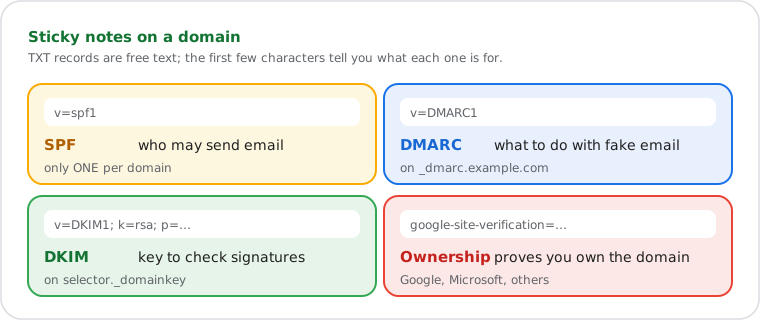
| Value Starts With | Record Type | Purpose |
|---|---|---|
v=spf1 |
SPF (RFC 7208) | Lists mail servers authorized to send email on behalf of this domain. Only one SPF record is permitted per domain — a second record causes SPF to fail. |
v=DMARC1 |
DMARC (RFC 7489) | Defines the policy for handling email that fails SPF or DKIM checks — none, quarantine, or reject. Published on the _dmarc subdomain. |
v=DKIM1; k=rsa; p= |
DKIM (RFC 6376) | Public key used by receiving mail servers to verify the DKIM signature in email headers. Published on a selector subdomain (e.g. default._domainkey). |
google-site-verification= |
Google Ownership Token | Domain ownership proof required by Google Search Console, Google Workspace, or other Google services. |
MS=ms |
Microsoft Ownership Token | Domain ownership verification string added during Microsoft 365 or Azure setup. |
| (any other text) | Custom / Service TXT | Arbitrary text per RFC 1464 — used by SaaS tools, CI/CD platforms, and other services for domain verification or configuration signalling. |
TXT record queries are sent as UDP datagrams to the selected resolver using dnsjava
(org.xbill.DNS). The Lookup class is configured with
setCache(null) and setTCP(false), ensuring each request
is a fresh UDP query — no cached data is ever returned.
When Authoritative DNS mode is selected, the tool first queries Google (8.8.8.8) for the domain's NS records, resolves each name server hostname to its A record IP, and sends the TXT query directly to those authoritative resolvers. This bypasses the recursive resolution layer entirely and returns data as it exists at the domain's own name servers — propagation delays from recursive resolver caches do not apply.
Per RFC 1035 §3.3.14, a single TXT record may contain multiple character strings, each limited to 255 bytes. When a TXT value exceeds 255 bytes — common with long DKIM public keys — the DNS zone stores it as multiple strings inside one record. The tool joins these strings with a space separator when displaying results, matching standard client behavior.
Do it yourself
All major operating systems include command-line DNS tools that support TXT record queries. The online tool queries from a neutral external resolver — results may differ from your local resolver due to caching. Use Authoritative DNS mode or specify a resolver IP in the command to control which source is queried.
nslookup -q=TXT google.com
nslookup -q=TXT google.com 8.8.8.8
nslookup -q=TXT google.com 1.1.1.1
Use -q=TXT to request TXT records specifically.
Append a resolver IP after the domain to override the system default —
useful for verifying how a record appears from a specific resolver before
email authentication changes go live.
Resolve-DnsName google.com -Type TXT
Resolve-DnsName google.com -Type TXT -Server 8.8.8.8
Resolve-DnsName google.com -Type TXT -Server 1.1.1.1dig google.com TXT
dig google.com TXT @8.8.8.8
dig google.com TXT @1.1.1.1
dig is the preferred tool for sysadmins and developers — it exposes
the full DNS response including TTL, response flags, and the authority section.
On macOS, dig is pre-installed. On Ubuntu/Debian,
install it with apt install dnsutils.
Verifying email authentication records before a migration. A DevOps engineer preparing to migrate a client domain to Google Workspace adds the required SPF, DKIM, and DMARC TXT records in the DNS control panel. Before cutting over mail routing, they run a TXT lookup in Authoritative DNS mode to confirm all three records are live at the domain's own name servers — not waiting on recursive resolver propagation.
Diagnosing email deliverability failures.
An email deliverability engineer investigating mail landing in spam runs a TXT lookup
on the sending domain. The results show two records beginning with v=spf1 —
a duplicate SPF record that RFC 7208 §3.4 explicitly prohibits. The duplicate causes
SPF to return a PermError at receiving mail servers, which DMARC treats as a failure.
Removing the duplicate resolves the deliverability issue.
Auditing domains for missing security records.
A security analyst conducting an infrastructure audit runs TXT lookups across all
company-owned domains. Several domains have no v=DMARC1 record,
confirming no policy is in place to handle spoofed email sent from those domains.
Each unprotected domain is flagged as a phishing risk — DMARC with a p=reject
policy is added to each.