DKIM Record Generator |
Your DKIM record
TXTs202611._domainkeymost DNS panels add the domains202611._domainkey.yourdomain.comv=DKIM1; k=rsa; p=…s202611._domainkey.yourdomain.com. 3600 IN TXT "v=DKIM1; k=rsa; p=…"Private key: save it now, keep it secret, never put it in DNS
It exists only in this tab: reload or close the page and it is gone. OpenDKIM, rspamd and Exim read either PEM form.
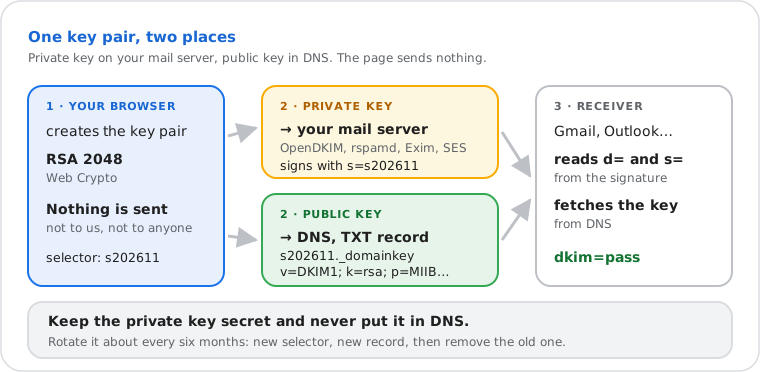
A DKIM record generator creates the key pair your mail server signs with and the DNS TXT record receivers use to
verify the signature. The private key stays on your server; the public key goes in DNS at
selector._domainkey.yourdomain.
How to Set Up DKIM With Your New Key
Publish the public key, give the private key to the software that signs your mail, then send a test message.
- Add a TXT record (what DNS records are) at your DNS host with the name and value above (the NS lookup shows which company runs your DNS). Long values may need to be split into several quoted strings in the same record; most DNS panels do this for you.
- Install the private key on the server that sends your mail (table below), with the same domain and selector.
- Wait for the TTL (often an hour), then run the DKIM checker with your selector.
- Send yourself a message and paste its headers into the email header analyzer:
dkim=passwithd=your domain means it works. Then removet=yif you set it. - Add a DMARC record so receivers know what to do with mail that fails.
| Signing software | Where the private key goes |
|---|---|
| OpenDKIM (with Postfix or Sendmail) | Save it as a file readable only by OpenDKIM, then add a KeyTable line: s202611._domainkey.example.com example.com:s202611:/etc/opendkim/keys/example.com/s202611.private, and a SigningTable line for your addresses |
| rspamd | In dkim_signing.conf: selector and the key file's path |
| Exim | On the SMTP transport: dkim_domain, dkim_selector and dkim_private_key (the file's path) |
| Amazon SES (BYODKIM) | Paste the key in the "one line, no header" form (SES accepts RSA keys of 1024 to 2048 bits) |
| Google Workspace, Microsoft 365, Mailchimp… | Not needed: these services create the key and give you the record to publish (steps) |
Which DKIM Key Should I Choose?
RSA 2048-bit: every receiver verifies it, and it is the size RFC 8301 recommends.
| Key | Record length | Use it when |
|---|---|---|
| RSA 2048 | about 410 characters | Always, unless your DNS host can't store it. Two TXT strings in one record |
| RSA 1024 | about 235 characters | Only for a DNS host limited to one 255-character string. The minimum receivers accept |
| RSA 4096 | about 750 characters | Not offered: many DNS panels refuse records that long, and 2048 is enough |
| Ed25519 | about 65 characters | As a second signature next to RSA: many receivers don't verify it yet. Paste its public key above to build the record |
DKIM Record Tags, Briefly
| Tag | What it does | Default |
|---|---|---|
v=DKIM1 | Version; if present it must come first | DKIM1 |
k= | Key type: rsa or ed25519 (RFC 8463) | rsa |
p= | The public key in base64. Empty means the key is revoked | required |
t= | y: testing, receivers shouldn't act on failures; s: the signer identity (i=) must use exactly the d= domain, not a subdomain | none |
h= | Hash algorithms allowed; only sha256 is still valid (RFC 8301) | all |
s= · n= | Service type (email or *) and notes for humans; rarely used | * · none |
Built in your browser: the key pair, the record and anything you paste stay on your device. Last verified 22 November 2026 (RFC 6376, RFC 8301, RFC 8463).
Frequently Asked Questions
How do I create a DKIM record?
selector._domainkey, value v=DKIM1; k=rsa; p=…) at your DNS host, install the private key in the software that signs your mail, then check the record with the DKIM checker.Is it safe to generate a DKIM key online?
What is a DKIM selector?
s= value in each signature, published at selector._domainkey.yourdomain. Choose any short name of letters, digits and hyphens. A dated name such as s202611 (the default here) shows how old the key is and makes the next one easy to name when you rotate.Can I have more than one DKIM record?
How long should a DKIM key be: 1024 or 2048 bits?
Do I need this for Google Workspace or Microsoft 365?
How often should I rotate DKIM keys?
p= value.Next steps