1
Select a CIDR Prefix
Choose a prefix from /0 to /32 in the list (each option shows the mask and the number of hosts), drag the slider, or click a bit in the bit strip.
Subnet Calculator |
Also accepts 192.168.1.10 255.255.255.0. Need IPv6? IPv6 subnet calculator.
24 network bits · 8 host bitsClick a bit to move the prefix
A subnet calculator turns an IP address and a mask (like /24 or 255.255.255.0) into the network address, broadcast address, range of usable host addresses and number of hosts. Type an address above, or click a row in the CIDR table below.
The network address names the subnet, the broadcast address reaches every device in it, and the usable range is what you can give to devices.
New to masks and prefixes? What a subnet mask is explains 255.255.255.0, /24 and the bit-by-bit math.
| Field | Meaning | Example (192.168.1.10/24) |
|---|---|---|
| Network address | First address: names the subnet, not given to a device | 192.168.1.0 |
| Usable range | Addresses you can give to devices | 192.168.1.1 – 192.168.1.254 |
| Broadcast | Last address: a packet sent to it reaches every device in the subnet | 192.168.1.255 |
| Subnet mask | The prefix written as four numbers | 255.255.255.0 |
| Wildcard mask | Inverse of the mask, for router access lists and OSPF | 0.0.0.255 |
| Reverse DNS zone | Where PTR records for the network live (for /8, /16, /24) | 1.168.192.in-addr.arpa |
A /24 has 256 addresses and 254 usable hosts; each extra bit halves the size. Click a row to load it in the calculator.
| Prefix | Subnet mask | Wildcard | Addresses | Usable hosts | Typical use |
|---|---|---|---|---|---|
| 255.0.0.0 | 0.255.255.255 | 16,777,216 | 16,777,214 | Old class A size; 10.0.0.0/8 private range | |
| 255.128.0.0 | 0.127.255.255 | 8,388,608 | 8,388,606 | ||
| 255.192.0.0 | 0.63.255.255 | 4,194,304 | 4,194,302 | ||
| 255.224.0.0 | 0.31.255.255 | 2,097,152 | 2,097,150 | ||
| 255.240.0.0 | 0.15.255.255 | 1,048,576 | 1,048,574 | 172.16.0.0/12 private range | |
| 255.248.0.0 | 0.7.255.255 | 524,288 | 524,286 | ||
| 255.252.0.0 | 0.3.255.255 | 262,144 | 262,142 | ||
| 255.254.0.0 | 0.1.255.255 | 131,072 | 131,070 | ||
| 255.255.0.0 | 0.0.255.255 | 65,536 | 65,534 | Old class B size; 192.168.0.0/16 private range | |
| 255.255.128.0 | 0.0.127.255 | 32,768 | 32,766 | ||
| 255.255.192.0 | 0.0.63.255 | 16,384 | 16,382 | ||
| 255.255.224.0 | 0.0.31.255 | 8,192 | 8,190 | ||
| 255.255.240.0 | 0.0.15.255 | 4,096 | 4,094 | ||
| 255.255.248.0 | 0.0.7.255 | 2,048 | 2,046 | ||
| 255.255.252.0 | 0.0.3.255 | 1,024 | 1,022 | 4 × /24: a large office or campus segment | |
| 255.255.254.0 | 0.0.1.255 | 512 | 510 | 2 × /24 | |
| 255.255.255.0 | 0.0.0.255 | 256 | 254 | Old class C size; the usual home and office network | |
| 255.255.255.128 | 0.0.0.127 | 128 | 126 | Half a /24 | |
| 255.255.255.192 | 0.0.0.63 | 64 | 62 | Quarter of a /24 | |
| 255.255.255.224 | 0.0.0.31 | 32 | 30 | Small office or VLAN | |
| 255.255.255.240 | 0.0.0.15 | 16 | 14 | Small VLAN, DMZ or cloud subnet | |
| 255.255.255.248 | 0.0.0.7 | 8 | 6 | Small block of static IPs from a provider | |
| 255.255.255.252 | 0.0.0.3 | 4 | 2 | Point-to-point link (classic) | |
| 255.255.255.254 | 0.0.0.1 | 2 | 2 | Point-to-point link (RFC 3021) | |
| 255.255.255.255 | 0.0.0.0 | 1 | 1 | One address: host route, loopback, firewall rule |
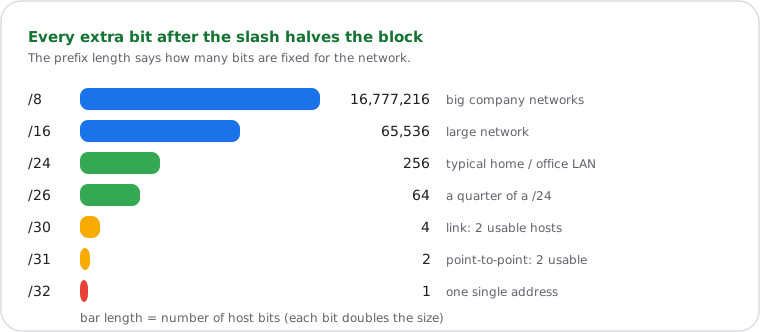
What a /24, /27, /29 or /30 is used for, with every mask in binary: the subnet mask cheat sheet.
Choose how many subnets you need, or how many hosts each needs; the calculator finds the right prefix.
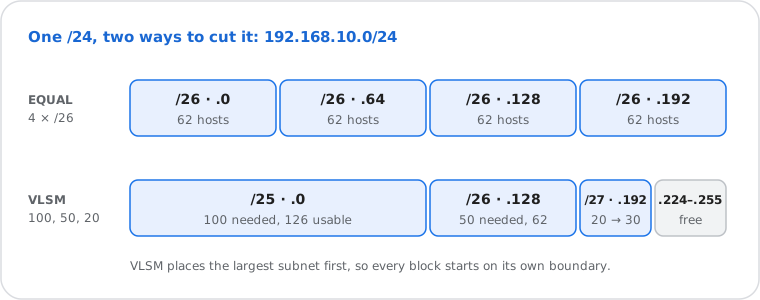
Equal subnets: 192.168.10.0/24 into 4 → each gets 2 more network bits → four /26 (192.168.10.0, .64, .128, .192) with 62 hosts each. Use the Split box above.
VLSM (variable length): when needs differ, give each subnet only what it needs, largest first. 100 + 50 + 20 hosts in 192.168.10.0/24 → a /25 (126 hosts) at .0, a /26 (62) at .128 and a /27 (30) at .192, leaving .224 to .255 free. The VLSM box does it, checks it fits, and lists what's left.
Enter a start and end address to get the smallest list of CIDR blocks that covers exactly that range.
Example: 10.0.0.0 to 10.0.2.255 is 768 addresses, which is 10.0.0.0/23 + 10.0.2.0/24. A range that doesn't start on a block boundary needs more blocks: 192.168.1.5 to 192.168.1.10 is .5/32, .6/31, .8/31 and .10/32. To go the other way, type a CIDR block in the main box. The same converter also has its own page: IP range to CIDR.
| Where it runs | In your browser; nothing is sent to our server |
| Accepts | IPv4 with /prefix or dotted mask (/0 to /32) |
| Outputs | Network, broadcast, usable range, hosts, mask, wildcard, binary, integer, type, class, reverse DNS zone, a one-line summary |
| Extras | Split by count or hosts, VLSM, IP range to CIDR, IP-in-network check, shareable link (?ip=192.168.1.10&p=26) |
| /31 and /32 | Handled per RFC 3021 (2 and 1 usable addresses) |
| Tested | The math is covered by automated tests (masks, ranges, /31, /32, VLSM, range to CIDR) |
Type or paste an IPv4 address, for example 192.168.1.10. You can paste it with its prefix (192.168.1.10/24) or its subnet mask (192.168.1.10 255.255.255.0); results update as you type.
Next steps