1
Enter the Domain Name
Type the domain to test — for example, example.com — without the https:// prefix. The tool adds it automatically.
Secure Cookie Test |
Secure Cookie Test sends a live GET request to any domain and parses the Set-Cookie response headers for the three security attributes defined in RFC 6265: the Secure flag, the HttpOnly flag, and the SameSite attribute. Each cookie found is analyzed individually. A cookie missing any of these attributes is a potential attack vector — Secure prevents HTTPS bypass, HttpOnly blocks XSS-based theft, and SameSite mitigates CSRF.
HTTP cookies are defined in RFC 6265. The Set-Cookie response header carries
the cookie value and its attributes. Three attributes control security:
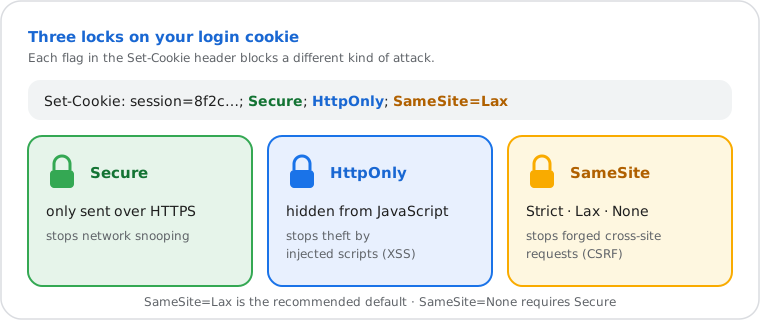
| Attribute | What It Does | Attack Mitigated | Default if Absent |
|---|---|---|---|
Secure |
Cookie sent over HTTPS only — never over unencrypted HTTP | Network interception (man-in-the-middle) | Cookie sent on HTTP and HTTPS |
HttpOnly |
Cookie hidden from JavaScript — not accessible via document.cookie | XSS-based session token theft | Cookie readable by client-side scripts |
SameSite=Strict |
Cookie never sent on cross-site requests | CSRF — strongest protection | — |
SameSite=Lax |
Cookie sent on top-level navigations, blocked on subresource requests | Most CSRF — recommended default | — |
SameSite=None |
Cookie sent on all cross-site requests — requires Secure flag | None — use only for legitimate cross-site flows | — |
| SameSite absent | — | Partial CSRF protection | Modern browsers default to Lax |
The complete security baseline for an authentication cookie is:
Set-Cookie: session=...; Secure; HttpOnly; SameSite=Lax; Path=/
Check any website's Set-Cookie headers for Secure, HttpOnly, and SameSite flags in seconds.
HTTP cookies are governed by RFC 6265 (HTTP State Management Mechanism, IETF, April 2011),
which defines the Set-Cookie response header and the Secure and HttpOnly attributes.
The SameSite attribute was introduced through browser consensus and formalized in RFC 6265bis
(widely implemented since Chrome 80, Firefox 79, Safari 13).
The tool sends a GET request — not HEAD — to the domain root. HEAD responses frequently omit Set-Cookie headers because cookies are typically issued during session initiation, not on header-only responses. GET requests follow the same code path as a browser's initial page load, returning the full response header set.
The cookie name prefixes __Secure- and __Host-
(defined in RFC 6265bis) provide additional browser-enforced hardening.
A __Host- cookie must carry Secure, must omit the Domain attribute,
and must set Path=/ — preventing subdomain-based session fixation attacks.
Results reflect the server's live configuration at query time. Cookies set only on authenticated routes or subpaths are not returned by the root URL test.
Do it yourself
The Set-Cookie header is visible in any HTTP response. Use these commands
to inspect cookie attributes directly from the terminal.
curl -sL -D - https://example.com -o /dev/null | grep -i set-cookie
The -L flag follows redirects to the final destination.
Each Set-Cookie line shows the full attribute string.
$r = Invoke-WebRequest -Uri "https://example.com" -MaximumRedirection 5
$r.Headers["Set-Cookie"]curl -v https://example.com 2>&1 | grep -i "set-cookie"The online tool queries from a neutral external server — results reflect the server's response to an external request, which may differ from a logged-in session or a request originating from your local network.
Post-HTTPS migration verification. A developer migrates an application from HTTP to HTTPS and needs to confirm that session cookies have been updated. After the migration, they run the test and confirm the session cookie now carries the Secure flag and SameSite=Lax. A legacy analytics cookie still lacks HttpOnly — flagged for a server-side configuration update before the next release.
Pre-launch security audit. A security engineer auditing a client's web application runs the test against the staging domain. Results show authentication cookies missing both HttpOnly and Secure — a critical finding that would expose session tokens to network interception and XSS theft. The engineer documents each Set-Cookie line and the missing attributes for the development team.
OAuth integration SameSite validation. A backend developer switches a cookie's SameSite policy from Strict to None to support a new cross-site OAuth flow. The test confirms the SameSite=None cookie now correctly carries the Secure flag — required by RFC 6265bis, and rejected by Chrome, Firefox, and Safari without it.