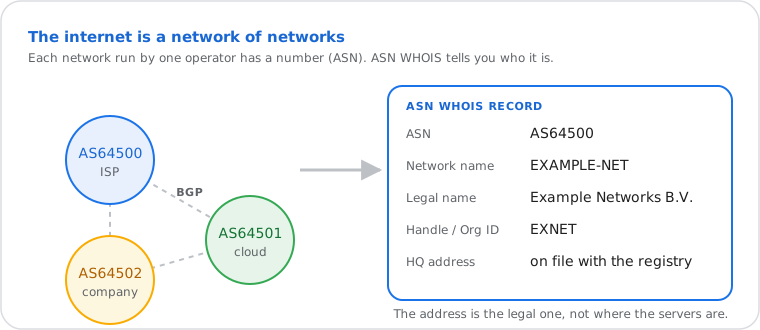
An ASN (autonomous system number) identifies a network that routes its own IP addresses on the
internet, such as an ISP, a cloud provider or a large company: AS15169 is Google, AS7922 is Comcast.
Networks use it in BGP, the internet's routing protocol, to announce which IP ranges they carry.
This ASN lookup queries the Regional Internet Registry (RIR) database via
RDAP (RFC 7480) or legacy WHOIS (port 43, RFC 3912) to return
the registered organization, network name, and registry handle for any
Autonomous System Number. An ASN is a globally unique 16-bit or 32-bit
identifier assigned by IANA and delegated to one of five RIRs — ARIN,
RIPE NCC, APNIC, LACNIC, or AFRINIC — to identify a network that
participates in BGP routing on the public internet.
Fact
Detail
Primary protocol
RDAP (RFC 7480) via rdap.org/autnum/
Fallback protocol
Port 43 WHOIS at whois.iana.org (RFC 3912): names the responsible registry only
Data source
ARIN, RIPE NCC, APNIC, LACNIC, AFRINIC
Accepted input formats
AS15169, ASN15169, 15169, or an IPv4/IPv6 address (matched to its ASN with MaxMind GeoLite2)
16-bit ASN range
0–65,535 — private use reserved: 64,512–65,534 (RFC 6996)
32-bit ASN range
0–4,294,967,295 — private use reserved: 4,200,000,000–4,294,967,294 (RFC 6996)
What we keep
Nothing: lookups aren't logged or stored by this tool
How to Find the ASN of an IP Address
Type the IP address in the box above: the tool finds the network that announces it, then shows
that network's registry details. For many IP addresses at once, or just the AS number and
operator, use our IP to ASN lookup. From a terminal:
whois -h whois.cymru.com " -v 8.8.8.8"
How to Look Up an ASN
Type an AS number (AS15169, ASN15169 or 15169) or an IP address; an IP is first matched to the network that announces it.
1
Enter an ASN or an IP address
Enter an AS number in any common form (AS15169, ASN15169 or 15169), or an IPv4/IPv6 address.
For an IP address, the tool first finds the network (ASN) it belongs to.
2
Submit the Lookup
Click "Look Up ASN" to query the RIR RDAP database at
rdap.org/autnum/ in real time.
3
Review Organization and Network Details
The result shows the registered organization name, network name (AS handle),
and registry org ID assigned to the ASN.
4
Inspect the Raw RDAP Record
Expand the Registry Routing Record panel to view or copy the full
RDAP JSON response directly from the RIR — no reformatting applied.
What the ASN Lookup Results Mean
Each network run by one operator has an ASN; an ASN lookup shows who it is. (Documentation data.)
Field
What It Means
Example
ASN
The Autonomous System Number in AS-prefixed format, normalized from your input
AS15169
Network Name
Short identifier for the AS registered at the RIR — the AS handle
GOOGLE
Legal Name
Full legal name of the organization that controls the AS, from the RDAP entity vCard
Google LLC
Handle / Org ID
Registry-assigned identifier for the organization record at the RIR
GOGL
HQ Address
Mailing address on file with the RIR — may be a legal address, not operational location
1600 Amphitheatre Pkwy, Mountain View, CA, US
Announced prefixes
The IP ranges this AS announces in BGP right now, and how many IPv4 addresses they cover (RIPEstat)
8.8.8.0/24 · 2001:4860::/32
Upstream providers
Networks seen just before this AS in BGP paths: who it buys transit from. Strength = how many RIPE route collectors see the link
AS3356 Lumen · strength 120
Customers (downstream)
Networks seen just after this AS in BGP paths: who it provides transit to
1,234
Registry Routing Record
Full RDAP JSON response from the RIR — the raw autnum object with all entities
JSON object, copy-ready
How This ASN Lookup Works
The tool sends an HTTPS GET request to
rdap.org/autnum/{asn}. The rdap.org proxy routes the query
to the authoritative RIR RDAP endpoint — ARIN for North American ASNs,
RIPE NCC for European and Middle Eastern ASNs, APNIC for Asia-Pacific,
LACNIC for Latin America, and AFRINIC for Africa — and returns a structured
JSON response conforming to RFC 9083 (RDAP JSON responses).
If the RDAP endpoint returns an error or is unreachable, the tool falls back
to a port 43 WHOIS query at whois.iana.org using the
AS{number} query format. IANA's WHOIS server redirects to the
appropriate RIR's port 43 server via the IANA whois referral mechanism.
The raw WHOIS text is returned as-is in the Registry Routing Record panel.
The routing section comes from RIPEstat,
run by the RIPE NCC: it shows what the AS announces and which networks it connects to, as seen by the RIPE RIS
route collectors around the world. We ask RIPEstat only when you look an AS up, and keep its answer for 24 hours.
ASN numbers exist in two formats per RFC 5396: 2-byte (16-bit, AS0–AS65535,
introduced with BGP-4) and 4-byte (32-bit, AS0–AS4294967295, standardized
in 2007 per RFC 4893 to address exhaustion of the 65,536-ASN pool).
Private-use ASNs are reserved per RFC 6996: 64512–65534 for 16-bit and
4200000000–4294967294 for 32-bit. Private ASNs are not announced on the
public internet and will return no RIR RDAP record.
Command line
How to Look Up an ASN From the Command Line
The whois command performs ASN lookups natively on
Linux and macOS. Note that nslookup and dig
are DNS tools — they do not query WHOIS or RDAP databases and cannot
be used for ASN lookups.
Mac / Linux whois
whois AS15169
The system whois client routes automatically to the correct RIR.
To query a specific RIR's port 43 server directly:
whois -h whois.arin.net AS15169       # ARIN — North America
whois -h whois.ripe.net AS3333        # RIPE NCC — Europe, Middle East
whois -h whois.apnic.net AS4608       # APNIC — Asia-Pacific
whois -h whois.lacnic.net AS28573     # LACNIC — Latin America
whois -h whois.afrinic.net AS37153    # AFRINIC — Africa
Returns the same structured RDAP JSON that the online tool displays.
Pipe to Out-File asn15169.json to save the result locally.
Windows Command Prompt with Sysinternals whois.exe
Windows has no built-in whois command. Download
whois.exe from the Microsoft Sysinternals suite, then:
whois AS15169
The online tool queries via RDAP at rdap.org/autnum/ — results may
differ from a local whois client if registration data
has changed since your client last resolved the RIR endpoint.
Common Uses for an ASN Lookup
A security analyst receives alerts showing repeated unauthorized access
attempts from multiple IP addresses. Routing all source IPs through
IP to ASN Lookup reveals they originate from a single ASN.
The ASN lookup returns the registered organization and abuse contact,
letting the analyst file a structured abuse report with the NOC
rather than reporting individual IPs one at a time.
A network engineer preparing to establish a BGP peering session with
an upstream provider needs to confirm the organization behind the
remote ASN before adding it to the router configuration. The ASN
lookup confirms the legal entity, registry handle, and RIR of record,
verifying the AS is operated by the expected organization before
any routing policy is applied.
A threat intelligence analyst tracking a botnet campaign identifies
multiple C2 servers across different IP addresses. IP to ASN
Lookup maps all of them to the same two ASNs. The ASN lookup
identifies both as bulletproof hosting providers with a history of
ignoring abuse reports, enabling the analyst to build blocklists at
the ASN level rather than chasing individual IPs.
Frequently Asked Questions
How do I look up an ASN?
Type the AS number (like AS15169 or 15169) or an IP address in the box above. The result shows who
owns the network, its name, country and registry, from live RDAP data.
What is my ASN?
Your ASN is the network of your internet provider. Our homepage and What Is My ISP page show it for
your current connection; click it to see the full details here.
What is the difference between an ASN and an IP address?
An IP address identifies one connection or device; an ASN identifies a whole network that routes many
IP ranges on the internet, such as an ISP, a cloud provider or a large company.
Who assigns AS numbers?
The five regional internet registries (ARIN, RIPE NCC, APNIC, LACNIC and AFRINIC), from blocks that
IANA gives them.
Can one company have several ASNs?
Yes. Large networks often run one ASN per region or business; Amazon, Microsoft and Google each
operate several.
How do I find all IP ranges (prefixes) of an ASN?
Look the AS up above: the routing section lists every IPv4 and IPv6 prefix it announces in BGP right now, with
the total number of IPv4 addresses and its upstream providers, from RIPEstat. Registry records can list more
ranges than are actually announced; the BGP list is what's reachable today.
What is a private ASN?
Numbers 64512–65534 and 4200000000–4294967294 are reserved for private use (RFC 6996).
They are used inside networks and never appear on the public internet, so they have no public owner.