MAC Address Lookup |
Try: 3C:22:FB:12:34:56 08:00:27:4E:66:A1 DA:A1:19:5C:2E:91 (random) Raspberry Pi
Look up many addresses: paste an ARP table, DHCP leases or a log
00:F4:B9
Apple, Inc.
Unicast (one device) Universal (from the maker) MA-L · /24Prefix only
| Company | Apple, Inc. |
|---|---|
| Country | United States |
| Registered address | 1 Infinite Loop Cupertino CA US 95014 |
| IEEE block | 00:F4:B9 · MA-L (24-bit prefix) · 16,777,216 addresses |
00 in bitsU/L universal (from the maker)I/G one device (unicast)
| Prefix | 00:F4:B9 | |
|---|---|---|
| Bare | 00F4B9 |
A MAC address lookup finds the company that made a network device from the first six hex digits of its MAC address (the OUI), using the IEEE registry. It also tells you when an address is random (private), which no lookup can trace to a manufacturer.
What Is a MAC Address?
A MAC address is the hardware address of a network interface: 48 bits, written as 12 hex digits such as 3C:22:FB:12:34:56, used to deliver data between devices on the same local network.
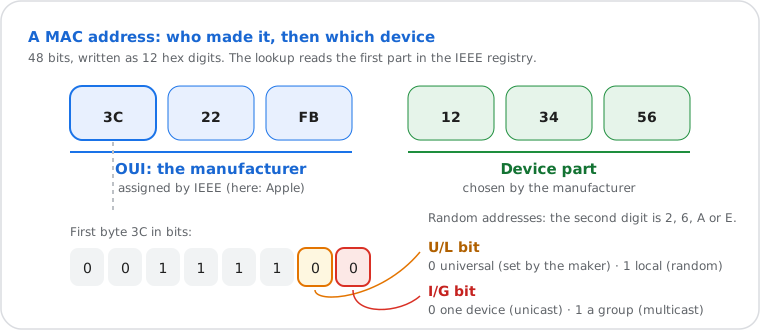
Every Wi-Fi and Ethernet interface has one. The manufacturer writes it in at the factory, using a prefix it bought from IEEE: the OUI (Organizationally Unique Identifier). Large companies hold a full 24-bit prefix (MA-L, 16.7 million addresses each); smaller ones buy 28-bit (MA-M) or 36-bit (MA-S) blocks. Your IP address can change with every network; the hardware MAC stays the same, which is why phones now hide it behind random addresses.
MAC addresses work only inside your local network: your router uses them to reach your laptop, but they are replaced at every hop on the internet. That's why no website can see your MAC address, and why a MAC address can't be traced to a location.
How to Find Your MAC Address
It's in your network settings: "Wi-Fi Address" on an iPhone, "Physical Address" on Windows, the "ether" line on a Mac or Linux.
| Device | Where to look |
|---|---|
| Windows | Settings › Network & internet › Wi-Fi (or Ethernet) › Hardware properties › Physical address. Or run getmac /v or ipconfig /all. |
| Mac | System Settings › Wi-Fi › Details next to your network (Wi-Fi address). Or in Terminal: ifconfig en0 | grep ether. |
| iPhone, iPad | Settings › General › About › Wi-Fi Address (the hardware one). The address a network sees is under Settings › Wi-Fi › ⓘ next to the network, "Private Wi-Fi Address". |
| Android | Settings › About phone › Wi-Fi MAC address (names vary by brand). Per network: Settings › Wi-Fi › the network › Privacy, "Use randomized MAC" or "Use device MAC". |
| Linux | ip link (the link/ether value), or cat /sys/class/net/wlan0/address. |
| Any device on your network | Your router's admin page lists connected devices with their MAC and IP (find the router's address with this guide), or run arp -a on a computer, then paste the output in the list box above. |
Random (Private) MAC Addresses: Why Some Show No Vendor
If the second digit is 2, 6, A or E, the address was set by software, usually a phone's private Wi-Fi address, and has no manufacturer to look up.
To stop Wi-Fi networks and shops from following people around, iOS 14, Android 10, Windows 10 and later use a
random MAC address for each network (some change it again over time). Random addresses must have the
U/L bit set to 1, which shows in the second hex digit: x2, x6,
xA or xE, as in DA:A1:19:…. Virtual machines, containers, VPN adapters
and bridges use such locally administered addresses too.
That's why a lookup of a phone often shows "random": the real hardware address is only used on networks where you turn the private address off. If you manage a network that filters by MAC, ask users to turn off private addresses for that network only.
Find the Device and IP Behind a MAC Address
On your own network, the ARP table maps MAC addresses to IP addresses: run arp -a, or open your router's device list.
- Make the device talk on the network (open a web page on it), so its address is fresh in the tables.
- On a computer on the same network, run
arp -a(Windows, Mac) orip neigh(Linux). Each line shows an IP address and its MAC. - Paste the output in the list box above: every device gets its manufacturer, and random addresses are marked.
- Unknown device? Check your router's list for its name, or block it there if it isn't yours.
Formats differ between systems but mean the same address: 3C:22:FB:12:34:56 (Mac, Linux),
3C-22-FB-12-34-56 (Windows), 3c22.fb12.3456 (Cisco), 3C22FB123456. This
lookup accepts all of them, and macOS's short form without leading zeros (0:1a:2b:…).
How This MAC Lookup Works
| Data | The IEEE public registry: 40,481 MA-L · 6,685 MA-M · 7,275 MA-S · 4,575 IAB · 224 CID (59,240 blocks). Copy in use: downloaded from IEEE on 2026-11-12; refreshed from IEEE weekly |
| Matching | Longest prefix first: 36-bit (MA-S, IAB), then 28-bit (MA-M), then 24-bit (MA-L), so a shared block shows its real owner |
| From the address itself | Unicast or multicast, universal or local (random), the IEEE 802c quadrant, special addresses (broadcast, IPv4/IPv6 multicast, VRRP, HSRP, STP, LLDP), formats and the IPv6 EUI-64 |
| Hints | Prefixes commonly used by virtual machines and containers (VirtualBox, VMware, Hyper-V, QEMU, Docker) are named as hints, not facts |
| Can't tell | Who owns a device, where it is, or its IP address: a MAC address doesn't carry that |
| Runs on | Our server, from the copy in memory: nothing is sent to another service. Lookups are not saved; our server and Cloudflare keep standard access logs |
Last verified 11 November 2026.
Frequently Asked Questions
What is a MAC address lookup?
Can I find a device's location or owner from its MAC address?
What is my MAC address? Can this website see it?
ifconfig); the steps are on this page.
Why does my phone show a different MAC address on each Wi-Fi network?
Why does the lookup say "Private" instead of a company?
Can two devices have the same MAC address?
Put this guide into practice