IP Blacklist Checker |
An IP blacklist (DNSBL) is a list of addresses that sent spam or attacks; mail servers check it before accepting email. Enter an IP to see which public lists include it, why, and how to get removed.
How Do I Check If My IP Is Blacklisted?
Enter the IP (your own is filled in) and run the check: each list answers live.
Having email trouble? Check the IP your mail server sends from, not your website's IP: find it with the MX lookup (for receiving) or in the "Received:" lines of a message you sent, using the email header analyzer. If you send through Gmail, Microsoft 365 or another provider, their IPs are what matter, and they manage them for you; check your SPF and DMARC instead.
What a Listing Means (and How Bad It Is)
A listing on a major list like Spamhaus, SpamCop or Barracuda blocks mail at many providers; minor and range lists rarely matter.
| Impact | Lists | What it means |
|---|---|---|
| Major | Spamhaus, SpamCop, Barracuda | Widely used by mail servers; a listing can block or spam-folder your email at many providers. Act now. |
| Medium | SpamRats, PSBL, DroneBL, Manitu, GBUdb, Mailspike, Blocklist.de | Used by some servers, often through spam filters that add up scores. Fix the cause; most expire on their own. |
| Minor | UCEPROTECT L1, 0Spam, WPBL, Madavi, InterServer, ScientificSpam, Backscatterer, Kempt | Few big providers use them. Worth fixing, rarely urgent. |
| Provider range | UCEPROTECT L2 | Lists your provider's whole range because of other customers. Usually nothing you can fix; most big mailboxes ignore it. |
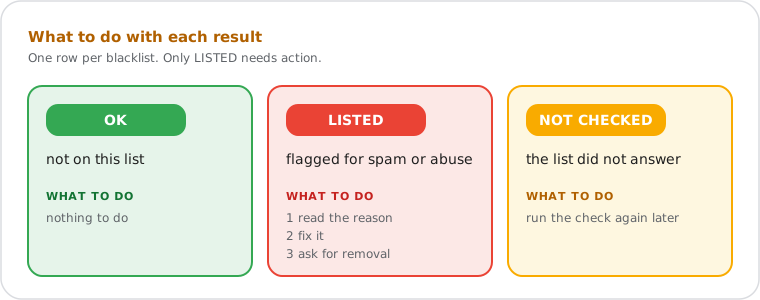
Unavailable means the list didn't pass our self-test, timed out or refused us; No IPv6 means the list doesn't publish IPv6 entries. Neither is counted as "not listed".
How to Get Your IP Removed From a Blacklist
Fix the cause first (infected device, open relay, compromised account), then use the list's removal page; many lists expire automatically.
- Find the cause. Read the list's reason. Common ones: malware on a PC or phone, a hacked email password used to send spam, a contact form abused by bots, a mail server accepting mail for anyone (open relay), bounces sent to forged senders.
- Fix it. Scan devices, change passwords, add a captcha, close the relay. Removal without a fix only lasts until the next report.
- Ask for removal on the list's page (the "Lookup and removal" link). SpamCop and UCEPROTECT Level 1 expire on their own; Barracuda and Spamhaus have free removal forms.
- Check again after a few hours.
Home connection listed? Lists such as Spamhaus PBL include home and mobile ranges on purpose: those connections aren't meant to send email directly. It doesn't affect normal email through Gmail or Outlook. Never pay for removal from a free list.
How DNSBL Lookups Work
The IP is reversed and added to the list's zone (2.0.0.127.bl.spamcop.net); an answer in 127.0.0.x means listed.
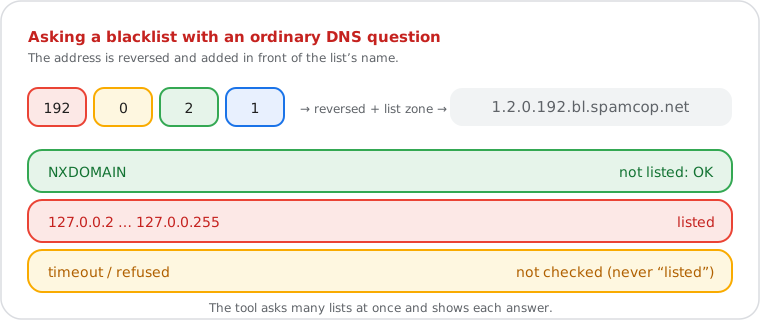
Blacklists are published in DNS (RFC 5782), so a mail server can ask in milliseconds while a message arrives. "Name doesn't exist" means not listed; an address from 127.0.0.2 to 127.0.0.255 means listed, and a TXT record at the same name usually says why. For IPv6, the 32 hex digits are reversed one by one. Answers in 127.255.255.x are refusals (rate limits, blocked resolvers), not listings.
Do it yourself
How to Check a Blacklist Yourself
dig +short 4.3.2.1.bl.spamcop.net checks 1.2.3.4: no answer means not listed.
dig +short 4.3.2.1.bl.spamcop.net
dig +short 4.3.2.1.bl.spamcop.net txt
dig +short 2.0.0.127.bl.spamcop.net
The second line shows the reason; the third is the RFC 5782 test entry, which every working list answers. On Windows: nslookup 4.3.2.1.bl.spamcop.net.
How This Blacklist Check Works
| Lists | 18 public DNS blocklists, queried in parallel with a 2-second timeout |
| Self-test | Every 6 hours each list must list 127.0.0.2 and not list 127.0.0.1 (RFC 5782); a list that fails is shown as unavailable. The IPv6 test entry decides whether a list can check IPv6 addresses |
| Listed | Only an answer from 127.0.0.2 to 127.0.0.255 counts; the list's TXT reason is shown |
| Spamhaus | Not checked: Spamhaus refuses public resolvers. A link to its own lookup is shown |
| Mail server checks | Reverse DNS (PTR) and forward confirmation |
| Runs on | Our server in the US (AWS, N. Virginia) |
| What we keep | Not saved to disk. The result for an IP stays in memory for up to one hour, so repeated checks don't overload the lists. |
Domain blacklists (Spamhaus DBL, SURBL, URIBL) aren't checked: this tool checks IP addresses only.
Frequently Asked Questions
Is my IP blacklisted?
Why is my IP blacklisted?
How do I get removed from a blacklist?
Does a blacklisted IP affect my browsing?
Why does it say "unavailable" for some lists?
Do you check Spamhaus?
Put this guide into practice